MUSE login
Automatically log in to shef.ac.uk without typing your details!
MUSE loginคืออะไร?
MUSE login เป็นส่วนขยายของ Chrome ที่พัฒนาโดย georgepowell10 และคุณลักษณะหลักของมันคือ "Automatically log in to shef.ac.uk without typing your details!"
ภาพหน้าจอของส่วนขยาย
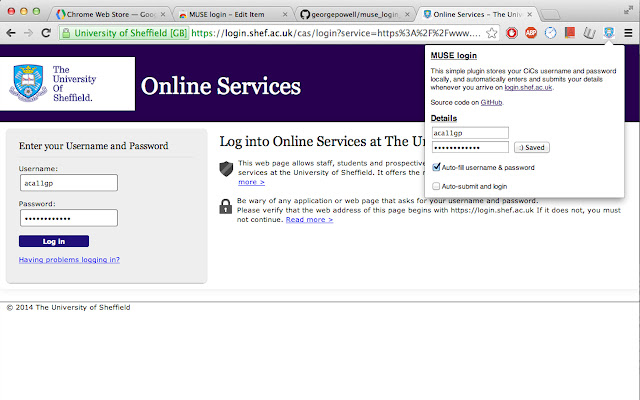
ดาวน์โหลดไฟล์ CRX ของส่วนขยาย MUSE login
ดาวน์โหลดไฟล์ส่วนขยาย MUSE login ในรูปแบบ crx และติดตั้งส่วนขยาย Chrome ด้วยตนเองในเบราว์เซอร์หรือแชร์ไฟล์ crx กับเพื่อนๆ เพื่อติดตั้งส่วนขยาย Chrome อย่างง่ายดาย
คำแนะนำในการใช้ส่วนขยาย
                        Fed up of typing your MUSE login every single freaking time? Why can't chrome remember your password or keep you signed in like every other website? Now it can! Introducing the MUSE login chrome extension. The extension automatically fills in and submits the login form whenever you arrive on the university login page, so you don't have to!

Fully open source and free forever at https://github.com/georgepowell/muse_login_chrome

Extension does not access the internet and stores your details safely on the local machine. Feel free to check out the source code if you have any doubts.
ข้อมูลพื้นฐานของส่วนขยาย
| ชื่อ |  MUSE login MUSE login |
| ID | lgemcjddblhggnfeigkgoefcedkhmdnl |
| URL อย่างเป็นทางการ | https://chrome.google.com/webstore/detail/muse-login/lgemcjddblhggnfeigkgoefcedkhmdnl |
| คำอธิบาย | Automatically log in to shef.ac.uk without typing your details! |
| ขนาดไฟล์ | 211 KB |
| จำนวนการติดตั้ง | 31 |
| เวอร์ชันปัจจุบัน | 0.1 |
| อัปเดตครั้งล่าสุด | 2014-03-03 |
| วันที่เผยแพร่ | 2014-03-03 |
| คะแนน | 5.00/5 รวมทั้งหมด 1 คะแนน |
| ผู้พัฒนา | georgepowell10 |
| ประเภทการชำระเงิน | free |
| ภาษาที่รองรับ | en-GB |
| manifest.json | |
{
    "update_url": "https:\/\/clients2.google.com\/service\/update2\/crx",
    "name": "MUSE login",
    "version": "0.1",
    "description": "Automatically log in to shef.ac.uk without typing your details!",
    "content_scripts": [
        {
            "js": [
                "jquery.js",
                "content_script.js"
            ],
            "matches": [
                "http:\/\/login.shef.ac.uk\/*",
                "https:\/\/login.shef.ac.uk\/*"
            ]
        }
    ],
    "permissions": [
        "declarativeContent",
        "storage"
    ],
    "icons": {
        "19": "icon-19.png",
        "48": "icon-48.png",
        "128": "icon-128.png"
    },
    "browser_action": {
        "default_icon": "icon-19.png",
        "default_title": "Muse Login!",
        "default_popup": "default_page.html"
    },
    "manifest_version": 2
} | |