Netflix Codes
Netflix Code generator is an extension which will help you find the perfect movie to watch by generating a code
Netflix Codesคืออะไร?
Netflix Codes เป็นส่วนขยายของ Chrome ที่พัฒนาโดย achal.ch และคุณลักษณะหลักของมันคือ "Netflix Code generator is an extension which will help you find the perfect movie to watch by generating a code"
ภาพหน้าจอของส่วนขยาย

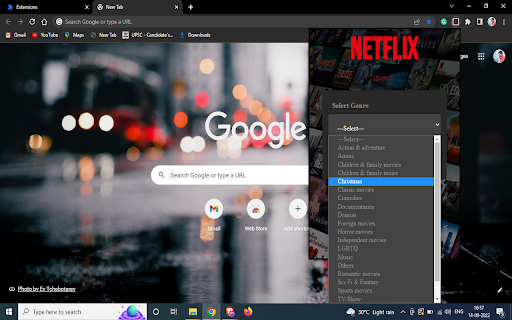
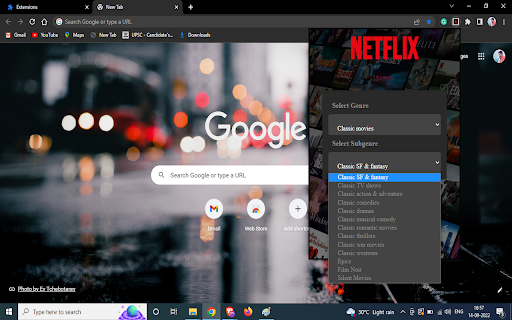

ดาวน์โหลดไฟล์ CRX ของส่วนขยาย Netflix Codes
ดาวน์โหลดไฟล์ส่วนขยาย Netflix Codes ในรูปแบบ crx และติดตั้งส่วนขยาย Chrome ด้วยตนเองในเบราว์เซอร์หรือแชร์ไฟล์ crx กับเพื่อนๆ เพื่อติดตั้งส่วนขยาย Chrome อย่างง่ายดาย
คำแนะนำในการใช้ส่วนขยาย
Sometimes when you wanna watch a movie and you just can't decide what to watch, But not anymore this extension will help you find the movie you wanna watch just select type of movie you wanna watch select a genre and it will generate a Netflix code by which it will only suggest that type of movies This extension is made by use of HTML, CSS, JavaScript. ข้อมูลพื้นฐานของส่วนขยาย
| ชื่อ |  Netflix Codes Netflix Codes |
| ID | lhojojjidomkdaccdkpmejlmmbdjlhjo |
| URL อย่างเป็นทางการ | https://chromewebstore.google.com/detail/netflix-codes/lhojojjidomkdaccdkpmejlmmbdjlhjo |
| คำอธิบาย | Netflix Code generator is an extension which will help you find the perfect movie to watch by generating a code |
| ขนาดไฟล์ | 193 KB |
| จำนวนการติดตั้ง | 95 |
| เวอร์ชันปัจจุบัน | 1.0 |
| อัปเดตครั้งล่าสุด | 2022-09-16 |
| วันที่เผยแพร่ | 2022-09-16 |
| คะแนน | 5.00/5 รวมทั้งหมด 3 คะแนน |
| ผู้พัฒนา | achal.ch |
| อีเมล | [email protected] |
| ประเภทการชำระเงิน | free |
| ภาษาที่รองรับ | en-US |
| manifest.json | |
{
    "update_url": "https:\/\/clients2.google.com\/service\/update2\/crx",
    "manifest_version": 3,
    "name": "Netflix Codes",
    "version": "1.0",
    "description": "Netflix Code generator is an extension which will help you find the perfect movie to watch by generating a code",
    "icons": {
        "16": "\/img\/icon16.png",
        "48": "\/img\/icon48.png",
        "128": "\/img\/icon128.png"
    },
    "action": {
        "default_icon": "\/img\/icon16.png",
        "default_popup": "\/HTML\/popup.html"
    }
} | |