Paint Tool (Updated)
Draw 🎨 anything anywhere in real-time, an MS Paint but in your browser.
Paint Tool (Updated)คืออะไร?
Paint Tool (Updated) เป็นส่วนขยายของ Chrome ที่พัฒนาโดย B & T และคุณลักษณะหลักของมันคือ "Draw 🎨 anything anywhere in real-time, an MS Paint but in your browser."
ภาพหน้าจอของส่วนขยาย
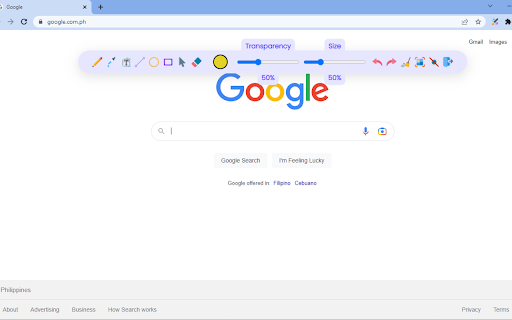

ดาวน์โหลดไฟล์ CRX ของส่วนขยาย Paint Tool (Updated)
ดาวน์โหลดไฟล์ส่วนขยาย Paint Tool (Updated) ในรูปแบบ crx และติดตั้งส่วนขยาย Chrome ด้วยตนเองในเบราว์เซอร์หรือแชร์ไฟล์ crx กับเพื่อนๆ เพื่อติดตั้งส่วนขยาย Chrome อย่างง่ายดาย
คำแนะนำในการใช้ส่วนขยาย
                        ⬇️Easy to set up ⬇️:

1. Install the extension, and reload the page to let the extension work.
2. Click on the extension whenever you need to draw or highlight something. 🖌
3. Drawings are automatically saved.
4. Reload the page to exit the draw mode from the browser.

✨Features ✨

1. Has all the features of MS Paint.
2. Adjustable thickness, transparency, and preset color.
3. Take a screenshot of the page.

Pin this absolutely free extension to draw random things 🖼 while visiting any webpage. 👩
ข้อมูลพื้นฐานของส่วนขยาย
| ชื่อ |  Paint Tool (Updated) Paint Tool (Updated) |
| ID | lkgfjmlmbhgmkiegoahhnfffnpndicle |
| URL อย่างเป็นทางการ | https://chromewebstore.google.com/detail/paint-tool-updated/lkgfjmlmbhgmkiegoahhnfffnpndicle |
| คำอธิบาย | Draw 🎨 anything anywhere in real-time, an MS Paint but in your browser. |
| ขนาดไฟล์ | 40.63 KB |
| จำนวนการติดตั้ง | 388 |
| เวอร์ชันปัจจุบัน | 1.0.5 |
| อัปเดตครั้งล่าสุด | 2023-04-11 |
| วันที่เผยแพร่ | 2022-10-17 |
| คะแนน | 4.73/5 รวมทั้งหมด 15 คะแนน |
| ผู้พัฒนา | B & T |
| อีเมล | [email protected] |
| ประเภทการชำระเงิน | free |
| ภาษาที่รองรับ | en |
| manifest.json | |
{
"update_url": "https:\/\/clients2.google.com\/service\/update2\/crx",
"manifest_version": 3,
"name": "Paint Tool (Updated)",
"version": "1.0.5",
"description": "Draw \ud83c\udfa8 anything anywhere in real-time, an MS Paint but in your browser.",
"background": {
"service_worker": "js\/background.js"
},
"web_accessible_resources": [
{
"resources": [
"html\/dashboard.html",
"html\/toolkit.html",
"js\/*.js",
"img\/*.png"
],
"matches": [
" | |