HowLongToBeat Context Menu
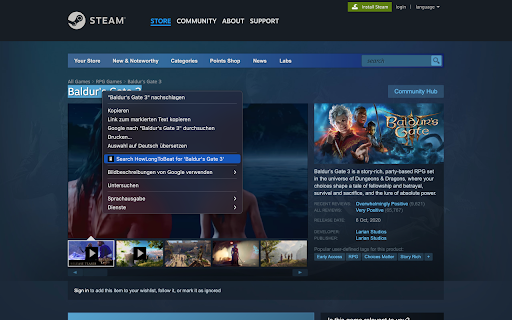
Search on howlongtobeat.com for highlighted text by right clicking
HowLongToBeat Context Menuคืออะไร?
HowLongToBeat Context Menu เป็นส่วนขยายของ Chrome ที่พัฒนาโดย phuturesign และคุณลักษณะหลักของมันคือ "Search on howlongtobeat.com for highlighted text by right clicking"
ภาพหน้าจอของส่วนขยาย
ดาวน์โหลดไฟล์ CRX ของส่วนขยาย HowLongToBeat Context Menu
ดาวน์โหลดไฟล์ส่วนขยาย HowLongToBeat Context Menu ในรูปแบบ crx และติดตั้งส่วนขยาย Chrome ด้วยตนเองในเบราว์เซอร์หรือแชร์ไฟล์ crx กับเพื่อนๆ เพื่อติดตั้งส่วนขยาย Chrome อย่างง่ายดาย
คำแนะนำในการใช้ส่วนขยาย
                        This convenient extension enhances your browsing experience by adding a HowLongToBeat.com search option to your right-click menu. This works on every website.

If you come across a game and want to find out how long it takes to beat, simply highlight the game's name, right click, and select "Search HowLongToBeat.com for " from the menu.

The search results will open in a new tab, giving you quick access to valuable information about game lengths, playtimes, and more.
ข้อมูลพื้นฐานของส่วนขยาย
| ชื่อ |  HowLongToBeat Context Menu HowLongToBeat Context Menu |
| ID | lpghmonmihhnfodlfndcbhcghfchknop |
| URL อย่างเป็นทางการ | https://chromewebstore.google.com/detail/howlongtobeat-context-men/lpghmonmihhnfodlfndcbhcghfchknop |
| คำอธิบาย | Search on howlongtobeat.com for highlighted text by right clicking |
| ขนาดไฟล์ | 7.39 KB |
| จำนวนการติดตั้ง | 98 |
| เวอร์ชันปัจจุบัน | 1.0 |
| อัปเดตครั้งล่าสุด | 2023-08-11 |
| วันที่เผยแพร่ | 2023-08-02 |
| ผู้พัฒนา | phuturesign |
| อีเมล | [email protected] |
| ประเภทการชำระเงิน | free |
| ภาษาที่รองรับ | en |
| manifest.json | |
{
    "update_url": "https:\/\/clients2.google.com\/service\/update2\/crx",
    "manifest_version": 3,
    "name": "HowLongToBeat Context Menu",
    "description": "Search on howlongtobeat.com for highlighted text by right clicking",
    "version": "1.0",
    "permissions": [
        "contextMenus"
    ],
    "background": {
        "service_worker": "background.js"
    },
    "icons": {
        "16": "images\/icon16.png",
        "19": "images\/icon19.png",
        "32": "images\/icon32.png",
        "38": "images\/icon38.png",
        "48": "images\/icon48.png",
        "128": "images\/icon128.png"
    }
} | |