EO.Market – Crypto Market Statistics
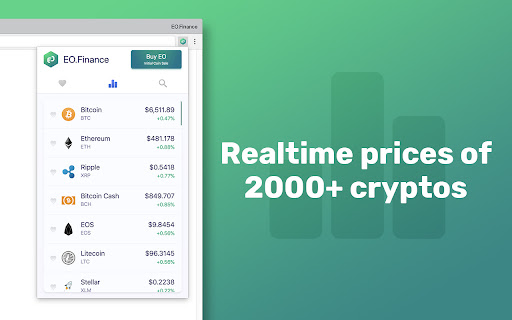
View realtime cryptocurrencies prices and coin market cap.
EO.Market – Crypto Market Statisticsคืออะไร?
EO.Market – Crypto Market Statistics เป็นส่วนขยายของ Chrome ที่พัฒนาโดย https://eo.market และคุณลักษณะหลักของมันคือ "View realtime cryptocurrencies prices and coin market cap."
ภาพหน้าจอของส่วนขยาย


ดาวน์โหลดไฟล์ CRX ของส่วนขยาย EO.Market – Crypto Market Statistics
ดาวน์โหลดไฟล์ส่วนขยาย EO.Market – Crypto Market Statistics ในรูปแบบ crx และติดตั้งส่วนขยาย Chrome ด้วยตนเองในเบราว์เซอร์หรือแชร์ไฟล์ crx กับเพื่อนๆ เพื่อติดตั้งส่วนขยาย Chrome อย่างง่ายดาย
คำแนะนำในการใช้ส่วนขยาย
View realtime cryptocurrencies prices and coin market cap. We listed 2000+ cryptos: Bitcoin, Ethereum, Ripple, EOS and all altcoins ข้อมูลพื้นฐานของส่วนขยาย
| ชื่อ |  EO.Market – Crypto Market Statistics EO.Market – Crypto Market Statistics |
| ID | mcifakmnfbcibcdcgdghdpfinkdjaekm |
| URL อย่างเป็นทางการ | https://chromewebstore.google.com/detail/eomarket-%E2%80%93-crypto-market/mcifakmnfbcibcdcgdghdpfinkdjaekm |
| คำอธิบาย | View realtime cryptocurrencies prices and coin market cap. |
| ขนาดไฟล์ | 389 KB |
| จำนวนการติดตั้ง | 574 |
| เวอร์ชันปัจจุบัน | 1.40 |
| อัปเดตครั้งล่าสุด | 2019-09-06 |
| วันที่เผยแพร่ | 2019-09-06 |
| คะแนน | 5.00/5 รวมทั้งหมด 12 คะแนน |
| ผู้พัฒนา | https://eo.market |
| อีเมล | [email protected] |
| ประเภทการชำระเงิน | free |
| เว็บไซต์ส่วนขยาย | https://eo.market |
| URL หน้านโยบายความเป็นส่วนตัว | https://eo.finance/about/privacy |
| ภาษาที่รองรับ | en-US |
| manifest.json | |
{
    "update_url": "https:\/\/clients2.google.com\/service\/update2\/crx",
    "name": "EO.Market \u2013 Crypto Market Statistics",
    "version": "1.40",
    "description": "View realtime cryptocurrencies prices and coin market cap.",
    "manifest_version": 2,
    "background": {
        "scripts": [
            "background.js"
        ],
        "persistent": false
    },
    "permissions": [
        "declarativeContent",
        "storage",
        "notifications"
    ],
    "web_accessible_resources": [
        "48x48.png"
    ],
    "page_action": {
        "default_popup": "main.html",
        "default_icon": {
            "16": "16x16.png",
            "32": "32x32.png",
            "48": "48x48.png",
            "64": "64x64.png",
            "128": "128x128.png"
        }
    },
    "icons": {
        "16": "16x16.png",
        "32": "32x32.png",
        "48": "48x48.png",
        "64": "64x64.png",
        "128": "128x128.png"
    }
} | |