Netflix Plus
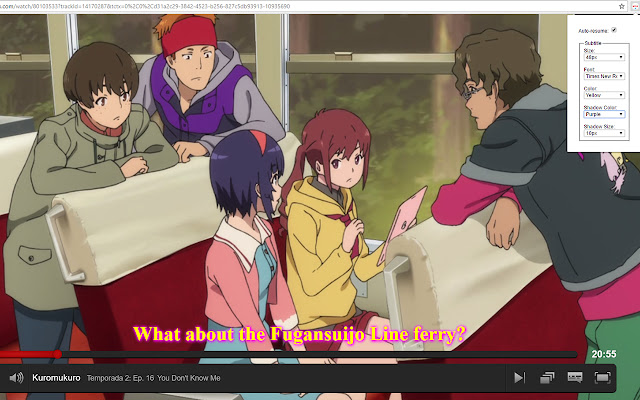
Auto-resume: You still there? popup, Customize subtitle color, size, font and shadow color and size. On the fly!
Netflix Plusคืออะไร?
Netflix Plus เป็นส่วนขยายของ Chrome ที่พัฒนาโดย Zion Developers และคุณลักษณะหลักของมันคือ "Auto-resume: You still there? popup, Customize subtitle color, size, font and shadow color and size. On the fly!"
ภาพหน้าจอของส่วนขยาย


ดาวน์โหลดไฟล์ CRX ของส่วนขยาย Netflix Plus
ดาวน์โหลดไฟล์ส่วนขยาย Netflix Plus ในรูปแบบ crx และติดตั้งส่วนขยาย Chrome ด้วยตนเองในเบราว์เซอร์หรือแชร์ไฟล์ crx กับเพื่อนๆ เพื่อติดตั้งส่วนขยาย Chrome อย่างง่ายดาย
คำแนะนำในการใช้ส่วนขยาย
                        ** This is NOT a Netflix Official Extension! **

Automatically resume movie when it get paused by AFK. (HTML5)
Change the movie's subtitle font, color, size, shadow size and color ! (HTML5)

More features to come!

Netflix is a Website owned by Netflix International B.V.
All the logos and pictures here used is for fair-use, And is belonged by the corresponding owners.
ข้อมูลพื้นฐานของส่วนขยาย
| ชื่อ |  Netflix Plus Netflix Plus |
| ID | mnaccajcnpoopaeogmdaffkmmhdlbfhe |
| URL อย่างเป็นทางการ | https://chrome.google.com/webstore/detail/netflix-plus/mnaccajcnpoopaeogmdaffkmmhdlbfhe |
| คำอธิบาย | Auto-resume: You still there? popup, Customize subtitle color, size, font and shadow color and size. On the fly! |
| ขนาดไฟล์ | 100 KB |
| จำนวนการติดตั้ง | 849 |
| เวอร์ชันปัจจุบัน | 2.5.7 |
| อัปเดตครั้งล่าสุด | 2017-03-27 |
| วันที่เผยแพร่ | 2017-03-27 |
| คะแนน | 3.44/5 รวมทั้งหมด 16 คะแนน |
| ผู้พัฒนา | Zion Developers |
| ประเภทการชำระเงิน | free |
| ภาษาที่รองรับ | en |
| manifest.json | |
{
    "update_url": "https:\/\/clients2.google.com\/service\/update2\/crx",
    "content_scripts": [
        {
            "all_frames": true,
            "exclude_globs": [],
            "include_globs": [
                "*netflix.com*"
            ],
            "css": [],
            "js": [
                "includes\/jquery-2.1.1.min.js",
                "includes\/netflix.js"
            ],
            "matches": [
                "*:\/\/*.netflix.com\/*"
            ],
            "run_at": "document_start"
        }
    ],
    "description": "Auto-resume: You still there? popup, Customize subtitle color, size, font and shadow color and size. On the fly!",
    "icons": {
        "128": "icons\/icon.png"
    },
    "browser_action": {
        "default_title": "Options",
        "default_popup": "options.html"
    },
    "background": {
        "scripts": [
            "includes\/options.js"
        ],
        "persistent": true
    },
    "manifest_version": 2,
    "name": "Netflix Plus",
    "short_name": "Netflix+",
    "options_page": "options.html",
    "permissions": [
        "storage"
    ],
    "version": "2.5.7",
    "web_accessible_resources": [
        "icons\/icon.png",
        "includes\/jquery-2.1.1.min.js",
        "includes\/netflix.js",
        "jquery-2.1.1.min.map"
    ]
} | |