Repibox - Recipe Viewer Extension
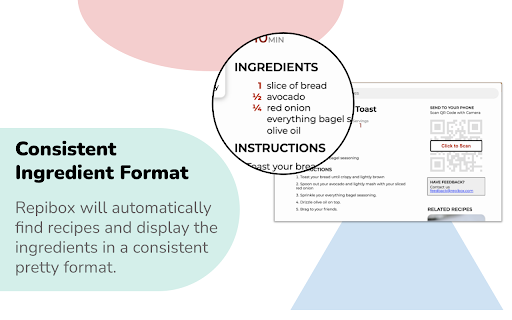
Automatically find recipes on cluttered sites. Repibox puts the recipe in a nifty popup at the top of the page.
Repibox - Recipe Viewer Extensionคืออะไร?
Repibox - Recipe Viewer Extension เป็นส่วนขยายของ Chrome ที่พัฒนาโดย https://repibox.com และคุณลักษณะหลักของมันคือ "Automatically find recipes on cluttered sites. Repibox puts the recipe in a nifty popup at the top of the page."
ภาพหน้าจอของส่วนขยาย


ดาวน์โหลดไฟล์ CRX ของส่วนขยาย Repibox - Recipe Viewer Extension
ดาวน์โหลดไฟล์ส่วนขยาย Repibox - Recipe Viewer Extension ในรูปแบบ crx และติดตั้งส่วนขยาย Chrome ด้วยตนเองในเบราว์เซอร์หรือแชร์ไฟล์ crx กับเพื่อนๆ เพื่อติดตั้งส่วนขยาย Chrome อย่างง่ายดาย
คำแนะนำในการใช้ส่วนขยาย
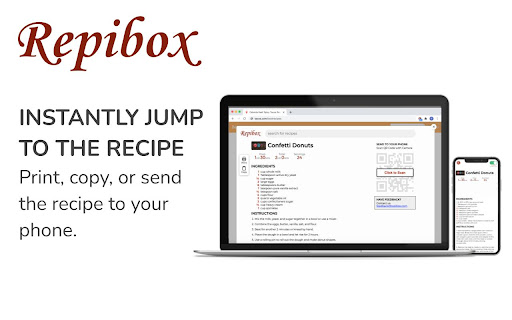
                        The Repibox recipe extension for chrome helps you instantly jump to the recipe. Repibox will detect if a page contains a recipe and will automatically display the ingredients and instructions at the top of the page so that you can cook distraction free.

Furthermore, you can use Repibox to find related recipes, print with pretty formatting, or send the recipe to your phone. Skip straight to the recipe with Repibox.

Terms of Service & Privacy: By installing the Repibox extension, you agree to our Terms of Service & Privacy Policy https://github.com/repibox/legal

Repibox is not an ad-blocker and advertisements will still load on the page. By using Repibox, you agree to only use Repibox for personal, non-commercial use, and will not distribute recipes.

Filter straight to the recipe with https://repibox.com .
ข้อมูลพื้นฐานของส่วนขยาย
| ชื่อ |  Repibox - Recipe Viewer Extension Repibox - Recipe Viewer Extension |
| ID | nbgpmjdmplldckdiolbacdflmebgnoij |
| URL อย่างเป็นทางการ | https://chromewebstore.google.com/detail/repibox-recipe-viewer-ext/nbgpmjdmplldckdiolbacdflmebgnoij |
| คำอธิบาย | Automatically find recipes on cluttered sites. Repibox puts the recipe in a nifty popup at the top of the page. |
| ขนาดไฟล์ | 2.22 MB |
| จำนวนการติดตั้ง | 1,265 |
| เวอร์ชันปัจจุบัน | 0.0.39 |
| อัปเดตครั้งล่าสุด | 2021-12-10 |
| วันที่เผยแพร่ | 2021-01-11 |
| คะแนน | 5.00/5 รวมทั้งหมด 31 คะแนน |
| ผู้พัฒนา | https://repibox.com |
| อีเมล | [email protected] |
| ประเภทการชำระเงิน | free |
| เว็บไซต์ส่วนขยาย | https://repibox.com |
| URL หน้านโยบายความเป็นส่วนตัว | https://github.com/repibox/legal/blob/master/Privacy-Policy.md |
| ภาษาที่รองรับ | en |
| manifest.json | |
{
    "update_url": "https:\/\/clients2.google.com\/service\/update2\/crx",
    "manifest_version": 2,
    "name": "Repibox - Recipe Viewer Extension",
    "short_name": "Repibox",
    "description": "Automatically find recipes on cluttered sites. Repibox puts the recipe in a nifty popup at the top of the page.",
    "version": "0.0.39",
    "icons": {
        "128": "img\/icon-128.png"
    },
    "permissions": [
        "*:\/\/*.larecipe.com\/*",
        "*:\/\/*.repibox.com\/*",
        "*:\/\/repibox.com\/*"
    ],
    "optional_permissions": [
        "storage"
    ],
    "browser_action": {
        "default_title": "Repibox",
        "default_icon": "img\/disabled-128.png"
    },
    "content_scripts": [
        {
            "matches": [
                "http:\/\/*\/*",
                "https:\/\/*\/*"
            ],
            "run_at": "document_end",
            "css": [
                "css\/cleanslate.css",
                "css\/main.css"
            ],
            "js": [
                "js\/lib\/jquery-3.1.0.min.js",
                "js\/lib\/jquery.microdata.js",
                "js\/lib\/jquery.microdata.json.js",
                "js\/lib\/jsHashes-1.07-hashes.js",
                "js\/lib\/clipboard-2.0.6.min.js",
                "js\/lib\/lz-string.min.js",
                "js\/lib\/jquery.qrcode.min.js",
                "js\/global.js",
                "js\/global-fg.js",
                "js\/helpers.js",
                "js\/models\/RecipeSection.js",
                "js\/models\/KeyNodes.js",
                "js\/models\/Recipe.js",
                "js\/send2device.js",
                "js\/webapp-connect.js",
                "js\/content.js"
            ]
        }
    ],
    "background": {
        "scripts": [
            "js\/global.js",
            "js\/background.js"
        ],
        "persistent": true
    },
    "web_accessible_resources": [
        "fonts\/*.ttf",
        "img\/*",
        "css\/main.css",
        "options.html",
        "html\/*"
    ],
    "options_ui": {
        "page": "options.html",
        "open_in_tab": true
    }
} | |