Prime Ratings: IMDb Ratings on Prime Video
See IMDb ratings for shows on Amazon Prime Video.
Prime Ratings: IMDb Ratings on Prime Videoคืออะไร?
Prime Ratings: IMDb Ratings on Prime Video เป็นส่วนขยายของ Chrome ที่พัฒนาโดย gcg1 และคุณลักษณะหลักของมันคือ "See IMDb ratings for shows on Amazon Prime Video."
ภาพหน้าจอของส่วนขยาย
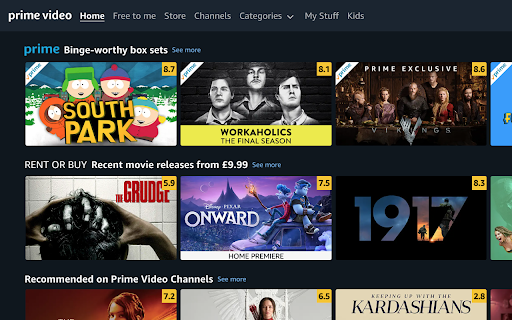

ดาวน์โหลดไฟล์ CRX ของส่วนขยาย Prime Ratings: IMDb Ratings on Prime Video
ดาวน์โหลดไฟล์ส่วนขยาย Prime Ratings: IMDb Ratings on Prime Video ในรูปแบบ crx และติดตั้งส่วนขยาย Chrome ด้วยตนเองในเบราว์เซอร์หรือแชร์ไฟล์ crx กับเพื่อนๆ เพื่อติดตั้งส่วนขยาย Chrome อย่างง่ายดาย
คำแนะนำในการใช้ส่วนขยาย
                        This extension displays IMDb ratings for shows on Amazon Prime Video.

Neither this extension nor its author is in any way affiliated with Amazon.
ข้อมูลพื้นฐานของส่วนขยาย
| ชื่อ |  Prime Ratings: IMDb Ratings on Prime Video Prime Ratings: IMDb Ratings on Prime Video |
| ID | nfhhcokdlgiihdofklhifafmmhnljbdf |
| URL อย่างเป็นทางการ | https://chromewebstore.google.com/detail/prime-ratings-imdb-rating/nfhhcokdlgiihdofklhifafmmhnljbdf |
| คำอธิบาย | See IMDb ratings for shows on Amazon Prime Video. |
| ขนาดไฟล์ | 94.87 KB |
| จำนวนการติดตั้ง | 1,146 |
| เวอร์ชันปัจจุบัน | 0.0.1.5 |
| อัปเดตครั้งล่าสุด | 2021-11-21 |
| วันที่เผยแพร่ | 2020-06-10 |
| คะแนน | 3.36/5 รวมทั้งหมด 11 คะแนน |
| ผู้พัฒนา | gcg1 |
| อีเมล | [email protected] |
| ประเภทการชำระเงิน | free |
| ภาษาที่รองรับ | en-US |
| manifest.json | |
{
    "update_url": "https:\/\/clients2.google.com\/service\/update2\/crx",
    "name": "Prime Ratings: IMDb Ratings on Prime Video",
    "version": "0.0.1.5",
    "description": "See IMDb ratings for shows on Amazon Prime Video.",
    "manifest_version": 2,
    "content_security_policy": "script-src 'self' https:\/\/cdn.firebase.com https:\/\/*.firebaseio.com; object-src 'self'",
    "icons": {
        "128": "icon128.png"
    },
    "browser_action": {
        "default_icon": "icon128.png"
    },
    "content_scripts": [
        {
            "matches": [
                "https:\/\/*.primevideo.com\/*",
                "https:\/\/*.amazon.co.uk\/*",
                "https:\/\/*.amazon.com\/*",
                "https:\/\/*.amazon.ca\/*",
                "https:\/\/*.amazon.com.au\/*"
            ],
            "css": [
                "styles.css"
            ],
            "js": [
                "firebase-app.js",
                "firebase-firestore.js",
                "db.js",
                "background.js"
            ]
        }
    ]
} | |