gemoji-chrome
This extension provides easy access to emoji shortcodes
gemoji-chromeคืออะไร?
gemoji-chrome เป็นส่วนขยายของ Chrome ที่พัฒนาโดย rhardih และคุณลักษณะหลักของมันคือ "This extension provides easy access to emoji shortcodes"
ภาพหน้าจอของส่วนขยาย
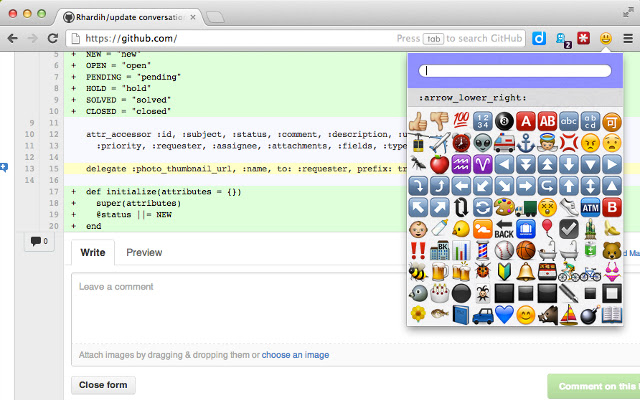

ดาวน์โหลดไฟล์ CRX ของส่วนขยาย gemoji-chrome
ดาวน์โหลดไฟล์ส่วนขยาย gemoji-chrome ในรูปแบบ crx และติดตั้งส่วนขยาย Chrome ด้วยตนเองในเบราว์เซอร์หรือแชร์ไฟล์ crx กับเพื่อนๆ เพื่อติดตั้งส่วนขยาย Chrome อย่างง่ายดาย
คำแนะนำในการใช้ส่วนขยาย
                        Plugin for finding and inserting gemoji shortcodes such as :+1:, :smile: and all the others.

Gemoji is just the name emoji icons used by Github and other sites.

Features:
  - Quicksearch; Find the emoji shortcode you are looking for, with just a few letters.
  - Keyboard navigation; Press tab and use the arrow keys and enter to select a given emoji.

The gemoji emoticons are supported on Campfire, GitHub, Basecamp, Turntable.fm, Teambox, Trac and Flowdock

This plugin is open source under the MIT license.

Source available at https://github.com/rhardih/gemoji-chrome

Icon: Face-grin from http://tango.freedesktop.org/Tango_Desktop_Project
ข้อมูลพื้นฐานของส่วนขยาย
| ชื่อ |  gemoji-chrome gemoji-chrome |
| ID | ngbmhomembgkmpjkgppjmofejjejonkb |
| URL อย่างเป็นทางการ | https://chrome.google.com/webstore/detail/gemoji-chrome/ngbmhomembgkmpjkgppjmofejjejonkb |
| คำอธิบาย | This extension provides easy access to emoji shortcodes |
| ขนาดไฟล์ | 1.47 MB |
| จำนวนการติดตั้ง | 2,000 |
| เวอร์ชันปัจจุบัน | 1.5 |
| อัปเดตครั้งล่าสุด | 2014-02-13 |
| วันที่เผยแพร่ | 2014-02-13 |
| คะแนน | 3.72/5 รวมทั้งหมด 115 คะแนน |
| ผู้พัฒนา | rhardih |
| อีเมล | [email protected] |
| ประเภทการชำระเงิน | free |
| เว็บไซต์ส่วนขยาย | https://github.com/rhardih/gemoji-chrome |
| URL หน้าช่วยเหลือ | https://github.com/rhardih/gemoji-chrome |
| ภาษาที่รองรับ | en |
| manifest.json | |
{
"update_url": "https:\/\/clients2.google.com\/service\/update2\/crx",
"manifest_version": 2,
"name": "gemoji-chrome",
"description": "This extension provides easy access to emoji shortcodes",
"version": "1.5",
"permissions": [
"tabs"
],
"browser_action": {
"default_icon": "assets\/smiley.png",
"default_popup": "popup.html"
},
"content_scripts": [
{
"matches": [
" | |