RxHistory
Price history as a spreadsheet
RxHistoryคืออะไร?
RxHistory เป็นส่วนขยายของ Chrome ที่พัฒนาโดย Penn Hackers และคุณลักษณะหลักของมันคือ "Price history as a spreadsheet"
ภาพหน้าจอของส่วนขยาย
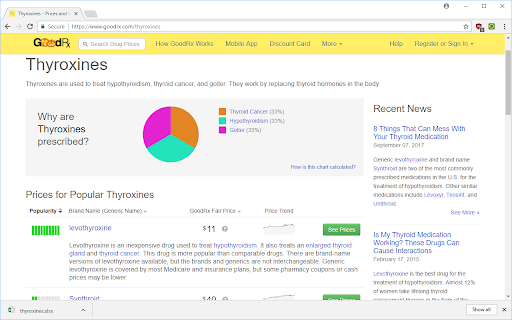

ดาวน์โหลดไฟล์ CRX ของส่วนขยาย RxHistory
ดาวน์โหลดไฟล์ส่วนขยาย RxHistory ในรูปแบบ crx และติดตั้งส่วนขยาย Chrome ด้วยตนเองในเบราว์เซอร์หรือแชร์ไฟล์ crx กับเพื่อนๆ เพื่อติดตั้งส่วนขยาย Chrome อย่างง่ายดาย
คำแนะนำในการใช้ส่วนขยาย
                        Download a spreadsheet with pricing history for drugs in a drug class on a popular prescription price comparison site, goodrx.com!

This extension supports any number of drugs, and processes all prices automatically.

Each drug will be on a separate sheet in the spreadsheet, downloads are in XLSX (Excel) format. Prices are all given in USD ($). Dates are in international format, year-month-day (ex: 2017-01-27).

Updates:
 - Option to save spreadsheet as long form.
 - Include dosage in spreadsheet

Author: Adel Qalieh

License: GPLv3
ข้อมูลพื้นฐานของส่วนขยาย
| ชื่อ |  RxHistory RxHistory |
| ID | nhblpgnkmlajcpfbddnjpnlnplmdldml |
| URL อย่างเป็นทางการ | https://chromewebstore.google.com/detail/rxhistory/nhblpgnkmlajcpfbddnjpnlnplmdldml |
| คำอธิบาย | Price history as a spreadsheet |
| ขนาดไฟล์ | 517 KB |
| จำนวนการติดตั้ง | 32 |
| เวอร์ชันปัจจุบัน | 2.0.0 |
| อัปเดตครั้งล่าสุด | 2017-12-10 |
| วันที่เผยแพร่ | 2017-12-09 |
| ผู้พัฒนา | Penn Hackers |
| ประเภทการชำระเงิน | free |
| ภาษาที่รองรับ | en-US |
| manifest.json | |
{
    "update_url": "https:\/\/clients2.google.com\/service\/update2\/crx",
    "name": "RxHistory",
    "version": "2.0.0",
    "manifest_version": 2,
    "description": "Price history as a spreadsheet",
    "homepage_url": "https:\/\/adelqalieh.com",
    "icons": {
        "16": "icons\/icon16.png",
        "48": "icons\/icon48.png",
        "128": "icons\/icon128.png"
    },
    "background": {
        "scripts": [
            "js\/FileSaver.min.js",
            "js\/moment.min.js",
            "js\/xlsx.full.min.js",
            "src\/bg\/background.js"
        ],
        "persistent": false
    },
    "page_action": {
        "default_icon": "icons\/icon19.png",
        "default_title": "Download price history spreasheet"
    },
    "options_ui": {
        "page": "src\/settings\/options.html",
        "chrome_style": true
    },
    "permissions": [
        "https:\/\/www.goodrx.com\/*",
        "declarativeContent",
        "storage"
    ],
    "content_scripts": [
        {
            "matches": [
                "https:\/\/www.goodrx.com\/*"
            ],
            "js": [
                "src\/inject\/inject.js"
            ]
        }
    ]
} | |