Zoho CRM inside WApp Web
Access & Manage Zoho CRM users inside WApp Web for contacts. Add notes to Zoho CRM users directly from WApp
Zoho CRM inside WApp Webคืออะไร?
Zoho CRM inside WApp Web เป็นส่วนขยายของ Chrome ที่พัฒนาโดย https://www.ulgebra.com และคุณลักษณะหลักของมันคือ "Access & Manage Zoho CRM users inside WApp Web for contacts. Add notes to Zoho CRM users directly from WApp"
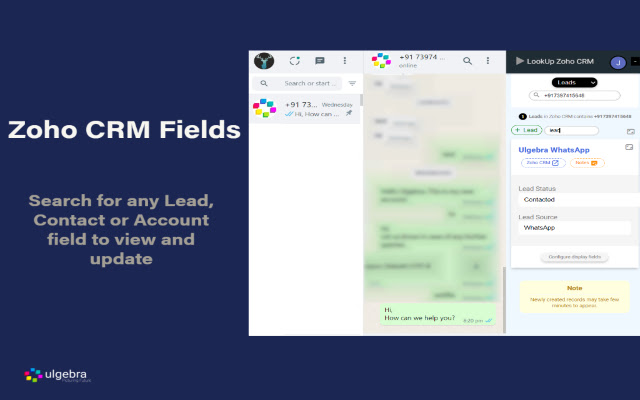
ภาพหน้าจอของส่วนขยาย


ดาวน์โหลดไฟล์ CRX ของส่วนขยาย Zoho CRM inside WApp Web
ดาวน์โหลดไฟล์ส่วนขยาย Zoho CRM inside WApp Web ในรูปแบบ crx และติดตั้งส่วนขยาย Chrome ด้วยตนเองในเบราว์เซอร์หรือแชร์ไฟล์ crx กับเพื่อนๆ เพื่อติดตั้งส่วนขยาย Chrome อย่างง่ายดาย
คำแนะนำในการใช้ส่วนขยาย
                        Associate and manage Zoho CRM contacts from WA Web to simplify communication. Access the abundant features listed below.

- Contact Addition into Zoho CRM
Create Leads, Contacts & Deals within Zoho CRM for contacts available on WA Web and view the respective contacts within Zoho CRM.

- Contact Details
Go through the contact details within WA Web.

- Contact Search
Search for a number on WA Web to view the Contacts, Leads or Accounts associated with the contact.

- Field Search
Search for any Zoho CRM field inside WA Web. You can also edit any field as and when required.

- Configure Displayed Fields
Using the ‘Configure display fields’ option customize the Zoho CRM fields to be visible on WA Web.

- View Zoho CRM Fields
Access all the Zoho CRM fields using the 'Show hidden fields' options.

- Notes
Stay up to date with the happenings any contact by adding notes WA Web

View the complete details through the link below:
https://apps.ulgebra.com/zoho/crm/zoho-crm-inside-whatsapp-web_1

Contact us at [email protected] in case of any assistance required.


Disclaimer:
This Chrome plugin is not endorsed or certified by WhatsApp Inc or Zoho CRM.

This is an unofficial enhancement tool for WhatsApp Web.

Our Extension Privacy policy:
https://ulgebra.com/privacy-policy/chrome-extensions/wa-web-zoho-crm.html
ข้อมูลพื้นฐานของส่วนขยาย
| ชื่อ |  Zoho CRM inside WApp Web Zoho CRM inside WApp Web |
| ID | njeihbodihkkobpnmekmkplikbkmehed |
| URL อย่างเป็นทางการ | https://chrome.google.com/webstore/detail/zoho-crm-inside-wapp-web/njeihbodihkkobpnmekmkplikbkmehed |
| คำอธิบาย | Access & Manage Zoho CRM users inside WApp Web for contacts. Add notes to Zoho CRM users directly from WApp |
| ขนาดไฟล์ | 120 KB |
| จำนวนการติดตั้ง | 962 |
| เวอร์ชันปัจจุบัน | 5.0 |
| อัปเดตครั้งล่าสุด | 2022-09-02 |
| วันที่เผยแพร่ | 2020-09-15 |
| ผู้พัฒนา | https://www.ulgebra.com |
| อีเมล | [email protected] |
| ประเภทการชำระเงิน | free |
| เว็บไซต์ส่วนขยาย | https://apps.ulgebra.com/zoho/crm/zoho-crm-inside-whatsapp-web_1 |
| URL หน้าช่วยเหลือ | https://desk.zoho.com/portal/ulgebra/en/newticket |
| URL หน้านโยบายความเป็นส่วนตัว | https://apps.ulgebra.com/privacy-policy |
| ภาษาที่รองรับ | en |
| manifest.json | |
{
    "update_url": "https:\/\/clients2.google.com\/service\/update2\/crx",
    "name": "Zoho CRM inside WApp Web",
    "version": "5.0",
    "description": "Access & Manage Zoho CRM users inside WApp Web for contacts. Add notes to Zoho CRM users directly from WApp",
    "permissions": [
        "storage",
        "tabs",
        "https:\/\/*.zappsusercontent.com\/*",
        "https:\/\/platform.zoho.com\/*",
        "https:\/\/platform.zoho.in\/*",
        "https:\/\/platform.zoho.eu\/*",
        "https:\/\/platform.zoho.com.au\/*",
        "https:\/\/platform.zoho.com.cn\/*"
    ],
    "options_page": "popup.html",
    "background": {
        "scripts": [
            "background.js"
        ],
        "persistent": true
    },
    "content_scripts": [
        {
            "run_at": "document_end",
            "matches": [
                "https:\/\/web.whatsapp.com\/*"
            ],
            "js": [
                "jquery.min.js",
                "contentScript.js"
            ]
        }
    ],
    "externally_connectable": {
        "matches": [
            "https:\/\/*.zappsusercontent.com\/*",
            "https:\/\/ulgebra-cdn-cicd-crm-msgbrd.gitlab.io\/*",
            "https:\/\/web.whatsapp.com\/*",
            "https:\/\/app.azurna.com\/*"
        ]
    },
    "page_action": {
        "default_popup": "popup.html",
        "default_icon": {
            "16": "images\/whatsapp-business-logo-16.png",
            "32": "images\/whatsapp-business-logo-32.png",
            "48": "images\/whatsapp-business-logo-48.png",
            "128": "images\/whatsapp-business-logo-128.png"
        }
    },
    "icons": {
        "16": "images\/whatsapp-business-logo-16.png",
        "32": "images\/whatsapp-business-logo-32.png",
        "48": "images\/whatsapp-business-logo-48.png",
        "128": "images\/whatsapp-business-logo-128.png"
    },
    "web_accessible_resources": [
        "images\/*"
    ],
    "manifest_version": 2
} | |