Booksmart
Smart bookmarking. Add folders and bookmark your current tab to any folder with just one click.
Booksmartคืออะไร?
Booksmart เป็นส่วนขยายของ Chrome ที่พัฒนาโดย Ana-Maria Iancu และคุณลักษณะหลักของมันคือ "Smart bookmarking. Add folders and bookmark your current tab to any folder with just one click."
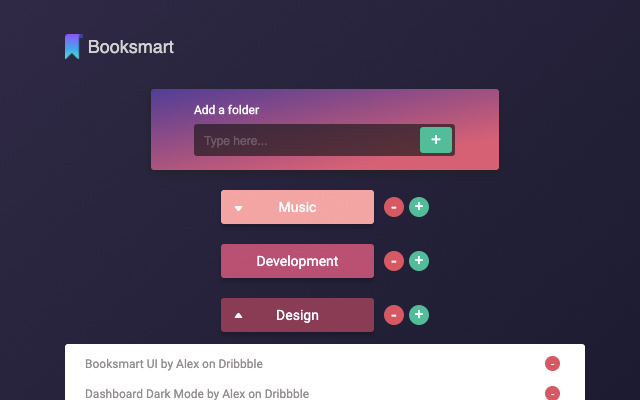
ภาพหน้าจอของส่วนขยาย

ดาวน์โหลดไฟล์ CRX ของส่วนขยาย Booksmart
ดาวน์โหลดไฟล์ส่วนขยาย Booksmart ในรูปแบบ crx และติดตั้งส่วนขยาย Chrome ด้วยตนเองในเบราว์เซอร์หรือแชร์ไฟล์ crx กับเพื่อนๆ เพื่อติดตั้งส่วนขยาย Chrome อย่างง่ายดาย
คำแนะนำในการใช้ส่วนขยาย
                        With Booksmart you can now bookmark pages with only 2 clicks. Just add a folder, and click on the plus button next to it. Done! Your link is saved and organised in a folder. Easy to use and nice to look at.
You can add as many folders as you want and as many bookmarks in each folder.
Booksmart is all about making it easier to save links and access them later quickly.

Version 0.3.0 updates:
- design changes

Version 0.2.0 updates:
- bug fixes
- confirmation message when you delete a folder
ข้อมูลพื้นฐานของส่วนขยาย
| ชื่อ |  Booksmart Booksmart |
| ID | nlffaabjkkfkehhdmcljfpcipffhhkbj |
| URL อย่างเป็นทางการ | https://chrome.google.com/webstore/detail/booksmart/nlffaabjkkfkehhdmcljfpcipffhhkbj |
| คำอธิบาย | Smart bookmarking. Add folders and bookmark your current tab to any folder with just one click. |
| ขนาดไฟล์ | 315 KB |
| จำนวนการติดตั้ง | 88 |
| เวอร์ชันปัจจุบัน | 0.3.0 |
| อัปเดตครั้งล่าสุด | 2020-12-15 |
| วันที่เผยแพร่ | 2020-11-30 |
| คะแนน | 4.78/5 รวมทั้งหมด 9 คะแนน |
| ผู้พัฒนา | Ana-Maria Iancu |
| อีเมล | [email protected] |
| ประเภทการชำระเงิน | free |
| ภาษาที่รองรับ | en |
| manifest.json | |
{
    "update_url": "https:\/\/clients2.google.com\/service\/update2\/crx",
    "manifest_version": 2,
    "name": "Booksmart",
    "version": "0.3.0",
    "description": "Smart bookmarking. Add folders and bookmark your current tab to any folder with just one click.",
    "short_name": "B",
    "permissions": [
        "activeTab",
        "storage"
    ],
    "browser_action": {
        "default_popup": "popup.html",
        "default_title": "Booksmart",
        "default_icon": "favicon.ico"
    },
    "content_security_policy": "script-src 'self' ; object-src 'self'"
} | |