CompassLT
Organise CompassLT
CompassLTคืออะไร?
CompassLT เป็นส่วนขยายของ Chrome ที่พัฒนาโดย DylanZipsin และคุณลักษณะหลักของมันคือ "Organise CompassLT"
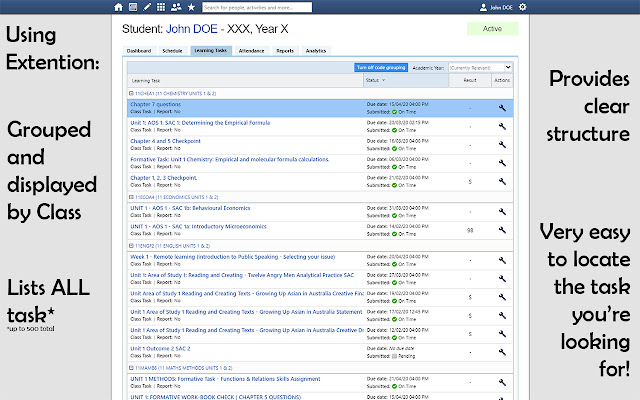
ภาพหน้าจอของส่วนขยาย

ดาวน์โหลดไฟล์ CRX ของส่วนขยาย CompassLT
ดาวน์โหลดไฟล์ส่วนขยาย CompassLT ในรูปแบบ crx และติดตั้งส่วนขยาย Chrome ด้วยตนเองในเบราว์เซอร์หรือแชร์ไฟล์ crx กับเพื่อนๆ เพื่อติดตั้งส่วนขยาย Chrome อย่างง่ายดาย
คำแนะนำในการใช้ส่วนขยาย
A simple extention which adds allows users to automatically organise their Compass Learning Tasks page. By default, items are sorted alphabetically by class code, and not all of them are displayed. With this extention, as the webpage loads, the maximum number of items are displayed and grouping by class code is enabled, sorting them first by class and then by submission date. ข้อมูลพื้นฐานของส่วนขยาย
| ชื่อ |  CompassLT CompassLT |
| ID | ocgkpcdhifhdgpipafhbgnplpgebohel |
| URL อย่างเป็นทางการ | https://chrome.google.com/webstore/detail/compasslt/ocgkpcdhifhdgpipafhbgnplpgebohel |
| คำอธิบาย | Organise CompassLT |
| ขนาดไฟล์ | 37.35 KB |
| จำนวนการติดตั้ง | 45 |
| เวอร์ชันปัจจุบัน | 1.1 |
| อัปเดตครั้งล่าสุด | 2020-08-24 |
| วันที่เผยแพร่ | 2020-05-18 |
| คะแนน | 2.00/5 รวมทั้งหมด 2 คะแนน |
| ผู้พัฒนา | DylanZipsin |
| อีเมล | [email protected] |
| ประเภทการชำระเงิน | free |
| ภาษาที่รองรับ | en |
| manifest.json | |
{
    "update_url": "https:\/\/clients2.google.com\/service\/update2\/crx",
    "name": "CompassLT",
    "description": "Organise CompassLT",
    "version": "1.1",
    "manifest_version": 2,
    "icons": {
        "16": "icon_16.png",
        "64": "icon_64.png",
        "128": "icon_128.png"
    },
    "content_scripts": [
        {
            "matches": [
                "https:\/\/viewbank-vic.compass.education\/Records\/User.aspx"
            ],
            "js": [
                "content.js"
            ]
        }
    ]
} | |