Leap Motion Controller
This extension allows the use of Leap Motion controller to scroll page and browse forward/backward.
Leap Motion Controllerคืออะไร?
Leap Motion Controller เป็นส่วนขยายของ Chrome ที่พัฒนาโดย Peter Schmalfeldt และคุณลักษณะหลักของมันคือ "This extension allows the use of Leap Motion controller to scroll page and browse forward/backward."
ภาพหน้าจอของส่วนขยาย
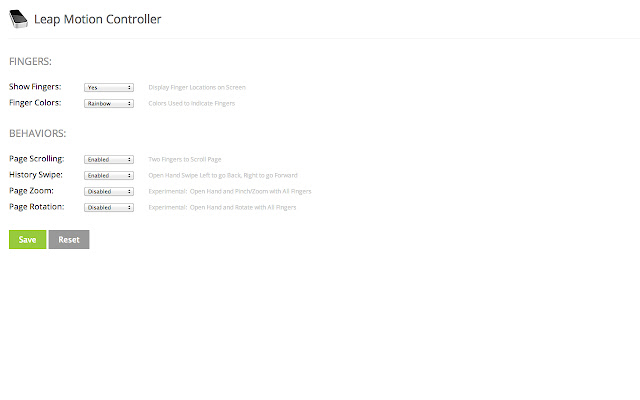
ดาวน์โหลดไฟล์ CRX ของส่วนขยาย Leap Motion Controller
ดาวน์โหลดไฟล์ส่วนขยาย Leap Motion Controller ในรูปแบบ crx และติดตั้งส่วนขยาย Chrome ด้วยตนเองในเบราว์เซอร์หรือแชร์ไฟล์ crx กับเพื่อนๆ เพื่อติดตั้งส่วนขยาย Chrome อย่างง่ายดาย
คำแนะนำในการใช้ส่วนขยาย
                        Leap Motion Chrome Extension.  Use your Leap Motion Device to Control Your Browser.

Instructions:

* Use two fingers to Scroll Page
* Use Open Hand to Swipe Left & Right to go Forward & Back through your Browser History

Configuration Options:

* Show Fingers
* Finger Colors
* Page Scrolling
* History Swipe
* Page Zoom
* Page Rotation
ข้อมูลพื้นฐานของส่วนขยาย
| ชื่อ |  Leap Motion Controller Leap Motion Controller |
| ID | odacmfmfjmfkojihlcjkngecflemhheo |
| URL อย่างเป็นทางการ | https://chrome.google.com/webstore/detail/leap-motion-controller/odacmfmfjmfkojihlcjkngecflemhheo |
| คำอธิบาย | This extension allows the use of Leap Motion controller to scroll page and browse forward/backward. |
| ขนาดไฟล์ | 103 KB |
| จำนวนการติดตั้ง | 447 |
| เวอร์ชันปัจจุบัน | 1.0.0 |
| อัปเดตครั้งล่าสุด | 2013-05-25 |
| วันที่เผยแพร่ | 2013-05-25 |
| คะแนน | 2.32/5 รวมทั้งหมด 19 คะแนน |
| ผู้พัฒนา | Peter Schmalfeldt |
| ประเภทการชำระเงิน | free |
| เว็บไซต์ส่วนขยาย | https://vimeo.com/66952815 |
| URL หน้าช่วยเหลือ | https://github.com/manifestinteractive/leap-motion-chrome-extension |
| ภาษาที่รองรับ | en-US |
| manifest.json | |
{
    "update_url": "https:\/\/clients2.google.com\/service\/update2\/crx",
    "manifest_version": 2,
    "name": "Leap Motion Controller",
    "description": "This extension allows the use of Leap Motion controller to scroll page and browse forward\/backward.",
    "version": "1.0.0",
    "homepage_url": "https:\/\/github.com\/manifestinteractive\/leap-motion-chrome-extension",
    "minimum_chrome_version": "19.0.1055.1",
    "icons": {
        "16": "img\/icon_16.png",
        "48": "img\/icon_48.png",
        "128": "img\/icon_128.png"
    },
    "permissions": [
        "tabs",
        "storage"
    ],
    "content_scripts": [
        {
            "matches": [
                "http:\/\/*\/*",
                "https:\/\/*\/*"
            ],
            "js": [
                "js\/leap.js",
                "js\/jquery-1.9.0.min.js",
                "js\/leapmotion.js"
            ],
            "run_at": "document_idle",
            "all_frames": false
        }
    ],
    "background": {
        "scripts": [
            "background.js"
        ],
        "persistent": false
    },
    "browser_action": {
        "default_icon": {
            "19": "img\/icon_19.png",
            "38": "img\/icon_38.png"
        },
        "default_title": "Leap Motion Controller",
        "default_popup": "popup.html"
    },
    "options_page": "options.html"
} | |