Sort Eat Out
Highlights vegan and vegetarian items on takeout menus.
Sort Eat Outคืออะไร?
Sort Eat Out เป็นส่วนขยายของ Chrome ที่พัฒนาโดย developer.sorteatout และคุณลักษณะหลักของมันคือ "Highlights vegan and vegetarian items on takeout menus."
ภาพหน้าจอของส่วนขยาย


ดาวน์โหลดไฟล์ CRX ของส่วนขยาย Sort Eat Out
ดาวน์โหลดไฟล์ส่วนขยาย Sort Eat Out ในรูปแบบ crx และติดตั้งส่วนขยาย Chrome ด้วยตนเองในเบราว์เซอร์หรือแชร์ไฟล์ crx กับเพื่อนๆ เพื่อติดตั้งส่วนขยาย Chrome อย่างง่ายดาย
คำแนะนำในการใช้ส่วนขยาย
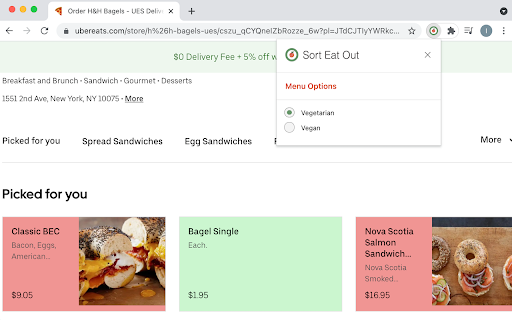
                        Sort Eat Out helps you choose the right meal based on your dietary preferences or restrictions, thus saving you countless minutes browsing food menus.

Currently supporting DoorDash and Uber Eats.

SortEatOut offers a Vegetarian and a Vegan filter, and will automatically color every item in the menu:
a) Green - matches your filter
b) Red - does not match your filter
c) Yellow - uncertain, please check with the restaurant
d) Grey - excluded, typically some drinks or desserts categories

DISCLAIMER: The information provided by this extension is purely informational and not for the purpose of providing strict dietary advice, you should contact a dietician or confirm with the restaurant for strict dietary advice.
ข้อมูลพื้นฐานของส่วนขยาย
| ชื่อ |  Sort Eat Out Sort Eat Out |
| ID | odfiljapdldjdpbcpogbhanmchpkgalm |
| URL อย่างเป็นทางการ | https://chromewebstore.google.com/detail/sort-eat-out/odfiljapdldjdpbcpogbhanmchpkgalm |
| คำอธิบาย | Highlights vegan and vegetarian items on takeout menus. |
| ขนาดไฟล์ | 28.42 KB |
| จำนวนการติดตั้ง | 111 |
| เวอร์ชันปัจจุบัน | 0.9.4 |
| อัปเดตครั้งล่าสุด | 2022-01-25 |
| วันที่เผยแพร่ | 2021-08-15 |
| คะแนน | 4.86/5 รวมทั้งหมด 7 คะแนน |
| ผู้พัฒนา | developer.sorteatout |
| อีเมล | [email protected] |
| ประเภทการชำระเงิน | free |
| เว็บไซต์ส่วนขยาย | https://www.sorteatout.com/ |
| ภาษาที่รองรับ | en |
| manifest.json | |
{
    "update_url": "https:\/\/clients2.google.com\/service\/update2\/crx",
    "manifest_version": 2,
    "name": "Sort Eat Out",
    "description": "Highlights vegan and vegetarian items on takeout menus.",
    "version": "0.9.4",
    "author": "@sorteaout.developer",
    "background": {
        "scripts": [
            "background.js",
            "config.js"
        ],
        "persistent": true
    },
    "permissions": [
        "storage",
        "webRequest",
        "tabs"
    ],
    "browser_action": {
        "default_icon": "128.png",
        "default_popup": "popup.html"
    },
    "content_scripts": [
        {
            "matches": [
                "https:\/\/*.doordash.com\/*",
                "https:\/\/*.ubereats.com\/*"
            ],
            "js": [
                "payload.js"
            ],
            "run_at": "document_end"
        }
    ]
} | |