Netflix TV
Turns Netflix into TV mode.
Netflix TVคืออะไร?
Netflix TV เป็นส่วนขยายของ Chrome ที่พัฒนาโดย Genius and Sons และคุณลักษณะหลักของมันคือ "Turns Netflix into TV mode."
ภาพหน้าจอของส่วนขยาย
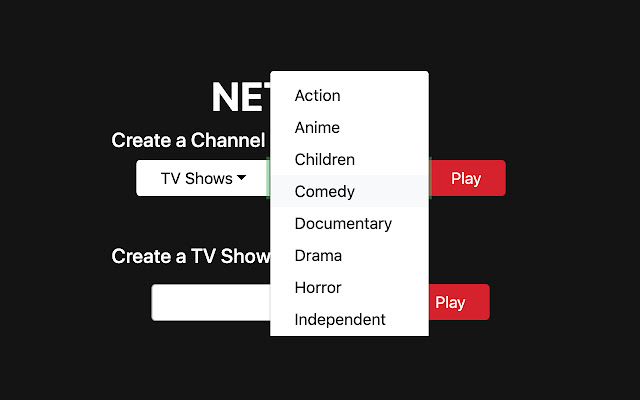


ดาวน์โหลดไฟล์ CRX ของส่วนขยาย Netflix TV
ดาวน์โหลดไฟล์ส่วนขยาย Netflix TV ในรูปแบบ crx และติดตั้งส่วนขยาย Chrome ด้วยตนเองในเบราว์เซอร์หรือแชร์ไฟล์ crx กับเพื่อนๆ เพื่อติดตั้งส่วนขยาย Chrome อย่างง่ายดาย
คำแนะนำในการใช้ส่วนขยาย
                        Turning Netflix into TV mode is easy! All you have to do is pick series or movies, the genre you'd like and press play! The extension will automagically start playing personalized content for you that matches your search. If you would like to have more granular controls you can create a TV show channel. You get to add all your favorite TV shows, and the extension will start playing a mixed playlist of episodes.

Stop wasting time deciding what to watch, and spend more time watching

Guide:
1. Visit netflix.com
2. Open the extension from top right corner
3. Create your own customized channel

Credits:
This extension is not affiliated with Netflix Inc. Netflix is a trademark of Netflix, Inc.
Photo credits: Roberto Nickson

Support email: [email protected]
ข้อมูลพื้นฐานของส่วนขยาย
| ชื่อ |  Netflix TV Netflix TV |
| ID | odmgfcepaajjipjjjhijpkhacagdjddo |
| URL อย่างเป็นทางการ | https://chrome.google.com/webstore/detail/netflix-tv/odmgfcepaajjipjjjhijpkhacagdjddo |
| คำอธิบาย | Turns Netflix into TV mode. |
| ขนาดไฟล์ | 1.36 MB |
| จำนวนการติดตั้ง | 970 |
| เวอร์ชันปัจจุบัน | 1.0.1 |
| อัปเดตครั้งล่าสุด | 2020-04-03 |
| วันที่เผยแพร่ | 2020-04-03 |
| คะแนน | 1.50/5 รวมทั้งหมด 2 คะแนน |
| ผู้พัฒนา | Genius and Sons |
| อีเมล | [email protected] |
| ประเภทการชำระเงิน | free |
| ภาษาที่รองรับ | en |
| manifest.json | |
{
    "update_url": "https:\/\/clients2.google.com\/service\/update2\/crx",
    "manifest_version": 2,
    "name": "Netflix TV",
    "description": "Turns Netflix into TV mode.",
    "version": "1.0.1",
    "icons": {
        "128": "icon-128.png",
        "16": "icon-16.png",
        "32": "icon-32.png",
        "48": "icon-48.png",
        "64": "icon-64.png"
    },
    "background": {
        "persistent": false,
        "matches": [
            "*:\/\/*.netflix.com\/*"
        ],
        "scripts": [
            "js\/common.js",
            "js\/background.js"
        ]
    },
    "content_scripts": [
        {
            "matches": [
                "*:\/\/*.netflix.com\/*"
            ],
            "js": [
                "js\/common.js",
                "js\/content.js"
            ]
        }
    ],
    "permissions": [
        "tabs",
        "storage",
        "*:\/\/*.netflix.com\/*",
        "*:\/\/*.thisisanalphanumeric.xyz\/*"
    ],
    "browser_action": {
        "default_popup": "popup.html",
        "default_title": "Netflix TV Settings"
    }
} | |