Spectrum
Instantly test your web page with different types of color vision deficiency.
Spectrumคืออะไร?
Spectrum เป็นส่วนขยายของ Chrome ที่พัฒนาโดย Yehor Lvivski และคุณลักษณะหลักของมันคือ "Instantly test your web page with different types of color vision deficiency."
ภาพหน้าจอของส่วนขยาย


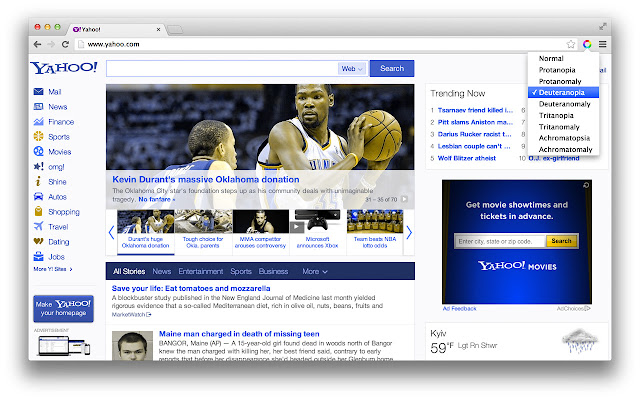


ดาวน์โหลดไฟล์ CRX ของส่วนขยาย Spectrum
ดาวน์โหลดไฟล์ส่วนขยาย Spectrum ในรูปแบบ crx และติดตั้งส่วนขยาย Chrome ด้วยตนเองในเบราว์เซอร์หรือแชร์ไฟล์ crx กับเพื่อนๆ เพื่อติดตั้งส่วนขยาย Chrome อย่างง่ายดาย
คำแนะนำในการใช้ส่วนขยาย
                        Color Vision Deficiency (CVD) affects people’s ability to distinguish certain colors. Estimates indicate that approximately 200 million people worldwide are affected by some kind of CVD. Individuals of Northern European ancestry, as many as 8 percent of men and 0.5 percent of women experience the common form of red-green color blindness.

This extension helps you to test web pages for people with different types of CVD. It's particularly useful for websites with data visualisations, because some colors may not be distinguishable from other colors in the charts.

Flash enabled websites are also supported!
ข้อมูลพื้นฐานของส่วนขยาย
| ชื่อ |  Spectrum Spectrum |
| ID | ofclemegkcmilinpcimpjkfhjfgmhieb |
| URL อย่างเป็นทางการ | https://chrome.google.com/webstore/detail/spectrum/ofclemegkcmilinpcimpjkfhjfgmhieb |
| คำอธิบาย | Instantly test your web page with different types of color vision deficiency. |
| ขนาดไฟล์ | 12.21 KB |
| จำนวนการติดตั้ง | 21,907 |
| เวอร์ชันปัจจุบัน | 0.2.0 |
| อัปเดตครั้งล่าสุด | 2017-01-11 |
| วันที่เผยแพร่ | 2017-01-11 |
| คะแนน | 3.77/5 รวมทั้งหมด 56 คะแนน |
| ผู้พัฒนา | Yehor Lvivski |
| ประเภทการชำระเงิน | free |
| ภาษาที่รองรับ | en |
| manifest.json | |
{
"update_url": "https:\/\/clients2.google.com\/service\/update2\/crx",
"manifest_version": 2,
"name": "Spectrum",
"description": "Instantly test your web page with different types of color vision deficiency.",
"version": "0.2.0",
"homepage_url": "http:\/\/lvivski.com\/spectrum",
"browser_action": {
"default_title": "Spectrum",
"default_popup": "popup.html",
"default_icon": {
"19": "img\/action_small.png",
"38": "img\/action.png"
}
},
"icons": {
"128": "img\/icon.png",
"48": "img\/icon_small.png"
},
"web_accessible_resources": [
"img\/filters.svg"
],
"content_scripts": [
{
"matches": [
" | |