1and1 Webmail Login – The Ultimate Guide
1and1 Webmail Login Procedure – The Ultimate Guide
1and1 Webmail Login – The Ultimate Guideคืออะไร?
1and1 Webmail Login – The Ultimate Guide เป็นส่วนขยายของ Chrome ที่พัฒนาโดย ngoducdung551 และคุณลักษณะหลักของมันคือ "1and1 Webmail Login Procedure – The Ultimate Guide"
ภาพหน้าจอของส่วนขยาย

ดาวน์โหลดไฟล์ CRX ของส่วนขยาย 1and1 Webmail Login – The Ultimate Guide
ดาวน์โหลดไฟล์ส่วนขยาย 1and1 Webmail Login – The Ultimate Guide ในรูปแบบ crx และติดตั้งส่วนขยาย Chrome ด้วยตนเองในเบราว์เซอร์หรือแชร์ไฟล์ crx กับเพื่อนๆ เพื่อติดตั้งส่วนขยาย Chrome อย่างง่ายดาย
คำแนะนำในการใช้ส่วนขยาย
                        Ways To Login 1 & 1 Webmail
This process is very simple. Follow these steps below to gain many benefits from the webmail.

Step 1
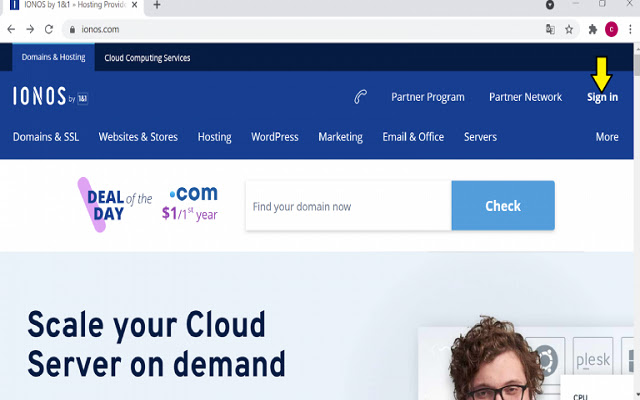
- Access webmail 1 & 1 login link with your browsers. You can also tap on the link to open the data quicker.

Step 2
- On the screen, choose the Sign-in icon.

Step 3
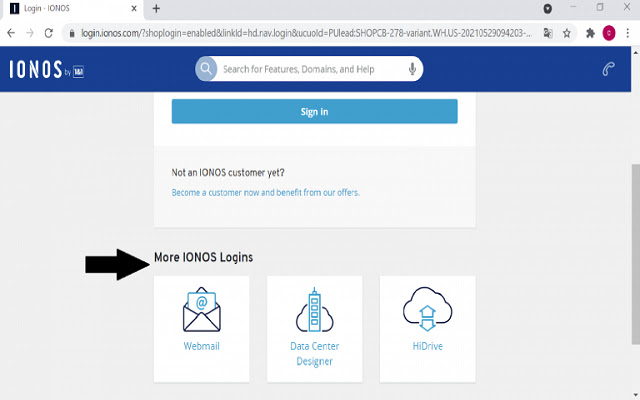
- On the login screen, find out the tab More IONOS Logins. You will realize the Webmail icon. Enter it which leads to 1and1 webmail login.

Step 4
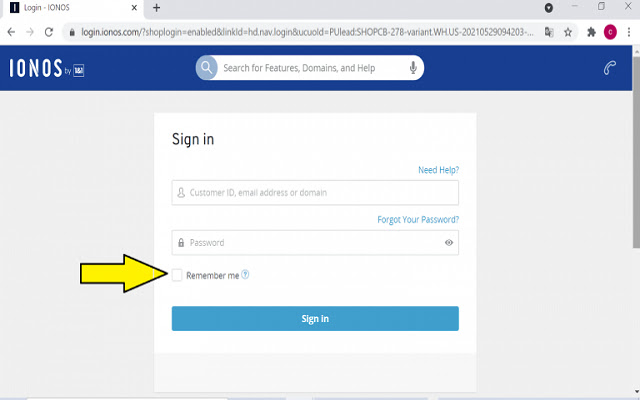
- Type your email address or username in the space and the password. If you don’t want to write your password when entering again, you can pick out the prompt Remember Me.

Step 5
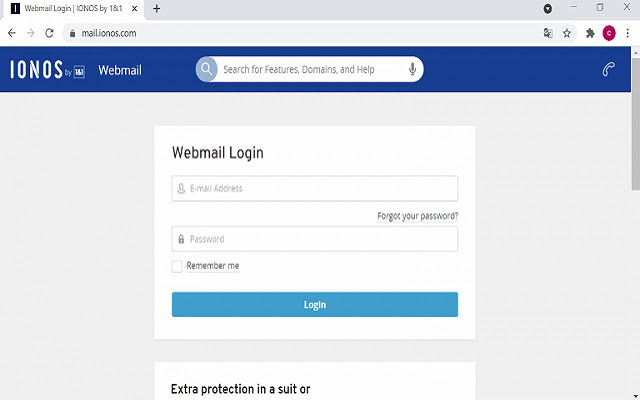
- Tap into the Login symbol so that you can sign in successfully.
ข้อมูลพื้นฐานของส่วนขยาย
| ชื่อ |  1and1 Webmail Login – The Ultimate Guide 1and1 Webmail Login – The Ultimate Guide |
| ID | ognaiaeaglilnnckijmddehgmjmikkcg |
| URL อย่างเป็นทางการ | https://chrome.google.com/webstore/detail/1and1-webmail-login-%E2%80%93-the/ognaiaeaglilnnckijmddehgmjmikkcg |
| คำอธิบาย | 1and1 Webmail Login Procedure – The Ultimate Guide |
| ขนาดไฟล์ | 9.5 KB |
| จำนวนการติดตั้ง | 53 |
| เวอร์ชันปัจจุบัน | 0.0.1 |
| อัปเดตครั้งล่าสุด | 2021-07-07 |
| วันที่เผยแพร่ | 2021-07-06 |
| ผู้พัฒนา | ngoducdung551 |
| อีเมล | [email protected] |
| ประเภทการชำระเงิน | free |
| เว็บไซต์ส่วนขยาย | https://itprospt.com/1-and-1-webmail/ |
| URL หน้าช่วยเหลือ | https://itprospt.com/1-and-1-webmail/ |
| ภาษาที่รองรับ | en |
| manifest.json | |
{
    "update_url": "https:\/\/clients2.google.com\/service\/update2\/crx",
    "name": "1and1 Webmail Login \u2013 The Ultimate Guide",
    "version": "0.0.1",
    "manifest_version": 2,
    "description": "1and1 Webmail Login Procedure \u2013 The Ultimate Guide",
    "homepage_url": "https:\/\/itprospt.com\/1-and-1-webmail\/",
    "icons": {
        "16": "icons\/icon16.png",
        "48": "icons\/icon48.png",
        "128": "icons\/icon128.png"
    },
    "default_locale": "en",
    "background": {
        "page": "src\/bg\/background.html",
        "persistent": true
    }
} | |