Keyword Redirect
Shortcuts to your long url's. Type 'go' and a keyword into the address bar to open url.
Keyword Redirectคืออะไร?
Keyword Redirect เป็นส่วนขยายของ Chrome ที่พัฒนาโดย Sasikanth Dronavalli และคุณลักษณะหลักของมันคือ "Shortcuts to your long url's. Type 'go' and a keyword into the address bar to open url."
ภาพหน้าจอของส่วนขยาย


ดาวน์โหลดไฟล์ CRX ของส่วนขยาย Keyword Redirect
ดาวน์โหลดไฟล์ส่วนขยาย Keyword Redirect ในรูปแบบ crx และติดตั้งส่วนขยาย Chrome ด้วยตนเองในเบราว์เซอร์หรือแชร์ไฟล์ crx กับเพื่อนๆ เพื่อติดตั้งส่วนขยาย Chrome อย่างง่ายดาย
คำแนะนำในการใช้ส่วนขยาย
                        Keyword Redirect:

Shortcuts to your long urls. Assign keywords to website urls and redirect to them without typing complete url.

### How to use it?

- just type 'go' and then your keyword in chrome search bar and you'll be redirect to the url you've entered.

### How to add shortcuts?

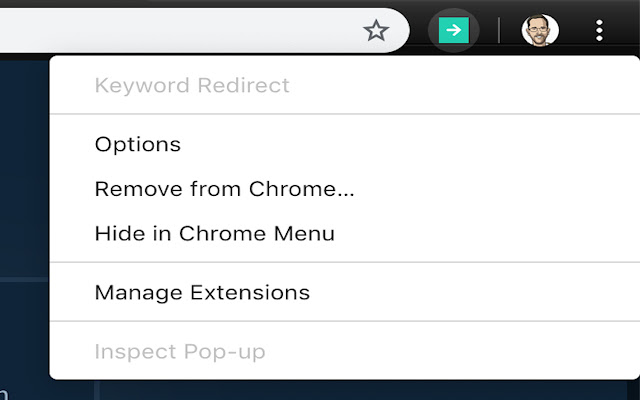
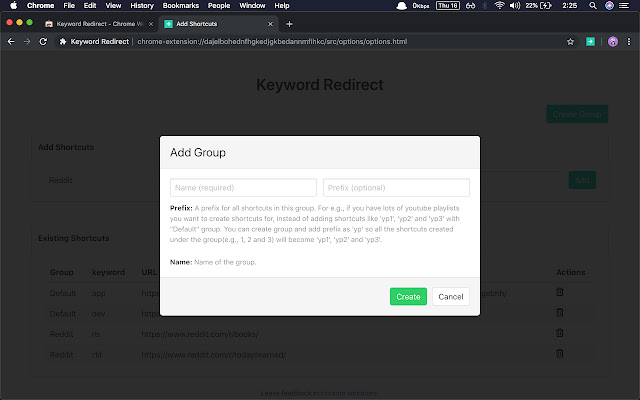
Right click on "Keyword Redirect" Icon in right to address bar and then select options. There you can create shortcuts for your urls.


### Where can I use it?

- Add shortcut to favourite youtube playlists/channels you listen to daily
- Add shortcuts to your favourite author page from blogs/news sites
- Add shortcuts to that subreddit/facebook group/twitter profile you visit often
- Add shortcuts to all the slack groups you are part of
- Add shortcut to project documentation you're working on

 ...etc

### Groups

What is a group?

For e.g., if you have lots of youtube playlists you want to create shortcuts for, instead of adding shortcuts like 'yp1', 'yp2', 'yp3', etc. You can create a group and add prefix to this group as 'yp' and you can create shortcuts with keywords '1', '2', '3', and attach them to your group.


### Code

code is open sourced in github: https://github.com/sasikanth513/keyword-redirect. Raise an issue for any featured requests, bugs.
ข้อมูลพื้นฐานของส่วนขยาย
| ชื่อ |  Keyword Redirect Keyword Redirect |
| ID | okmndadncjgigahlgcbgenaoecagebhh |
| URL อย่างเป็นทางการ | https://chrome.google.com/webstore/detail/keyword-redirect/okmndadncjgigahlgcbgenaoecagebhh |
| คำอธิบาย | Shortcuts to your long url's. Type 'go' and a keyword into the address bar to open url. |
| ขนาดไฟล์ | 76.21 KB |
| จำนวนการติดตั้ง | 267 |
| เวอร์ชันปัจจุบัน | 0.5 |
| อัปเดตครั้งล่าสุด | 2020-02-02 |
| วันที่เผยแพร่ | 2020-02-02 |
| คะแนน | 4.22/5 รวมทั้งหมด 9 คะแนน |
| ผู้พัฒนา | Sasikanth Dronavalli |
| อีเมล | [email protected] |
| ประเภทการชำระเงิน | free |
| เว็บไซต์ส่วนขยาย | https://sasi.io |
| URL หน้าช่วยเหลือ | https://sasi.io |
| ภาษาที่รองรับ | en |
| manifest.json | |
{
    "update_url": "https:\/\/clients2.google.com\/service\/update2\/crx",
    "name": "Keyword Redirect",
    "description": "Shortcuts to your long url's. Type 'go' and a keyword into the address bar to open url.",
    "version": "0.5",
    "options_page": "src\/options\/options.html",
    "background": {
        "page": "src\/background\/background.html"
    },
    "permissions": [
        "storage",
        "tabs"
    ],
    "omnibox": {
        "keyword": "go"
    },
    "manifest_version": 2,
    "content_security_policy": "script-src 'self' 'unsafe-eval'; object-src 'self'",
    "browser_action": {
        "default_icon": {
            "16": "assets\/extension-icons\/icon16.png",
            "32": "assets\/extension-icons\/icon32.png"
        }
    },
    "icons": {
        "16": "assets\/extension-icons\/icon16.png",
        "32": "assets\/extension-icons\/icon32.png",
        "48": "assets\/extension-icons\/icon48.png",
        "128": "assets\/extension-icons\/icon.png"
    }
} | |