ServiceDesk Plus - DIY Implementation
Chrome Extension for ServiceDesk Plus Product Implementation
ServiceDesk Plus - DIY Implementationคืออะไร?
ServiceDesk Plus - DIY Implementation เป็นส่วนขยายของ Chrome ที่พัฒนาโดย manageengine.com และคุณลักษณะหลักของมันคือ "Chrome Extension for ServiceDesk Plus Product Implementation"
ภาพหน้าจอของส่วนขยาย
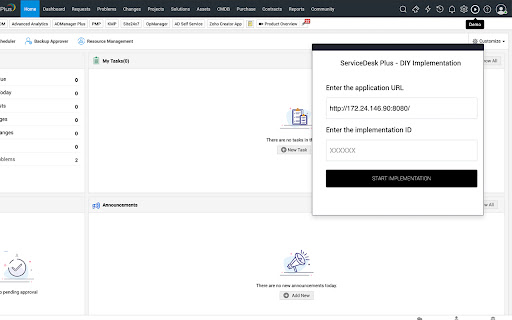


ดาวน์โหลดไฟล์ CRX ของส่วนขยาย ServiceDesk Plus - DIY Implementation
ดาวน์โหลดไฟล์ส่วนขยาย ServiceDesk Plus - DIY Implementation ในรูปแบบ crx และติดตั้งส่วนขยาย Chrome ด้วยตนเองในเบราว์เซอร์หรือแชร์ไฟล์ crx กับเพื่อนๆ เพื่อติดตั้งส่วนขยาย Chrome อย่างง่ายดาย
คำแนะนำในการใช้ส่วนขยาย
This plugin will assist in implementing the personalized plan created for ManageEngine ServiceDesk Plus. ข้อมูลพื้นฐานของส่วนขยาย
| ชื่อ |  ServiceDesk Plus - DIY Implementation ServiceDesk Plus - DIY Implementation |
| ID | oohoniicgoomojjcicpghihgkmngdboj |
| URL อย่างเป็นทางการ | https://chromewebstore.google.com/detail/servicedesk-plus-diy-impl/oohoniicgoomojjcicpghihgkmngdboj |
| คำอธิบาย | Chrome Extension for ServiceDesk Plus Product Implementation |
| ขนาดไฟล์ | 358 KB |
| จำนวนการติดตั้ง | 69 |
| เวอร์ชันปัจจุบัน | 2.0 |
| อัปเดตครั้งล่าสุด | 2021-08-04 |
| วันที่เผยแพร่ | 2021-08-03 |
| ผู้พัฒนา | manageengine.com |
| อีเมล | [email protected] |
| ประเภทการชำระเงิน | free |
| URL หน้านโยบายความเป็นส่วนตัว | https://www.manageengine.com/privacy.html |
| ภาษาที่รองรับ | en-US |
| manifest.json | |
{
"update_url": "https:\/\/clients2.google.com\/service\/update2\/crx",
"name": "ServiceDesk Plus - DIY Implementation",
"version": "2.0",
"icons": {
"128": "icon-128x128.png"
},
"manifest_version": 2,
"description": "Chrome Extension for ServiceDesk Plus Product Implementation",
"browser_action": {
"default_icon": "icon-192x192.png",
"default_title": "ServiceDesk Plus - DIY Implementation"
},
"background": {
"scripts": [
".\/jquery.js",
"background.js",
".\/content.js"
]
},
"content_scripts": [
{
"matches": [
" | |