Archillension
chrome extension that replaces your new tab background with the most recent images tweeted by @archillect
Archillensionคืออะไร?
Archillension เป็นส่วนขยายของ Chrome ที่พัฒนาโดย brkwtzr และคุณลักษณะหลักของมันคือ "chrome extension that replaces your new tab background with the most recent images tweeted by @archillect"
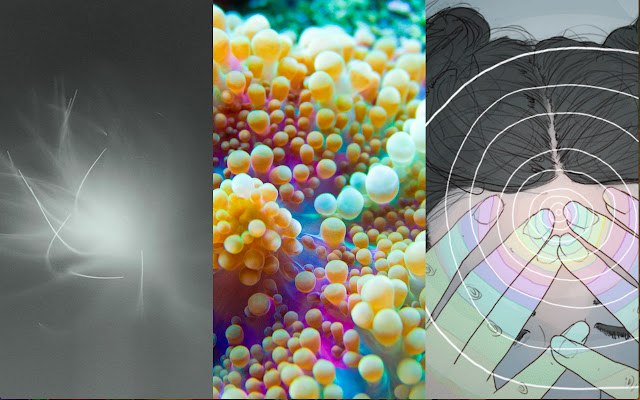
ภาพหน้าจอของส่วนขยาย


ดาวน์โหลดไฟล์ CRX ของส่วนขยาย Archillension
ดาวน์โหลดไฟล์ส่วนขยาย Archillension ในรูปแบบ crx และติดตั้งส่วนขยาย Chrome ด้วยตนเองในเบราว์เซอร์หรือแชร์ไฟล์ crx กับเพื่อนๆ เพื่อติดตั้งส่วนขยาย Chrome อย่างง่ายดาย
คำแนะนำในการใช้ส่วนขยาย
                        Get a shot of aesthetic inspiration every time you open a new tab.

This lightweight extension replaces your new tab page with the three most recent images or animated GIFs generated by Archillect (archillect.com), a machine learning project by Murat Pak.

The layout is simple and adaptive, designed to showcase the media and its thematic development. A new image or animated GIF is added once every 10 minutes. For the curious, each image is linked to its source.

Note that Archillect may produce NFSW images-- though almost always tastefully.
ข้อมูลพื้นฐานของส่วนขยาย
| ชื่อ |  Archillension Archillension |
| ID | opnpedplmjoakbdnpghampcbameebobk |
| URL อย่างเป็นทางการ | https://chrome.google.com/webstore/detail/archillension/opnpedplmjoakbdnpghampcbameebobk |
| คำอธิบาย | chrome extension that replaces your new tab background with the most recent images tweeted by @archillect |
| ขนาดไฟล์ | 42.85 KB |
| จำนวนการติดตั้ง | 62 |
| เวอร์ชันปัจจุบัน | 2.0 |
| อัปเดตครั้งล่าสุด | 2019-09-29 |
| วันที่เผยแพร่ | 2019-09-29 |
| คะแนน | 4.77/5 รวมทั้งหมด 13 คะแนน |
| ผู้พัฒนา | brkwtzr |
| ประเภทการชำระเงิน | free |
| ภาษาที่รองรับ | en |
| manifest.json | |
{
    "update_url": "https:\/\/clients2.google.com\/service\/update2\/crx",
    "manifest_version": 2,
    "name": "Archillension",
    "version": "2.0",
    "description": "chrome extension that replaces your new tab background with the most recent images tweeted by @archillect",
    "browser_action": {
        "default_icon": "icon.png",
        "default_popup": ".\/views\/popup.html"
    },
    "chrome_url_overrides": {
        "newtab": ".\/views\/index.html"
    },
    "permissions": [
        "http:\/\/archillect.com\/"
    ]
} | |