VIT WiFi Auto Login
Automatically login to VIT WiFi
VIT WiFi Auto Loginคืออะไร?
VIT WiFi Auto Login เป็นส่วนขยายของ Chrome ที่พัฒนาโดย Rahul Davamani และคุณลักษณะหลักของมันคือ "Automatically login to VIT WiFi"
ภาพหน้าจอของส่วนขยาย
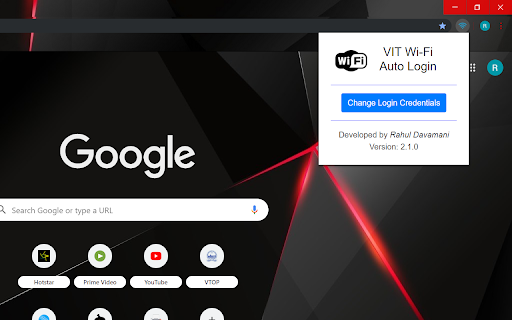


ดาวน์โหลดไฟล์ CRX ของส่วนขยาย VIT WiFi Auto Login
ดาวน์โหลดไฟล์ส่วนขยาย VIT WiFi Auto Login ในรูปแบบ crx และติดตั้งส่วนขยาย Chrome ด้วยตนเองในเบราว์เซอร์หรือแชร์ไฟล์ crx กับเพื่อนๆ เพื่อติดตั้งส่วนขยาย Chrome อย่างง่ายดาย
คำแนะนำในการใช้ส่วนขยาย
                        This is a Chrome Extension used to automate your login process to connect your VIT 2.4G/5G.
Provide Your Login Credentials and Connect to VIT WiFi like an ordirnary WiFi.
Your Passwords are Stored on Your Browser. It is not sent or stored on any external storage.
Support and Share it to others.
Designed and Developed by Rahul Davamani.

Versions:

* 1.0.0
 - Test Version
 - 15/10/2019

* 1.1.0
 - Developed Version
 - 15/10/2019

* 1.2.0
 - Added Logo, Icons and Tiles
 - Simplified the Name of the Extension and other Patch Works
 - 16/10/2019

* 1.2.1
 - Cleaned Up the Code
 - 17/10/2019

* 1.3.0
 - Added Notification
 - 19/10/2019

* 1.3.1
 - Minified the Code with Gulp.js
 - 20/10/2019
ข้อมูลพื้นฐานของส่วนขยาย
| ชื่อ |  VIT WiFi Auto Login VIT WiFi Auto Login |
| ID | opplgfmlhieaibnddnjciilcadohjopd |
| URL อย่างเป็นทางการ | https://chromewebstore.google.com/detail/vit-wifi-auto-login/opplgfmlhieaibnddnjciilcadohjopd |
| คำอธิบาย | Automatically login to VIT WiFi |
| ขนาดไฟล์ | 136 KB |
| จำนวนการติดตั้ง | 3,448 |
| เวอร์ชันปัจจุบัน | 1.3.1 |
| อัปเดตครั้งล่าสุด | 2019-10-20 |
| วันที่เผยแพร่ | 2019-10-20 |
| คะแนน | 4.86/5 รวมทั้งหมด 7 คะแนน |
| ผู้พัฒนา | Rahul Davamani |
| อีเมล | [email protected] |
| ประเภทการชำระเงิน | free |
| ภาษาที่รองรับ | en |
| manifest.json | |
{
    "update_url": "https:\/\/clients2.google.com\/service\/update2\/crx",
    "manifest_version": 2,
    "name": "VIT WiFi Auto Login",
    "short_name": "VIT WiFi",
    "author": "Rahul Davamani",
    "version": "1.3.1",
    "description": "Automatically login to VIT WiFi",
    "icons": {
        "128": ".\/icons\/icon128.png",
        "48": ".\/icons\/icon48.png",
        "16": ".\/icons\/icon16.png"
    },
    "browser_action": {
        "default_popup": ".\/popup\/popup.html"
    },
    "background": {
        "scripts": [
            ".\/background_pages\/eventPage.js"
        ],
        "persistent": false
    },
    "content_scripts": [
        {
            "matches": [
                "http:\/\/phc.prontonetworks.com\/cgi-bin\/authlogin*"
            ],
            "js": [
                ".\/content_scripts\/content.js",
                ".\/library\/jquery.js"
            ]
        }
    ],
    "permissions": [
        "storage",
        "notifications"
    ]
} | |