Gmail™ Instant Title Links
Automatically turn URLs in gmail titles clickable links
Gmail™ Instant Title Linksคืออะไร?
Gmail™ Instant Title Links เป็นส่วนขยายของ Chrome ที่พัฒนาโดย Aviche และคุณลักษณะหลักของมันคือ "Automatically turn URLs in gmail titles clickable links"
ภาพหน้าจอของส่วนขยาย
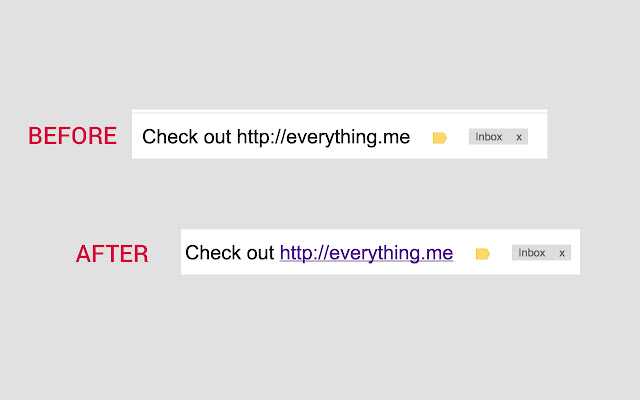
ดาวน์โหลดไฟล์ CRX ของส่วนขยาย Gmail™ Instant Title Links
ดาวน์โหลดไฟล์ส่วนขยาย Gmail™ Instant Title Links ในรูปแบบ crx และติดตั้งส่วนขยาย Chrome ด้วยตนเองในเบราว์เซอร์หรือแชร์ไฟล์ crx กับเพื่อนๆ เพื่อติดตั้งส่วนขยาย Chrome อย่างง่ายดาย
คำแนะนำในการใช้ส่วนขยาย
                        When people share a website the copy the url and in many cases simply paste it in the email's title...
The thing is that for some reason Gmail™ doesn't change the url in email titles into a link which means you need to copy it and paste it in the browser...

Now lets admit, this isn't a real big problem... but wouldn't it be nice if you can turn those URL titles into links?
Well now you can... Just add this extension and and UrL that appears in your email title will be turned into a link :-)

Enjoy
ข้อมูลพื้นฐานของส่วนขยาย
| ชื่อ |  Gmail™ Instant Title Links Gmail™ Instant Title Links |
| ID | pchdmcajhbjplgkkinpfncgenmiacpfk |
| URL อย่างเป็นทางการ | https://chrome.google.com/webstore/detail/gmail-instant-title-links/pchdmcajhbjplgkkinpfncgenmiacpfk |
| คำอธิบาย | Automatically turn URLs in gmail titles clickable links |
| ขนาดไฟล์ | 46.08 KB |
| จำนวนการติดตั้ง | 13 |
| เวอร์ชันปัจจุบัน | 2.0 |
| อัปเดตครั้งล่าสุด | 2015-03-25 |
| วันที่เผยแพร่ | 2015-03-25 |
| คะแนน | 5.00/5 รวมทั้งหมด 1 คะแนน |
| ผู้พัฒนา | Aviche |
| ประเภทการชำระเงิน | free |
| ภาษาที่รองรับ | en-US |
| manifest.json | |
{
    "update_url": "https:\/\/clients2.google.com\/service\/update2\/crx",
    "manifest_version": 2,
    "name": "Gmail\u2122 Instant Title Links",
    "description": "Automatically turn URLs in gmail titles clickable links",
    "version": "2.0",
    "permissions": [
        "https:\/\/*\/*",
        "http:\/\/*\/*",
        "activeTab",
        "webNavigation"
    ],
    "background": {
        "scripts": [
            "background.js"
        ],
        "persistent": true
    },
    "content_scripts": [
        {
            "matches": [
                "https:\/\/mail.google.com\/*"
            ],
            "js": [
                "contentScript.js"
            ]
        }
    ]
} | |