Browserhub – Automated Visual Web Scraping
The visual web scraping builder of browserhub.io
Browserhub – Automated Visual Web Scrapingคืออะไร?
Browserhub – Automated Visual Web Scraping เป็นส่วนขยายของ Chrome ที่พัฒนาโดย https://browserhub.io และคุณลักษณะหลักของมันคือ "The visual web scraping builder of browserhub.io"
ภาพหน้าจอของส่วนขยาย
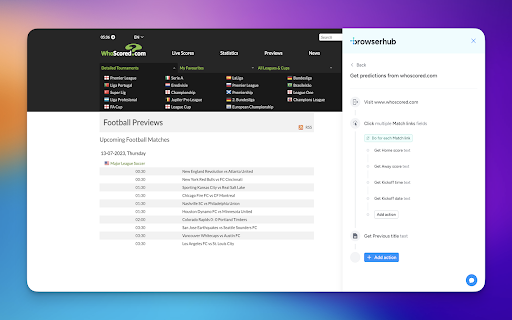


ดาวน์โหลดไฟล์ CRX ของส่วนขยาย Browserhub – Automated Visual Web Scraping
ดาวน์โหลดไฟล์ส่วนขยาย Browserhub – Automated Visual Web Scraping ในรูปแบบ crx และติดตั้งส่วนขยาย Chrome ด้วยตนเองในเบราว์เซอร์หรือแชร์ไฟล์ crx กับเพื่อนๆ เพื่อติดตั้งส่วนขยาย Chrome อย่างง่ายดาย
คำแนะนำในการใช้ส่วนขยาย
                        This extension will help you build a web scraper visually.

Some of the steps that you can do:
• Get a list of data from a web page
• Get some texts from a web page
• Get some links from a web page
• Setup pagination with a button click or continuous scroll
• Click an element from a web page
• Select a dropdown value from a web page
• Write some input to a particular field from a web page
• Solve CAPTCHAs
• And many more
ข้อมูลพื้นฐานของส่วนขยาย
| ชื่อ |  Browserhub – Automated Visual Web Scraping Browserhub – Automated Visual Web Scraping |
| ID | pjghcpedbaikfbofdlpnacpdhcblflda |
| URL อย่างเป็นทางการ | https://chromewebstore.google.com/detail/browserhub-%E2%80%93-automated-vi/pjghcpedbaikfbofdlpnacpdhcblflda |
| คำอธิบาย | The visual web scraping builder of browserhub.io |
| ขนาดไฟล์ | 115 KB |
| จำนวนการติดตั้ง | 44 |
| เวอร์ชันปัจจุบัน | 1.4.1 |
| อัปเดตครั้งล่าสุด | 2023-10-30 |
| วันที่เผยแพร่ | 2023-07-11 |
| ผู้พัฒนา | https://browserhub.io |
| อีเมล | [email protected] |
| ประเภทการชำระเงิน | free |
| เว็บไซต์ส่วนขยาย | https://www.browserhub.io |
| URL หน้านโยบายความเป็นส่วนตัว | https://www.browserhub.io/privacy |
| ภาษาที่รองรับ | en-US |
| manifest.json | |
{
"update_url": "https:\/\/clients2.google.com\/service\/update2\/crx",
"manifest_version": 3,
"name": "Browserhub \u2013 Automated Visual Web Scraping",
"description": "The visual web scraping builder of browserhub.io",
"version": "1.4.1",
"icons": {
"16": "logo16.png",
"32": "logo32.png",
"48": "logo48.png",
"128": "logo128.png"
},
"background": {
"service_worker": "background.js"
},
"action": {
"default_icon": {
"16": "logo16.png",
"32": "logo32.png",
"48": "logo48.png",
"128": "logo128.png"
}
},
"content_scripts": [
{
"matches": [
" | |