OfficeMA Timesheet Timer
An easy to use cloud based task timer to track your OfficeMA Timesheet tasks directly from Chrome.
OfficeMA Timesheet Timer là gì?
OfficeMA Timesheet Timer là một tiện ích mở rộng Chrome được phát triển bởi http://www.officema.co.uk, và tính năng chính của nó là "An easy to use cloud based task timer to track your OfficeMA Timesheet tasks directly from Chrome.".
Ảnh Chụp Màn Hình của Tiện Ích Mở Rộng
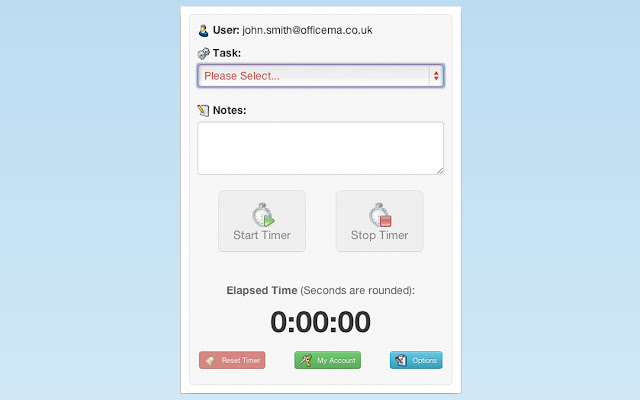


Tải xuống tệp CRX của tiện ích mở rộng OfficeMA Timesheet Timer
Tải xuống các tệp mở rộng OfficeMA Timesheet Timer dưới định dạng crx, cài đặt các tiện ích mở rộng Chrome bằng tay trong trình duyệt hoặc chia sẻ các tệp crx với bạn bè để dễ dàng cài đặt các tiện ích mở rộng Chrome.
Hướng Dẫn Sử Dụng Tiện Ích Mở Rộng
                        This extension enables you to track time spent on tasks directly from Chrome. You need an OfficeMA Timesheet account to use this extension, but don't worry if you don't have an account simply signup free with your Google Account or @ https://www.officema.co.uk/signup.html

OfficeMA Timesheet is a feature rich and powerful multi-user time tracking service, yet it's really easy to use and you can record your time in seconds. Whether you are tracking time just for yourself or for multiple users, give OfficeMA Timesheet a try.

We know the last thing you want is to waste your time when trying to track time this is why OfficeMA Timesheet makes it really easy to quickly track time spent on tasks. OfficeMA Timesheet even goes beyond time recording, it produces very powerful charts that enables you to visualise your recorded hours in terms of revenue, cost, profit margin, user utilisation and project budget.

Here is what you get with this extension:

- An options page so you can login/signup with Google or set your OfficeMA Timesheet login details.
- Start, pause and save your progress in any of your OfficeMA Timesheet tasks directly from Chrome.
- Go to your OfficeMA Timesheet account by a simple click on a button.
- Hourly reminders when the timer is running or paused.
- Task progress is saved locally so if you can accidentally close Chrome you can start the timer right from where you left it.
- Once the task is stopped it's then saved to your OfficeMA Timesheet account as a timesheet entry.
Thông Tin Cơ Bản về Tiện Ích Mở Rộng
| Tên |  OfficeMA Timesheet Timer OfficeMA Timesheet Timer |
| ID | cgeoeefakhnlmohgklmpkabhgbmflooc |
| URL Chính Thức | https://chrome.google.com/webstore/detail/officema-timesheet-timer/cgeoeefakhnlmohgklmpkabhgbmflooc |
| Mô tả | An easy to use cloud based task timer to track your OfficeMA Timesheet tasks directly from Chrome. |
| Kích Thước Tệp | 252 KB |
| Số Lần Cài Đặt | 551 |
| Phiên Bản Hiện Tại | 1.0.7 |
| Cập Nhật Lần Cuối | 2015-09-25 |
| Ngày Phát Hành | 2015-09-25 |
| Đánh Giá | 4.17/5 Tổng số 6 Đánh Giá |
| Nhà Phát Triển | http://www.officema.co.uk |
| Loại Thanh Toán | free |
| Trang Web Mở Rộng | http://www.officema.co.uk |
| URL Trang Trợ Giúp | http://blog.officema.co.uk/ |
| Ngôn Ngữ Được Hỗ Trợ | en-GB |
| manifest.json | |
{
    "update_url": "https:\/\/clients2.google.com\/service\/update2\/crx",
    "background": {
        "scripts": [
            "js\/jquery-1.10.2.min.js",
            "js\/background.js"
        ]
    },
    "browser_action": {
        "default_icon": "img\/16.png",
        "default_popup": "popup.html",
        "default_title": "OfficeMA Timesheet Timer"
    },
    "description": "An easy to use cloud based task timer to track your OfficeMA Timesheet tasks directly from Chrome.",
    "homepage_url": "http:\/\/www.officema.co.uk",
    "icons": {
        "128": "img\/128.png",
        "16": "img\/16.png",
        "48": "img\/48.png"
    },
    "key": "MIGfMA0GCSqGSIb3DQEBAQUAA4GNADCBiQKBgQCEw8j3fWt4ZAJru5mERAOvXu6QXCVFPpEVvdsctRfziDBvsS9tnDYlPKy9npmy8AY7wsSlTr3HcCEwJ8LPQoAz2L\/f\/fpszoG9U8EcSrkse\/dp6braQw5BZ52xyzob+v\/VT12l1rXrfLs8Rf7ZKH7sZZwyl9Mcx1\/WCAnveP+RHwIDAQAB",
    "manifest_version": 2,
    "name": "OfficeMA Timesheet Timer",
    "options_page": "options.html",
    "oauth2": {
        "client_id": "218347693023-nut20fsacduklhr1h0rpfv8an4ek1p04.apps.googleusercontent.com",
        "scopes": [
            "https:\/\/www.googleapis.com\/auth\/userinfo.profile",
            "https:\/\/www.googleapis.com\/auth\/userinfo.email"
        ]
    },
    "permissions": [
        "identity",
        "identity.email",
        "notifications",
        "storage",
        "alarms",
        "https:\/\/www.officema.co.uk\/OfficeMAWeb\/*"
    ],
    "version": "1.0.7",
    "web_accessible_resources": [
        "img\/48.png"
    ]
} | |