Enterprise Data Catalog Plug-in
Enterprise Data Catalog Plug-in is a quick way to access detailed metadata information about data assets.
Enterprise Data Catalog Plug-in là gì?
Enterprise Data Catalog Plug-in là một tiện ích mở rộng Chrome được phát triển bởi Informatica, và tính năng chính của nó là "Enterprise Data Catalog Plug-in is a quick way to access detailed metadata information about data assets.".
Ảnh Chụp Màn Hình của Tiện Ích Mở Rộng
Tải xuống tệp CRX của tiện ích mở rộng Enterprise Data Catalog Plug-in
Tải xuống các tệp mở rộng Enterprise Data Catalog Plug-in dưới định dạng crx, cài đặt các tiện ích mở rộng Chrome bằng tay trong trình duyệt hoặc chia sẻ các tệp crx với bạn bè để dễ dàng cài đặt các tiện ích mở rộng Chrome.
Hướng Dẫn Sử Dụng Tiện Ích Mở Rộng
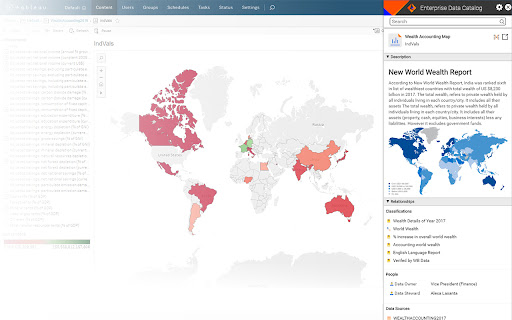
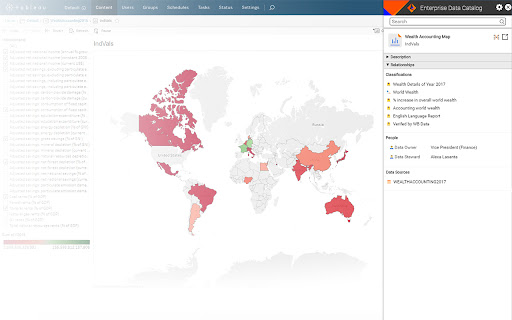
                        Enterprise Data Catalog Plug-in is a browser extension that is designed keeping data consumers and analysts in mind. With this plug-in, data consumers and analysts get business context and technical details about enterprise data assets, such as dashboards, reports, tables, and databases.

Use this extension within the Chrome browser to search and view any metadata, such as data asset description, relationships, associated business terms, data asset owners and contributors, and data sources. Launch the full version of Enterprise Data Catalog from the browser to view any metadata needed for data analysis and reporting.

Informatica Enterprise Data Catalog is a AI-powered data catalog that provides a machine-learning-based discovery engine to scan and catalog data assets across the enterprise across cloud, on-premises, and big data. Learn more about Enterprise Data Catalog on www.informatica.com/eic
Thông Tin Cơ Bản về Tiện Ích Mở Rộng
| Tên |  Enterprise Data Catalog Plug-in Enterprise Data Catalog Plug-in |
| ID | ehmlceddjeepgfiimoofdnkblnkhojbh |
| URL Chính Thức | https://chromewebstore.google.com/detail/enterprise-data-catalog-p/ehmlceddjeepgfiimoofdnkblnkhojbh |
| Mô tả | Enterprise Data Catalog Plug-in is a quick way to access detailed metadata information about data assets. |
| Kích Thước Tệp | 1.65 MB |
| Số Lần Cài Đặt | 364 |
| Phiên Bản Hiện Tại | 1.2.2.33 |
| Cập Nhật Lần Cuối | 2021-07-03 |
| Ngày Phát Hành | 2019-06-25 |
| Đánh Giá | 5.00/5 Tổng số 4 Đánh Giá |
| Nhà Phát Triển | Informatica |
| [email protected] | |
| Loại Thanh Toán | free |
| Trang Web Mở Rộng | https://www.informatica.com/eic |
| URL Trang Chính Sách Bảo Mật | https://www.informatica.com/privacy-policy.html |
| Ngôn Ngữ Được Hỗ Trợ | en |
| manifest.json | |
{
    "update_url": "https:\/\/clients2.google.com\/service\/update2\/crx",
    "manifest_version": 2,
    "name": "Enterprise Data Catalog Plug-in",
    "description": "Enterprise Data Catalog Plug-in is a quick way to access detailed metadata information about data assets.",
    "version": "1.2.2.33",
    "incognito": "split",
    "browser_action": {
        "default_icon": "ldmLogo.png",
        "default_title": "Enterprise Data Catalog Plug-in"
    },
    "icons": {
        "128": "ldmLogo.png"
    },
    "content_scripts": [
        {
            "run_at": "document_end",
            "matches": [
                "http:\/\/*\/*",
                "https:\/\/*\/*"
            ],
            "css": [
                "res\/css\/content_script.css",
                "res\/css\/login.css"
            ],
            "js": [
                "res\/js\/jquery\/jquery-3.2.1.min.js",
                "res\/js\/jquery\/jquery-ui.min.js",
                "res\/js\/jquery\/jquery.lang.string.js",
                "res\/js\/jquery\/jquery.class.js",
                "res\/js\/jquery\/jquery.cookie.js",
                "res\/js\/jquery\/jquery.reflection.js",
                "res\/js\/jquery\/jquery-tmpl.js",
                "res\/js\/eicConfiguration.js",
                "res\/js\/util.js",
                "res\/js\/ajaxUtils.js",
                "res\/js\/util.js",
                "res\/js\/EICsession.js",
                "res\/js\/extensionView.js",
                "res\/js\/ReportBookmarklet.js",
                "res\/js\/content_script.js"
            ],
            "all_frames": false
        }
    ],
    "options_page": "options.html",
    "background": {
        "scripts": [
            "res\/js\/jquery\/jquery-3.2.1.min.js",
            "background.js"
        ],
        "persistent": true
    },
    "permissions": [
        "tabs",
        "storage",
        "http:\/\/*\/",
        "https:\/\/*\/",
        "webRequest",
        "webRequestBlocking"
    ],
    "web_accessible_resources": [
        "res\/*",
        "images\/*",
        "index.html"
    ],
    "content_security_policy": "script-src 'self' 'unsafe-eval'; object-src 'self'"
} | |