Lucky - Skip search
Navigate to the first search result link directly when you type a query
Lucky - Skip search là gì?
Lucky - Skip search là một tiện ích mở rộng Chrome được phát triển bởi http://i-feel-lucky.com, và tính năng chính của nó là "Navigate to the first search result link directly when you type a query".
Ảnh Chụp Màn Hình của Tiện Ích Mở Rộng
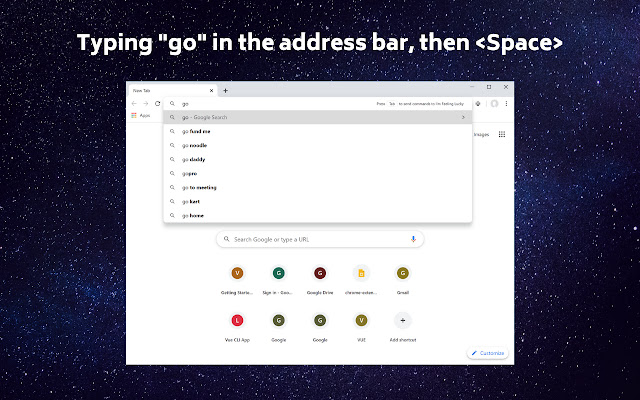


Tải xuống tệp CRX của tiện ích mở rộng Lucky - Skip search
Tải xuống các tệp mở rộng Lucky - Skip search dưới định dạng crx, cài đặt các tiện ích mở rộng Chrome bằng tay trong trình duyệt hoặc chia sẻ các tệp crx với bạn bè để dễ dàng cài đặt các tiện ích mở rộng Chrome.
Hướng Dẫn Sử Dụng Tiện Ích Mở Rộng
                        "I'm Feeling Lucky" button was one of the oldest features on Google that is designed to save people more time. When you click on the "I'm Feeling Lucky" button, it directly takes you to web pages that answer your query. For example, if you type the word "fb" and clicked "I'm Feeling Lucky," you may end up on facebook.com

When you use "I'm Feeling Lucky" button, you skip Google's search result page, along with all its ads and other irrelevant content. Most people spend 5-10 seconds on Google's search result page before clicking a link. "Lucky - Skip search" browser extension makes it simple for you to use "I'm Feeling Lucky" button in the browser. Simply type go  and it will take you directly to the first result.

"Lucky - Skip search" browser extension will also annotate Google search result with '1' - '9', allowing you simply press '1' to go to the first result. With "Lucky", you may save yourself 5-10 seconds every time you search!

Features:
- Navigate to first result with "go "
- Keyboard shortcut: Press '1' - '9' on Google search result page to go directly to the result link ('1' is the first result, '2' is the second result, etc.)
- Right click to search selected text with "I'm Feeling Lucky"
- Deep integration with Google search to provide highest quality result
- Autocomplete suggestions with personalized query suggestions powered by Google search
- No registration required

Learn more: https://i-feel-lucky.com/
Thông Tin Cơ Bản về Tiện Ích Mở Rộng
| Tên |  Lucky - Skip search Lucky - Skip search |
| ID | fpenjoflgejmljiniakaonpgfcamcooc |
| URL Chính Thức | https://chrome.google.com/webstore/detail/lucky-skip-search/fpenjoflgejmljiniakaonpgfcamcooc |
| Mô tả | Navigate to the first search result link directly when you type a query |
| Kích Thước Tệp | 87.56 KB |
| Số Lần Cài Đặt | 2,236 |
| Phiên Bản Hiện Tại | 3.0.0 |
| Cập Nhật Lần Cuối | 2022-10-19 |
| Ngày Phát Hành | 2020-06-10 |
| Đánh Giá | 4.22/5 Tổng số 18 Đánh Giá |
| Nhà Phát Triển | http://i-feel-lucky.com |
| [email protected] | |
| Loại Thanh Toán | free |
| Trang Web Mở Rộng | https://i-feel-lucky.com/ |
| URL Trang Trợ Giúp | https://i-feel-lucky.com/ |
| URL Trang Chính Sách Bảo Mật | https://modheader.com/privacy |
| Ngôn Ngữ Được Hỗ Trợ | en |
| manifest.json | |
{
    "update_url": "https:\/\/clients2.google.com\/service\/update2\/crx",
    "manifest_version": 3,
    "name": "__MSG_appName__",
    "version": "3.0.0",
    "description": "__MSG_appDesc__",
    "default_locale": "en",
    "omnibox": {
        "keyword": "go"
    },
    "action": {
        "default_icon": {
            "16": "img\/icon_16.png",
            "48": "img\/icon_48.png",
            "128": "img\/icon_128.png"
        },
        "default_title": "__MSG_appName__",
        "default_popup": "popup\/index.html"
    },
    "content_scripts": [
        {
            "matches": [
                "*:\/\/www.google.com\/search*"
            ],
            "js": [
                "content\/import-index.js"
            ],
            "run_at": "document_idle"
        }
    ],
    "background": {
        "service_worker": "background.js",
        "type": "module"
    },
    "icons": {
        "16": "img\/icon_16.png",
        "48": "img\/icon_48.png",
        "128": "img\/icon_128.png"
    },
    "incognito": "spanning",
    "permissions": [
        "activeTab",
        "contextMenus",
        "storage"
    ],
    "host_permissions": [
        "https:\/\/www.google.com\/"
    ],
    "web_accessible_resources": [
        {
            "resources": [
                "chunks\/*-*.js",
                "content\/index.js"
            ],
            "matches": [
                "*:\/\/www.google.com\/*",
                "https:\/\/www.google.com\/*"
            ]
        }
    ]
} | |