Startab New Tab
Your favorite productivity tools in one stylish new tab!
Startab New Tab là gì?
Startab New Tab là một tiện ích mở rộng Chrome được phát triển bởi https://startab.io, và tính năng chính của nó là "Your favorite productivity tools in one stylish new tab!".
Ảnh Chụp Màn Hình của Tiện Ích Mở Rộng



Tải xuống tệp CRX của tiện ích mở rộng Startab New Tab
Tải xuống các tệp mở rộng Startab New Tab dưới định dạng crx, cài đặt các tiện ích mở rộng Chrome bằng tay trong trình duyệt hoặc chia sẻ các tệp crx với bạn bè để dễ dàng cài đặt các tiện ích mở rộng Chrome.
Hướng Dẫn Sử Dụng Tiện Ích Mở Rộng
                        Introducing Startab New Tab: A Smart, Customizable, and Comprehensive Solution for Enhanced Productivity

Startab New Tab is a versatile and intelligent extension that caters to your unique needs and assists you in efficiently planning and managing your tasks.

Ideal for:
✅ Organized individuals seeking to optimize their new tab functionality
✅ Users desiring a straightforward and effective task management solution
✅ Individuals looking for a centralized location to access upcoming events, calendars, and time & date information

Our mission is to empower people to be more productive, and we are dedicated to continuous improvement of Startab's features and capabilities.

Our suite of integrated solutions includes Startab Bookmarks Manager for seamless organization of bookmarks and tabs.

We appreciate your feedback!
💬 Leave a review
📥 Contact us at [email protected]

⭐ Productivity Tools
All tools are optional, enabling you to toggle them on or off as needed.

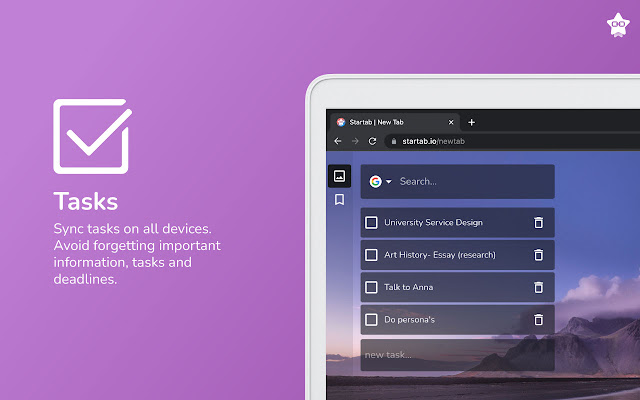
✔️ Tasks
✔️ Calendar
✔️ Google Calendar events
✔️ Clock for effective time management
✔️ Search bar with 6 search providers (Google, YouTube, DuckDuckGo, Amazon, Reddit, Wolfram)

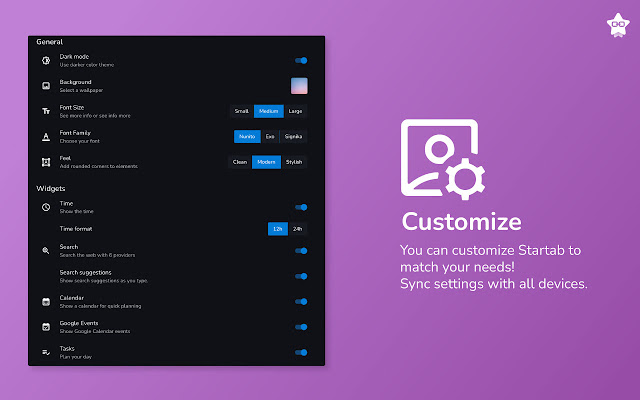
⭐ Customization

✔️ Dark mode for enhanced focus and eye comfort
✔️ Background image selection from Unsplash
✔️ Customizable font and font size
✔️ Rounded corner feel
✔️ Time format options (12/24h)

Note: To ensure an optimal user experience, click the 'Keep it' button on the 'Change back to Google' notification after installing Startab. This will display Startab on each new tab as intended.

⭐ Privacy

Startab New Tab requires no browser permissions and offers both email and Google account login options. Integration with Google Calendar is available for easy access to your events. Your tasks and settings are securely saved in the cloud, allowing you to access them from any device.

⭐ Cutting-Edge Software

Startab utilizes React 18 and Material UI for a fast, modern user experience.

The extension adheres to the latest industry standards, implementing manifest v3. As noted by Google, "Manifest V3 represents one of the biggest shifts in the extensions' platform since it launched a decade ago. Extensions using Manifest V3 will enjoy enhancements in security, privacy, and performance; […] Manifest V3 is part of a shift in the philosophy behind how we approach end-user security and privacy.”

Startab is built using the MERN stack:

MongoDB — document database
Express(.js) — Node.js web framework
React(.js) — a client-side JavaScript framework
Node(.js) — the premier JavaScript web server
Thông Tin Cơ Bản về Tiện Ích Mở Rộng
| Tên |  Startab New Tab Startab New Tab |
| ID | hageeciohfflmoakebendeflkbhmicel |
| URL Chính Thức | https://chrome.google.com/webstore/detail/startab-new-tab/hageeciohfflmoakebendeflkbhmicel |
| Mô tả | Your favorite productivity tools in one stylish new tab! |
| Kích Thước Tệp | 67.86 KB |
| Số Lần Cài Đặt | 167 |
| Phiên Bản Hiện Tại | 0.0.4 |
| Cập Nhật Lần Cuối | 2023-04-27 |
| Ngày Phát Hành | 2022-11-14 |
| Đánh Giá | 4.00/5 Tổng số 8 Đánh Giá |
| Nhà Phát Triển | https://startab.io |
| [email protected] | |
| Loại Thanh Toán | free |
| Trang Web Mở Rộng | https://startab.io |
| URL Trang Trợ Giúp | https://startab.io/support |
| URL Trang Chính Sách Bảo Mật | https://startab.io/privacy |
| Ngôn Ngữ Được Hỗ Trợ | en-US |
| manifest.json | |
{
    "update_url": "https:\/\/clients2.google.com\/service\/update2\/crx",
    "manifest_version": 3,
    "name": "Startab New Tab",
    "version": "0.0.4",
    "description": "Your favorite productivity tools in one stylish new tab!",
    "options_page": "src\/pages\/options\/index.html",
    "background": {
        "service_worker": "src\/pages\/background\/index.js"
    },
    "action": {
        "default_popup": "src\/pages\/popup\/index.html",
        "default_icon": "icon-34.png"
    },
    "chrome_url_overrides": {
        "newtab": "src\/pages\/newtab\/index.html"
    },
    "icons": {
        "128": "icon-128.png"
    },
    "permissions": [],
    "web_accessible_resources": [
        {
            "resources": [
                "assets\/js\/*.js",
                "icon-128.png",
                "icon-34.png"
            ],
            "matches": [
                "*:\/\/*\/*"
            ]
        }
    ],
    "key": "MIIBIjANBgkqhkiG9w0BAQEFAAOCAQ8AMIIBCgKCAQEArzc5msErrvi3z94KUGU5M0d7qJjXpYUjMUxvqZ39F76mncFJc8wo0OYJ\/FRsnBBTvetZAKZrgafS+gmM+lnE\/ZvzgK93XkEIh2VpEN9DD8\/w4uor8gN0kDLoIp2cgNVJRjMI8Osm9coGn40GM82AT+zUdhLrXco2py8qwsZvdwS+Lc8czju0xet62kHd3+zg7qF+kmrPKBbIywCAq3x3Oj2xGlObO9cMj6mpfbMPplCEFkX2gBm3aOTQoNcMZL7yqUEJxqJe+nBqOSGKTLozEoCnqKDjrmijLacQhzNYO4ScarhyhGJGaCHNHp4SPGhcuouYbTd90wMVLn4rLDa\/ywIDAQAB"
} | |