SportHub
Customized updates about your favourite sports
SportHub là gì?
SportHub là một tiện ích mở rộng Chrome được phát triển bởi rohit satya, và tính năng chính của nó là "Customized updates about your favourite sports".
Ảnh Chụp Màn Hình của Tiện Ích Mở Rộng
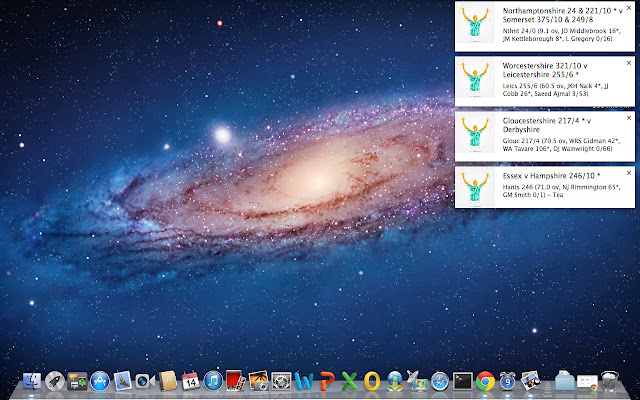

Tải xuống tệp CRX của tiện ích mở rộng SportHub
Tải xuống các tệp mở rộng SportHub dưới định dạng crx, cài đặt các tiện ích mở rộng Chrome bằng tay trong trình duyệt hoặc chia sẻ các tệp crx với bạn bè để dễ dàng cài đặt các tiện ích mở rộng Chrome.
Hướng Dẫn Sử Dụng Tiện Ích Mở Rộng
                        Sporthub is for all the sports fanatics out there. We will help you stay updated with all the sports and teams you like without having to visit your browser every time or hampering your workflow in any way. We do this by using customized rich notifications depending on the sport. Hope you love it.

You don't need to create an account or login using gmail, etc. Just install and enjoy.

We aim to expand to a lot of sports including football, tennis, basketball, etc. Right now we are starting off with cricket. Other sports and more features will be added very soon.

It will be great if you can provide feedback by leaving some comments, so that we can make things even better.

Keep cheering for you favorite team(s).

Cheers!
Thông Tin Cơ Bản về Tiện Ích Mở Rộng
| Tên |  SportHub SportHub |
| ID | lkkeoaoijenggefjnnfgejgngahgkein |
| URL Chính Thức | https://chrome.google.com/webstore/detail/sporthub/lkkeoaoijenggefjnnfgejgngahgkein |
| Mô tả | Customized updates about your favourite sports |
| Kích Thước Tệp | 557 KB |
| Số Lần Cài Đặt | 19 |
| Phiên Bản Hiện Tại | 0.1.4 |
| Cập Nhật Lần Cuối | 2014-07-31 |
| Ngày Phát Hành | 2014-07-31 |
| Đánh Giá | 4.00/5 Tổng số 4 Đánh Giá |
| Nhà Phát Triển | rohit satya |
| Loại Thanh Toán | free |
| Ngôn Ngữ Được Hỗ Trợ | en |
| manifest.json | |
{
    "update_url": "https:\/\/clients2.google.com\/service\/update2\/crx",
    "manifest_version": 2,
    "name": "SportHub",
    "description": "Customized updates about your favourite sports",
    "version": "0.1.4",
    "permissions": [
        "http:\/\/cricscore-api.appspot.com\/",
        "notifications"
    ],
    "background": {
        "scripts": [
            "scripts\/bb218a37.vendor.js",
            "scripts\/6e0cfa39.bkscripts.js"
        ]
    },
    "browser_action": {
        "default_icon": {
            "19": "images\/icon.png",
            "38": "images\/icon.png",
            "48": "images\/icon.png",
            "128": "images\/icon.png"
        },
        "default_popup": "index.html"
    },
    "icons": {
        "16": "images\/icon.png",
        "48": "images\/icon.png",
        "128": "images\/icon.png"
    }
} | |