Photo Rules
This extension draws guide lines on images. It is usefull to study photo composition.
Photo Rules là gì?
Photo Rules là một tiện ích mở rộng Chrome được phát triển bởi Paolodemo, và tính năng chính của nó là "This extension draws guide lines on images. It is usefull to study photo composition.".
Ảnh Chụp Màn Hình của Tiện Ích Mở Rộng
Tải xuống tệp CRX của tiện ích mở rộng Photo Rules
Tải xuống các tệp mở rộng Photo Rules dưới định dạng crx, cài đặt các tiện ích mở rộng Chrome bằng tay trong trình duyệt hoặc chia sẻ các tệp crx với bạn bè để dễ dàng cài đặt các tiện ích mở rộng Chrome.
Hướng Dẫn Sử Dụng Tiện Ích Mở Rộng
                        Update 0.6: Minor bugfix
Update 0.5: Added banner
            fixed functionality in Flickr (only in single photo view)
Update 0.4: fixed jquery min.map error
Update 0.3: added Triangles

---------------------------------------------------------------

This extension draws guide lines on images. It is usefull to study photo composition.
Usage: click before on the button in the toolbar and then on the image you want to study. A new tab will be opened containing the image with the following guides:
Center lines
Triangles
Rule of Thirds
Rule of Fifths
Diagonal lines
Golden section
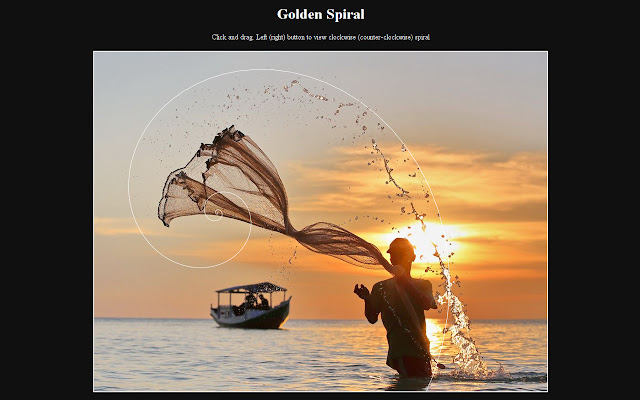
Golden spiral
Thông Tin Cơ Bản về Tiện Ích Mở Rộng
| Tên |  Photo Rules Photo Rules |
| ID | llomjalehmbhidabdjdbiadoeeioabbb |
| URL Chính Thức | https://chrome.google.com/webstore/detail/photo-rules/llomjalehmbhidabdjdbiadoeeioabbb |
| Mô tả | This extension draws guide lines on images. It is usefull to study photo composition. |
| Kích Thước Tệp | 839 KB |
| Số Lần Cài Đặt | 201 |
| Phiên Bản Hiện Tại | 0.6 |
| Cập Nhật Lần Cuối | 2014-11-13 |
| Ngày Phát Hành | 2014-11-13 |
| Đánh Giá | 4.14/5 Tổng số 7 Đánh Giá |
| Nhà Phát Triển | Paolodemo |
| [email protected] | |
| Loại Thanh Toán | free |
| Ngôn Ngữ Được Hỗ Trợ | en |
| manifest.json | |
{
    "update_url": "https:\/\/clients2.google.com\/service\/update2\/crx",
    "manifest_version": 2,
    "name": "Photo Rules",
    "description": "This extension draws guide lines on images. It is usefull to study photo composition.",
    "version": "0.6",
    "web_accessible_resources": [
        "js\/jquery-2.0.3.min.map"
    ],
    "icons": {
        "16": "images\/photo16.png",
        "48": "images\/photo48.png",
        "128": "images\/photo128.png"
    },
    "browser_action": {
        "default_icon": {
            "16": "images\/photo16.png",
            "19": "images\/photo19.png",
            "38": "images\/photo38.png",
            "48": "images\/photo48.png",
            "128": "images\/photo128.png"
        },
        "default_title": "Photo Rules"
    },
    "background": {
        "scripts": [
            "background.js"
        ]
    },
    "content_scripts": [
        {
            "matches": [
                "*:\/\/*\/*",
                "file:\/\/\/*"
            ],
            "js": [
                "js\/jquery-2.0.3.min.js",
                "js\/jquery.svg.min.js",
                "js\/jquery.mousewheel.js",
                "draw_rule.js"
            ],
            "all_frames": true
        }
    ],
    "content_security_policy": "script-src 'self' https:\/\/ssl.google-analytics.com; object-src 'self'",
    "permissions": [
        "tabs"
    ]
} | |