Harambe
Dicks Out For Harambe
Harambe là gì?
Harambe là một tiện ích mở rộng Chrome được phát triển bởi Steven Jin, và tính năng chính của nó là "Dicks Out For Harambe".
Ảnh Chụp Màn Hình của Tiện Ích Mở Rộng

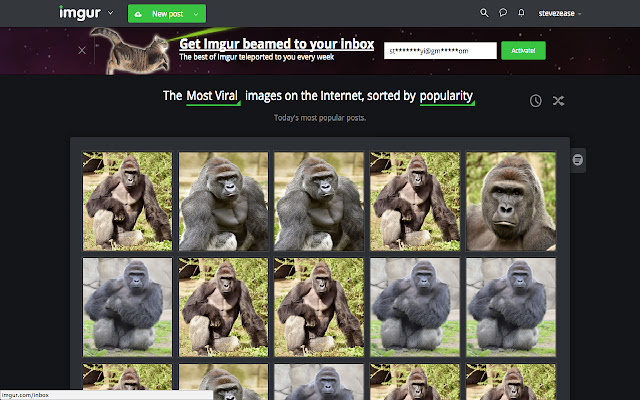
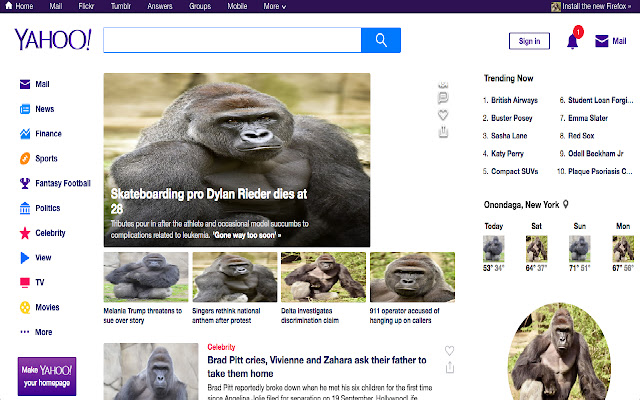
Tải xuống tệp CRX của tiện ích mở rộng Harambe
Tải xuống các tệp mở rộng Harambe dưới định dạng crx, cài đặt các tiện ích mở rộng Chrome bằng tay trong trình duyệt hoặc chia sẻ các tệp crx với bạn bè để dễ dàng cài đặt các tiện ích mở rộng Chrome.
Hướng Dẫn Sử Dụng Tiện Ích Mở Rộng
                        Have a friend you want to prank? Hate that jerk Todd and want to get even?
Share with them the joy of Harambe

It's Easy:
While they're away from their computer:
Step 1. Go to Chrome
Step 2. Go to the extensions page by googling "Chrome Extensions" & clicking on the first link
Step 3. Search in extensions search "Harambe Pictures"
Step 4. install the top result

Now all of his/her pictures will turn into Harambe
Want to go one step further? Right click on the extension and click: "Hide in Chrome Menu."
They'll be freaking out for the next hour

This extension changes all images on a page to Harambe which then checks for changes on a 10 second interval.
Thông Tin Cơ Bản về Tiện Ích Mở Rộng
| Tên |  Harambe Harambe |
| ID | mkghponibaehackhmaijeonapklpndlc |
| URL Chính Thức | https://chrome.google.com/webstore/detail/harambe/mkghponibaehackhmaijeonapklpndlc |
| Mô tả | Dicks Out For Harambe |
| Kích Thước Tệp | 1.98 MB |
| Số Lần Cài Đặt | 16 |
| Phiên Bản Hiện Tại | 1.3.1 |
| Cập Nhật Lần Cuối | 2018-01-07 |
| Ngày Phát Hành | 2018-01-07 |
| Đánh Giá | 2.83/5 Tổng số 6 Đánh Giá |
| Nhà Phát Triển | Steven Jin |
| [email protected] | |
| Loại Thanh Toán | free |
| Ngôn Ngữ Được Hỗ Trợ | en |
| manifest.json | |
{
    "update_url": "https:\/\/clients2.google.com\/service\/update2\/crx",
    "manifest_version": 2,
    "name": "Harambe",
    "description": "Dicks Out For Harambe",
    "version": "1.3.1",
    "content_scripts": [
        {
            "matches": [
                "http:\/\/*\/*",
                "https:\/\/*\/*"
            ],
            "js": [
                "harambe.js",
                "textswapper.js"
            ]
        }
    ],
    "web_accessible_resources": [
        "1.jpg",
        "2.jpg",
        "3.jpg",
        "4.jpg",
        "5.jpg",
        "6.jpg",
        "7.jpg",
        "8.jpg",
        "9.jpg",
        "10.jpg"
    ],
    "browser_action": {
        "default_icon": "icon.png",
        "default_popup": "popup.html"
    },
    "permissions": [
        "activeTab",
        "https:\/\/ajax.googleapis.com\/"
    ]
} | |