Salesforce Credentials
Manage your Salesforce Credentials and login with one click.
Salesforce Credentials là gì?
Salesforce Credentials là một tiện ích mở rộng Chrome được phát triển bởi Alexandr Kurevlev, và tính năng chính của nó là "Manage your Salesforce Credentials and login with one click.".
Ảnh Chụp Màn Hình của Tiện Ích Mở Rộng


Tải xuống tệp CRX của tiện ích mở rộng Salesforce Credentials
Tải xuống các tệp mở rộng Salesforce Credentials dưới định dạng crx, cài đặt các tiện ích mở rộng Chrome bằng tay trong trình duyệt hoặc chia sẻ các tệp crx với bạn bè để dễ dàng cài đặt các tiện ích mở rộng Chrome.
Hướng Dẫn Sử Dụng Tiện Ích Mở Rộng
                        This extension allows you to manage and store your Salesforce Credentials, login with one click and more...

Key features:

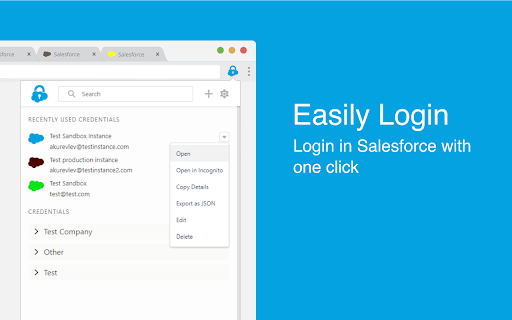
- Manage your credentials: Add/Edit/Delete your credentials within the extension

- Easily Login: Login in Salesforce with one click without the verification code

- Add credentials by logging in: Login in Salesforce as you usually do and click 'Add' to add credential

- Login from Address Bar: Enter 'sf' and space in your address bar and start typing username, name or group to login

- Never lose tab: Set your own color for every credential to work on multiple instances at the same time

- Collaborate with your сolleagues: Import and export credentials to file or clipboard to share with your colleagues

- Always in Sync: Keep your Credentials synced with your Google Account in Chrome
Thông Tin Cơ Bản về Tiện Ích Mở Rộng
| Tên |  Salesforce Credentials Salesforce Credentials |
| ID | mneimgababoaidaajoibedahomnpmbja |
| URL Chính Thức | https://chromewebstore.google.com/detail/salesforce-credentials/mneimgababoaidaajoibedahomnpmbja |
| Mô tả | Manage your Salesforce Credentials and login with one click. |
| Kích Thước Tệp | 584 KB |
| Số Lần Cài Đặt | 874 |
| Phiên Bản Hiện Tại | 1.4.3 |
| Cập Nhật Lần Cuối | 2020-05-05 |
| Ngày Phát Hành | 2020-05-05 |
| Đánh Giá | 4.67/5 Tổng số 3 Đánh Giá |
| Nhà Phát Triển | Alexandr Kurevlev |
| [email protected] | |
| Loại Thanh Toán | free |
| Ngôn Ngữ Được Hỗ Trợ | en |
| manifest.json | |
{
    "update_url": "https:\/\/clients2.google.com\/service\/update2\/crx",
    "manifest_version": 2,
    "name": "Salesforce Credentials",
    "description": "Manage your Salesforce Credentials and login with one click.",
    "version": "1.4.3",
    "browser_action": {
        "default_icon": "icons\/logo\/icon48.png",
        "default_title": "Salesforce Credentials",
        "default_popup": "popup.html"
    },
    "icons": {
        "16": "icons\/logo\/icon16.png",
        "48": "icons\/logo\/icon48.png",
        "128": "icons\/logo\/icon128.png"
    },
    "content_scripts": [
        {
            "run_at": "document_end",
            "matches": [
                "https:\/\/*.salesforce.com\/*",
                "https:\/\/*.force.com\/*",
                "https:\/\/*.visualforce.com\/*"
            ],
            "js": [
                "js\/utils.js",
                "js\/setTabs.js"
            ]
        },
        {
            "matches": [
                "https:\/\/*.salesforce.com\/*",
                "https:\/\/*.force.com\/*",
                "https:\/\/*.visualforce.com\/*"
            ],
            "js": [
                "js\/loginHelper.js"
            ]
        }
    ],
    "web_accessible_resources": [
        "addCredentialPopup.html"
    ],
    "omnibox": {
        "keyword": "sf"
    },
    "background": {
        "scripts": [
            "js\/utils.js",
            "js\/background.build.js"
        ],
        "persistent": false
    },
    "permissions": [
        "https:\/\/*.salesforce.com\/*",
        "https:\/\/*.force.com\/*",
        "https:\/\/*.visualforce.com\/*",
        "storage",
        "tabs",
        "downloads",
        "cookies"
    ]
} | |