Multiple File Download
This extension enables the user to select all the documents present in the web page for download.
Multiple File Download là gì?
Multiple File Download là một tiện ích mở rộng Chrome được phát triển bởi prabhushan, và tính năng chính của nó là "This extension enables the user to select all the documents present in the web page for download.".
Ảnh Chụp Màn Hình của Tiện Ích Mở Rộng

Tải xuống tệp CRX của tiện ích mở rộng Multiple File Download
Tải xuống các tệp mở rộng Multiple File Download dưới định dạng crx, cài đặt các tiện ích mở rộng Chrome bằng tay trong trình duyệt hoặc chia sẻ các tệp crx với bạn bè để dễ dàng cài đặt các tiện ích mở rộng Chrome.
Hướng Dẫn Sử Dụng Tiện Ích Mở Rộng
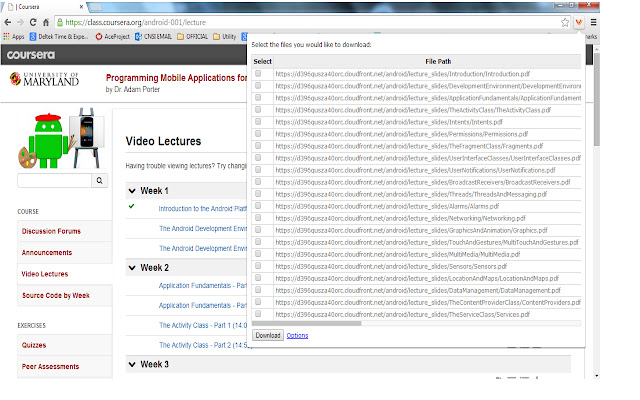
                        Many times we encounter situations where multiple files need to be downloaded from a web page. For example, user can download all the files in Coursera lessons in one shot. This would save lot of time.

Multiple file downloader facilitates the same. It scans through the web page and displays all the files, which user can download. User can select multiple files and click download.
It allows user to customize what file extensions should be downloaded in the web page.The user can also add custom extensions using the options page. User can also decide whether files need to be downloaded to default folder set in Chrome browser or prompt for each file.
BENEFITS FOR END USERS
1) Multi Select files in one go
2) Customise and also add your own extensions to download
KNOWN ISSUE
The extension scans for hyperlink across the web page. As per the design of the page, the hyperlink can be a button or image or both. So there are chances that duplicate links can appear on the extension.
Thông Tin Cơ Bản về Tiện Ích Mở Rộng
| Tên |  Multiple File Download Multiple File Download |
| ID | opncjdadngnekakilfcgjlgbmekljdbm |
| URL Chính Thức | https://chrome.google.com/webstore/detail/multiple-file-download/opncjdadngnekakilfcgjlgbmekljdbm |
| Mô tả | This extension enables the user to select all the documents present in the web page for download. |
| Kích Thước Tệp | 154 KB |
| Số Lần Cài Đặt | 10,000 |
| Phiên Bản Hiện Tại | 1.3 |
| Cập Nhật Lần Cuối | 2014-09-09 |
| Ngày Phát Hành | 2014-09-09 |
| Đánh Giá | 2.56/5 Tổng số 55 Đánh Giá |
| Nhà Phát Triển | prabhushan |
| Loại Thanh Toán | free |
| Ngôn Ngữ Được Hỗ Trợ | en-US |
| manifest.json | |
{
"update_url": "https:\/\/clients2.google.com\/service\/update2\/crx",
"manifest_version": 2,
"name": "Multiple File Download",
"description": "This extension enables the user to select all the documents present in the web page for download. ",
"short_name": "File download",
"version": "1.3",
"background": {
"page": "popup.html"
},
"icons": {
"16": "sonicdownload.png",
"48": "sonicdownload.png",
"128": "sonicdownload.png"
},
"permissions": [
"tabs",
" | |