Shalin
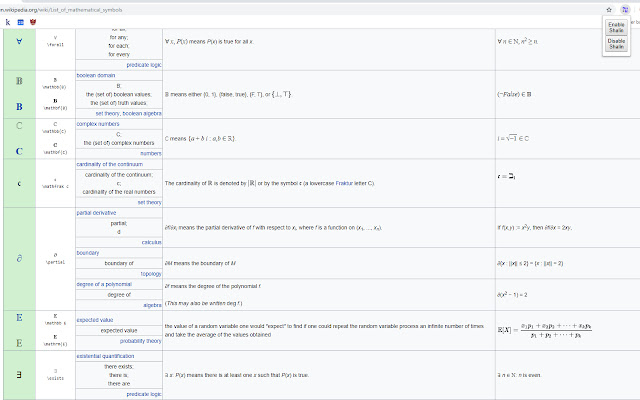
Suggests math symbol replacements for what you're typing.
Shalin là gì?
Shalin là một tiện ích mở rộng Chrome được phát triển bởi Pondle, và tính năng chính của nó là "Suggests math symbol replacements for what you're typing.".
Ảnh Chụp Màn Hình của Tiện Ích Mở Rộng
Tải xuống tệp CRX của tiện ích mở rộng Shalin
Tải xuống các tệp mở rộng Shalin dưới định dạng crx, cài đặt các tiện ích mở rộng Chrome bằng tay trong trình duyệt hoặc chia sẻ các tệp crx với bạn bè để dễ dàng cài đặt các tiện ích mở rộng Chrome.
Hướng Dẫn Sử Dụng Tiện Ích Mở Rộng
                        Chrome extension that provides shortcuts to math symbol replacements for what you're typing.

Important note: Unfortunately, it appears Chrome has been updated to remove the functionality that makes this extension work properly. It is no longer maintained, and is unlikely to be updated unless the functionality returns in some form. My apologies!

Features:
- Instantly change trigger words into the associated symbol using "`"
- Lightweight
- Enable/Disable
- No external calls (runs locally)
- Most symbols from https://en.wikipedia.org/wiki/List_of_mathematical_symbols

How to use:
1. Type the key phrase (a list will be available shortly)
2. Press the backtick key (`)
3. Watch the magic happen!
Thông Tin Cơ Bản về Tiện Ích Mở Rộng
| Tên |  Shalin Shalin |
| ID | pdakidnecjjjcekpdccdjhombkklccnh |
| URL Chính Thức | https://chrome.google.com/webstore/detail/shalin/pdakidnecjjjcekpdccdjhombkklccnh |
| Mô tả | Suggests math symbol replacements for what you're typing. |
| Kích Thước Tệp | 111 KB |
| Số Lần Cài Đặt | 74 |
| Phiên Bản Hiện Tại | 0.1.4 |
| Cập Nhật Lần Cuối | 2020-09-15 |
| Ngày Phát Hành | 2019-02-08 |
| Đánh Giá | 4.50/5 Tổng số 4 Đánh Giá |
| Nhà Phát Triển | Pondle |
| [email protected] | |
| Loại Thanh Toán | free |
| Trang Web Mở Rộng | http://shalin.benpotter.ca |
| Ngôn Ngữ Được Hỗ Trợ | en |
| manifest.json | |
{
    "update_url": "https:\/\/clients2.google.com\/service\/update2\/crx",
    "name": "Shalin",
    "description": "Suggests math symbol replacements for what you're typing.",
    "version": "0.1.4",
    "manifest_version": 2,
    "author": "Ben Potter",
    "permissions": [
        "input"
    ],
    "background": {
        "scripts": [
            "background.js"
        ],
        "persistent": false
    },
    "browser_action": {
        "default_popup": "popup\/popup.html",
        "default_icon": {
            "16": "imgs\/img_16.png",
            "32": "imgs\/img_32.png",
            "64": "imgs\/img_64.png",
            "128": "imgs\/img_128.png",
            "256": "imgs\/img_256.png"
        }
    },
    "icons": {
        "16": "imgs\/img_16.png",
        "32": "imgs\/img_32.png",
        "64": "imgs\/img_64.png",
        "128": "imgs\/img_128.png",
        "256": "imgs\/img_256.png"
    }
} | |