3D Viewer and Advanced Studio
3D STL, OBJ, 3D Studio Max Viewer and exports it as image or other data interchange formats for your Chrome Browser
什么是3D Viewer and Advanced Studio?
3D Viewer and Advanced Studio是由http://www.mediamaster.eu开发的Chrome扩展程序,该扩展的主要功能是“3D STL, OBJ, 3D Studio Max Viewer and exports it as image or other data interchange formats for your Chrome Browser”。
扩展截图


下载3D Viewer and Advanced Studio扩展crx文件
下载3D Viewer and Advanced Studio扩展crx格式的文件,手动将Chrome插件安装到浏览器中,也可以将crx文件分享给朋友,轻松安装Chrome插件。
扩展使用说明
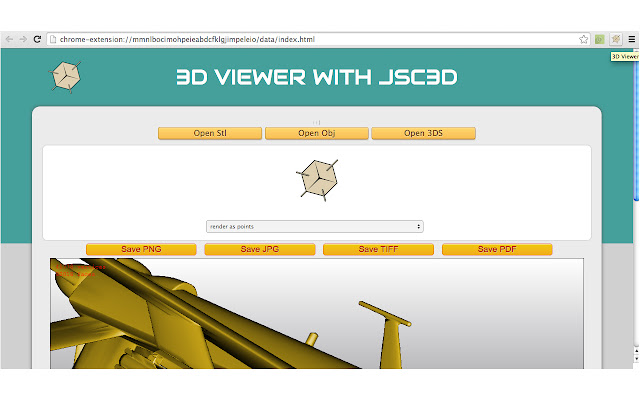
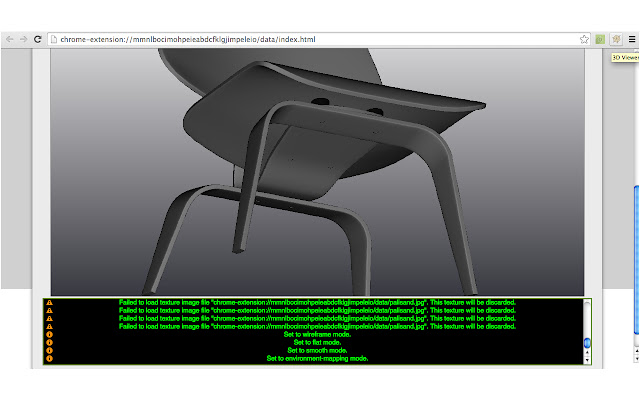
                        This web app provides a 3d object, 3d Studio Max and 3d stl viewer for presenting 3d models and small scenes on a web page. You can to save render result in png, jpg, tiff and pdf and you can to change render mode and image definition. In the project are also available a useful console that tracks the user's actions. Note: when the application starts in the viewing area you can find a file "3D" for example in stl.
=====================
Release 2.1.5 - Improved function to open 3D file in basic viewer
Release 2.1.1 - Remove some permissions not required from file manifest of extension
Release 2.1.0 - Printing/Exporting 3D model to Cloud Print as PNG format
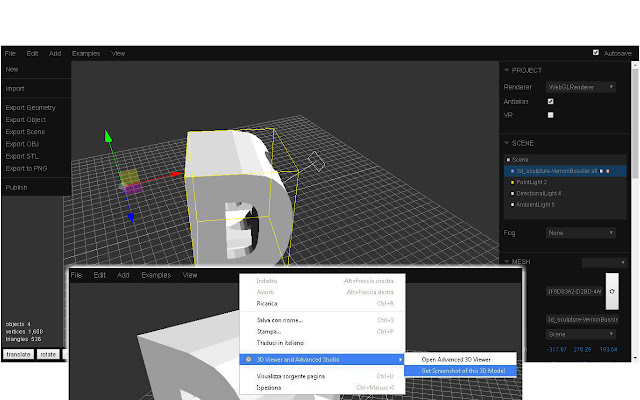
Release 2.0 - Now you can open intuitive and powerful 3D Advanced Model Viewer with context menu and again with context menu you can get Screenshot of Model
=====================
• Export 3D View in png, jpg, tiff and pdf
• Touch control rotation of 3D object
• Useful console that tracks the user's actions
• Render as: point, wireframe, flat, smooth, environment
• Open stl, obj and 3ds extension of the three dimensional files
• Advanced 3D Model Viewer with WebGLRenderer, export scene, scale, rotation, material manager, local storage settings and others interestings functions
扩展基本信息
| 名称 |  3D Viewer and Advanced Studio 3D Viewer and Advanced Studio |
| ID | agobiegfpgmphnbofolggnbidjolbedi |
| 官方URL | https://chrome.google.com/webstore/detail/3d-viewer-and-advanced-st/agobiegfpgmphnbofolggnbidjolbedi |
| 简介 | 3D STL, OBJ, 3D Studio Max Viewer and exports it as image or other data interchange formats for your Chrome Browser |
| 文件大小 | 2.83 MB |
| 安装次数 | 21 |
| 当前版本 | 2.1.5 |
| 更新时间 | 2019-03-08 |
| 上架时间 | 2019-03-08 |
| 开发者 | http://www.mediamaster.eu |
| 电子邮箱 | [email protected] |
| 付费类型 | free |
| 帮助页面URL | http://mediamaster.eu/contatti |
| 隐私政策页面URL | http://ulmdevice.altervista.org/privacy-policy.html |
| 支持的语言 | en |
| manifest.json | |
{
    "update_url": "https:\/\/clients2.google.com\/service\/update2\/crx",
    "manifest_version": 2,
    "name": "3D Viewer and Advanced Studio",
    "short_name": "3D Model Viewer",
    "description": "3D STL, OBJ, 3D Studio Max Viewer and exports it as image or other data interchange formats for your Chrome Browser",
    "version": "2.1.5",
    "minimum_chrome_version": "38",
    "icons": {
        "16": "assets\/icon_16.png",
        "128": "assets\/icon_128.png"
    },
    "permissions": [
        "tabs",
        "activeTab",
        "contextMenus",
        "storage",
        "unlimitedStorage"
    ],
    "browser_action": {
        "default_icon": {
            "19": "assets\/icon_16.png",
            "38": "assets\/icon_128.png"
        }
    },
    "offline_enabled": true,
    "content_security_policy": "script-src 'self' https:\/\/www.google.com\/cloudprint\/ 'unsafe-eval'; frame-src 'self' https:\/\/www.google.com\/cloudprint\/; default-src 'self'; media-src *; img-src * data:; style-src * 'unsafe-inline'; font-src *; connect-src *; base-uri *",
    "background": {
        "scripts": [
            "background.js"
        ]
    }
} | |