Cacher
Save code snippets from anywhere on the web. Companion extension to Cacher, the code snippet organizer for pro developers.
什么是Cacher?
Cacher是由https://www.cacher.io开发的Chrome扩展程序,该扩展的主要功能是“Save code snippets from anywhere on the web. Companion extension to Cacher, the code snippet organizer for pro developers.”。
扩展截图



下载Cacher扩展crx文件
下载Cacher扩展crx格式的文件,手动将Chrome插件安装到浏览器中,也可以将crx文件分享给朋友,轻松安装Chrome插件。
扩展使用说明
                        Save code snippets from anywhere on the web!

Save any code block – Use the "Save to Cacher" button it to quickly save code examples from sites like StackOverflow and Medium.

Save any selected text – Select a block of text, right-click and save it with the Cacher context menu.

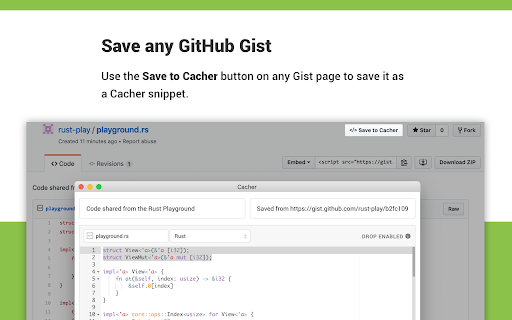
Save any Gist – Save any GitHub Gist as a snippet with the "Save to Cacher" button.

––

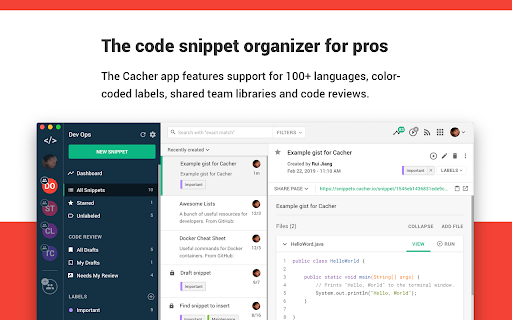
Cacher is a cross-platform, cloud-based app used to curate a snippet library for you and your team.

Features:

– Desktop clients for Windows, macOS and Linux.
– Full-featured web app: app.cacher.io
– Support for editing and viewing 100+ programming languages.
– Flexible, nest-able color-coded labels to categorize snippets.
– Shareable snippet pages via Cacher's code-sharing community: snippets.cacher.io
– Team and organization features like shared libraries, notifications, role management and code reviews.

Supercharged with integrations for:

– GitHub Gist (Bi-directional sync)
– IntelliJ-Platform IDEs
– Visual Studio Code
– Atom Editor
– Sublime Text
– Slack

––

Note that certain features of Cacher require a plan subscription. View plans and features at: https://www.cacher.io/pricing

Terms of use: https://www.cacher.io/terms
Privacy policy: https://www.cacher.io/privacy
扩展基本信息
| 名称 |  Cacher Cacher |
| ID | aiiaandmkmekfhembfoghdnfiiiedhhk |
| 官方URL | https://chromewebstore.google.com/detail/cacher/aiiaandmkmekfhembfoghdnfiiiedhhk |
| 简介 | Save code snippets from anywhere on the web. Companion extension to Cacher, the code snippet organizer for pro developers. |
| 文件大小 | 4.37 MB |
| 安装次数 | 1,784 |
| 当前版本 | 1.2.0 |
| 更新时间 | 2022-07-08 |
| 上架时间 | 2020-03-24 |
| 评分 | 4.25/5 共4次评分 |
| 开发者 | https://www.cacher.io |
| 电子邮箱 | [email protected] |
| 付费类型 | free |
| 扩展官网 | https://www.cacher.io |
| 帮助页面URL | https://support.cacher.io |
| 隐私政策页面URL | https://www.cacher.io/privacy |
| 支持的语言 | en |
| manifest.json | |
{
    "update_url": "https:\/\/clients2.google.com\/service\/update2\/crx",
    "name": "Cacher",
    "version": "1.2.0",
    "description": "Save code snippets from anywhere on the web. Companion extension to Cacher, the code snippet organizer for pro developers.",
    "manifest_version": 3,
    "permissions": [
        "contextMenus",
        "notifications",
        "storage"
    ],
    "host_permissions": [
        "*:\/\/*\/*"
    ],
    "background": {
        "service_worker": "scripts\/background.js"
    },
    "content_scripts": [
        {
            "matches": [
                "*:\/\/*\/*"
            ],
            "js": [
                "scripts\/content.js"
            ],
            "css": [
                "styles\/content.css"
            ]
        }
    ],
    "externally_connectable": {
        "matches": [
            "*:\/\/app.cacher.test\/*",
            "*:\/\/app.cacher.io\/*"
        ]
    },
    "action": {
        "default_popup": "popup\/index.html",
        "default_title": "Cacher",
        "default_icon": {
            "16": "images\/icon16.png",
            "24": "images\/icon24.png",
            "32": "images\/icon32.png"
        }
    },
    "icons": {
        "16": "images\/icon16.png",
        "24": "images\/icon24.png",
        "48": "images\/icon48.png",
        "128": "images\/icon128.png"
    }
} | |