Search by image on Amazon
Search goods by image on Amazon
什么是Search by image on Amazon?
Search by image on Amazon是由tegra.innnova开发的Chrome扩展程序,该扩展的主要功能是“Search goods by image on Amazon”。
扩展截图

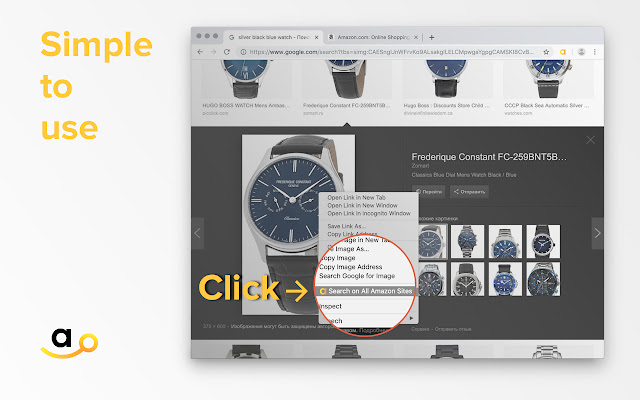


下载Search by image on Amazon扩展crx文件
下载Search by image on Amazon扩展crx格式的文件,手动将Chrome插件安装到浏览器中,也可以将crx文件分享给朋友,轻松安装Chrome插件。
扩展使用说明
                        Search goods by image on Amazon

It happened that you liked a product or a picture, and you wanted to buy it, but you didn’t know how to find it?
Now the problem is solved! Just two right-click mouse - and you can easily find a variety of products with prices for your picture on Amazon!

For your comfort, we have removed the elements blocking access to images on Amazon. For example, on the product page, when the image is zoomed.
You can search by an any image in internet, not only from store or item page.
We conducted a study of similar tools and can confidently say that this extension shows the best results.

Try searching for branded items. We know that Amazon is full of copies of different brands and sellers.
Now you can do even more orders.
We tried to make a great helper for your shopping!

We also want to point out that by installing the extension, you allow developers to receive a cashback from your purchases as a reward for using the extension.
扩展基本信息
| 名称 |  Search by image on Amazon Search by image on Amazon |
| ID | apeifblhljjimcgfaeomacpndhjjgpkc |
| 官方URL | https://chrome.google.com/webstore/detail/search-by-image-on-amazon/apeifblhljjimcgfaeomacpndhjjgpkc |
| 简介 | Search goods by image on Amazon |
| 文件大小 | 139 KB |
| 安装次数 | 15,737 |
| 当前版本 | 5.8.1 |
| 更新时间 | 2020-11-24 |
| 上架时间 | 2020-11-24 |
| 评分 | 4.05/5 共388次评分 |
| 开发者 | tegra.innnova |
| 电子邮箱 | [email protected] |
| 付费类型 | free |
| 扩展官网 | https://searchbyimage.app |
| 隐私政策页面URL | https://searchbyimage.app/privacy |
| 支持的语言 | id,ms,de,en,en-GB,en-US,fil,fr,nl,no,vi,tr,ca,da,et,es,es-419,hr,it,lv,lt,hu,pl,pt-BR,pt-PT,ro,sk,sl,fi,sv,cs,el,sr,bg,ru,uk,mr,hi,bn,gu,ta,te,ml,th,zh-CN,zh-TW,ja,ko |
| manifest.json | |
{
"update_url": "https:\/\/clients2.google.com\/service\/update2\/crx",
"background": {
"scripts": [
"js\/bg.js"
]
},
"browser_action": {
"default_icon": "icon\/icon128.png",
"default_title": "__MSG_extTitle__",
"default_popup": "popup.html"
},
"content_scripts": [
{
"all_frames": false,
"js": [
"js\/jquery.min.js",
"js\/content.js"
],
"css": [
"css\/style.css"
],
"matches": [
" | |