Chrome Booster + Clear Cache & Cookies
Chrome Booster with featured Unsplash images, DuckDuckGo Search And Clear Cache & Cookies Option
什么是Chrome Booster + Clear Cache & Cookies?
Chrome Booster + Clear Cache & Cookies是由heterodox开发的Chrome扩展程序,该扩展的主要功能是“Chrome Booster with featured Unsplash images, DuckDuckGo Search And Clear Cache & Cookies Option”。
扩展截图


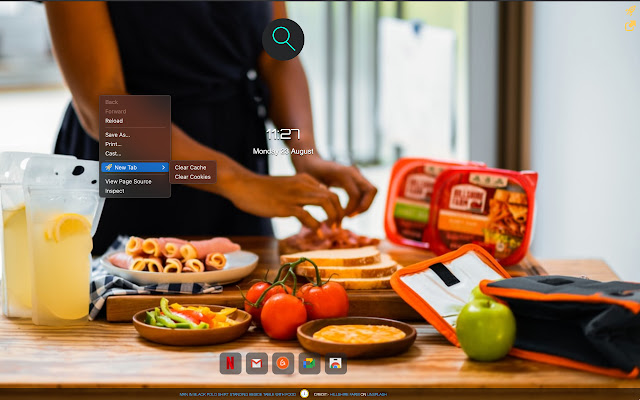


下载Chrome Booster + Clear Cache & Cookies扩展crx文件
下载Chrome Booster + Clear Cache & Cookies扩展crx格式的文件,手动将Chrome插件安装到浏览器中,也可以将crx文件分享给朋友,轻松安装Chrome插件。
扩展使用说明
                        Whenever you find yourself with too many tabs, click the One Tab icon in New Tab to improve the performance. When you need to access the tabs again, you can click on the Restore Tabs icon.
In Addition your data in sync with your Google account So you can Restore the tabs from Home Which you moved to OneTab from office.

Beautiful featured photos from Unsplash in your new tabs.
Each time you open a new tab, will show you a beautiful high-resolution photo from Unsplash — free to download and use however you want.

DuckDuckGo The search engine that doesn't track you.

Features:
 • Beautiful photos from Unsplash in every new tab
 • Download photos directly to your computer
 • Save up to 95% memory and reduce tab clutter
 • DuckDuckGo as the Search Engine.
 • Option to clear site cache & cookies from on Right click.
扩展基本信息
| 名称 |  Chrome Booster + Clear Cache & Cookies Chrome Booster + Clear Cache & Cookies |
| ID | bhmoolpggichjcaoglpbfcokkgnhnjnj |
| 官方URL | https://chrome.google.com/webstore/detail/chrome-booster-+-clear-ca/bhmoolpggichjcaoglpbfcokkgnhnjnj |
| 简介 | Chrome Booster with featured Unsplash images, DuckDuckGo Search And Clear Cache & Cookies Option |
| 文件大小 | 118 KB |
| 安装次数 | 28 |
| 当前版本 | 4.2 |
| 更新时间 | 2021-08-26 |
| 上架时间 | 2020-01-12 |
| 评分 | 5.00/5 共1次评分 |
| 开发者 | heterodox |
| 电子邮箱 | [email protected] |
| 付费类型 | free |
| 支持的语言 | en |
| manifest.json | |
{
    "update_url": "https:\/\/clients2.google.com\/service\/update2\/crx",
    "name": "Chrome Booster + Clear Cache & Cookies",
    "description": "Chrome Booster with featured Unsplash images, DuckDuckGo Search And Clear Cache & Cookies Option",
    "version": "4.2",
    "permissions": [
        "activeTab",
        "storage",
        "tabs",
        "topSites",
        "chrome:\/\/favicon\/",
        "browsingData",
        "contextMenus"
    ],
    "background": {
        "scripts": [
            "background.js"
        ]
    },
    "browser_action": {
        "default_title": "Chrome Booster",
        "default_icon": "256.png"
    },
    "icons": {
        "16": "16.png",
        "32": "32.png",
        "128": "128.png",
        "256": "256.png",
        "512": "512.png"
    },
    "manifest_version": 2,
    "chrome_url_overrides": {
        "newtab": "\/index.html"
    }
} | |