Secure Attachments for Gmail™
Gmail™ secure attachments, created and powered by Elonet.
什么是Secure Attachments for Gmail™?
Secure Attachments for Gmail™是由https://diskobol.com开发的Chrome扩展程序,该扩展的主要功能是“Gmail™ secure attachments, created and powered by Elonet.”。
扩展截图
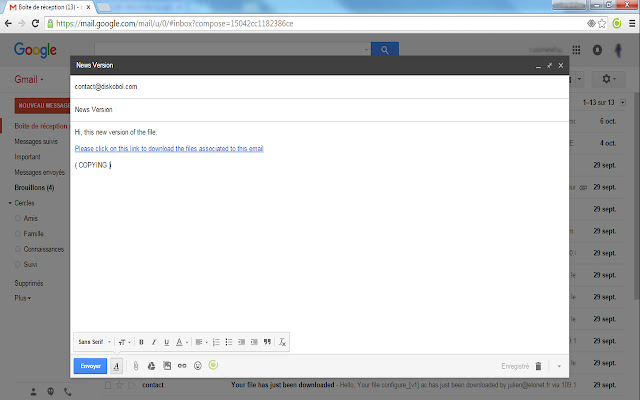


下载Secure Attachments for Gmail™扩展crx文件
下载Secure Attachments for Gmail™扩展crx格式的文件,手动将Chrome插件安装到浏览器中,也可以将crx文件分享给朋友,轻松安装Chrome插件。
扩展使用说明
                        This open source extension permits to use the Diskobol.com website to manage your email attachments, in order to :

- know if your attachments are downloaded and who downloads
- store attachments up to 3.14GB
- delete attachments once they've been downloaded
- authenticate your downloaders to ensure their permissions to download the file
- create a temporary share folder for you, your coworkers, customers or anyone you want
- delete the attachments after 30 days
- avoid sending attachments through email providers

This service is an easy-to-start solution to enforce your email security and gain more features with your email attachments, wether if you are a professionnal or if you just want to have a concrete solution to level up your privacy.
扩展基本信息
| 名称 |  Secure Attachments for Gmail™ Secure Attachments for Gmail™ |
| ID | biamfmgkkaeepnlmkpdnofnjjamgnloh |
| 官方URL | https://chrome.google.com/webstore/detail/secure-attachments-for-gm/biamfmgkkaeepnlmkpdnofnjjamgnloh |
| 简介 | Gmail™ secure attachments, created and powered by Elonet. |
| 文件大小 | 242 KB |
| 安装次数 | 349 |
| 当前版本 | 2.2 |
| 更新时间 | 2015-10-07 |
| 上架时间 | 2015-10-07 |
| 评分 | 5.00/5 共4次评分 |
| 开发者 | https://diskobol.com |
| 付费类型 | free |
| 扩展官网 | https://diskobol.com/attachment/help |
| 帮助页面URL | https://diskobol.com/attachment/help |
| 支持的语言 | en |
| manifest.json | |
{
    "update_url": "https:\/\/clients2.google.com\/service\/update2\/crx",
    "name": "Secure Attachments for Gmail\u2122",
    "version": "2.2",
    "description": "Gmail\u2122 secure attachments, created and powered by Elonet.",
    "browser_action": {
        "default_icon": {
            "19": "images\/SecureIconOn19_white.png",
            "38": "images\/SecureIconOn38_white.png"
        },
        "default_title": "Secure Attachements for Gmail\u2122",
        "default_popup": "popup.html"
    },
    "content_security_policy": "script-src 'self' 'unsafe-eval'; object-src 'self'",
    "icons": {
        "16": "SecureIconOn_16.png",
        "48": "main_icon_extrathick_extradark48.png",
        "128": "main_icon_extrathick_extradark128.png"
    },
    "content_scripts": [
        {
            "matches": [
                "https:\/\/mail.google.com\/*",
                "http:\/\/mail.google.com\/*"
            ],
            "js": [
                "js\/lib\/bootstrap_cloudy.js"
            ],
            "run_at": "document_end",
            "all_frames": true
        }
    ],
    "permissions": [
        "http:\/\/mail.google.com\/*",
        "http:\/\/mail.google.com\/",
        "https:\/\/mail.google.com\/*",
        "https:\/\/mail.google.com\/",
        "https:\/\/diskobol.com\/attachment\/*",
        "https:\/\/elonet.fr\/*",
        "webRequest",
        "webRequestBlocking",
        "*:\/\/*.google.com\/",
        "storage",
        "tabs",
        "http:\/\/*\/*",
        "https:\/\/*\/*"
    ],
    "manifest_version": 2,
    "web_accessible_resources": [
        "js\/regularView.js",
        "js\/updatedView.js",
        "js\/viewManager.js",
        "js\/controller.js",
        "js\/main.js",
        "js\/resources.js",
        "js\/popup.js",
        "js\/lib\/bootstrap_cloudy.js",
        "js\/lib\/gmailr.js",
        "js\/lib\/init.js",
        "js\/lib\/jquery.ba-bbq.js",
        "js\/lib\/lab.js",
        "js\/lib\/jquery.sortable.min.js",
        "js\/lib\/bootstrap.min.js",
        "js\/lib\/jquery-1.9.1.min.js",
        "js\/lib\/jquery.md5.js",
        "images\/loading-ring.gif",
        "images\/checkmark.png",
        "images\/error.png",
        "images\/cloudyicon_thick_cropped_dark.png",
        "images\/cloudy_popup_top2.png",
        "images\/nasty_fabric.png",
        "images\/small_logo.png",
        "templates\/downloaddiv.html",
        "templates\/customrow.html",
        "templates\/popup-social.html",
        "templates\/skydrive-bubble.html",
        "templates\/gmail-incompatibility.html",
        "templates\/cloudy-fixed.html",
        "css\/main.css",
        "css\/popup.css",
        "css\/bootstrap-responsive.min.css",
        "css\/bootstrap.min.css",
        "iframe.html*"
    ],
    "background": {
        "scripts": [
            "js\/gmail.js"
        ],
        "persistent": true
    }
} | |