IQAutobot — IQ Option Robot
Robot for IQ Option platform
什么是IQAutobot — IQ Option Robot?
IQAutobot — IQ Option Robot是由iqautobot开发的Chrome扩展程序,该扩展的主要功能是“Robot for IQ Option platform”。
扩展截图
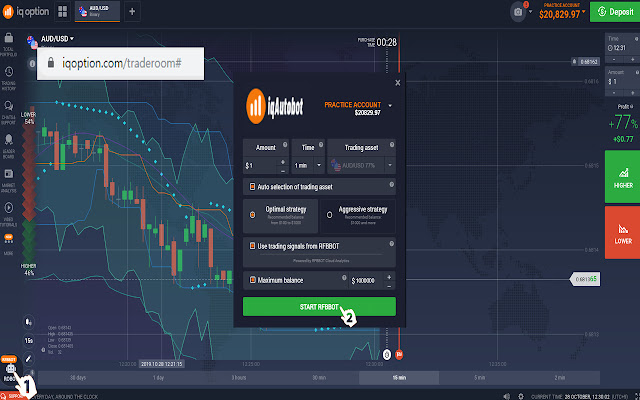
下载IQAutobot — IQ Option Robot扩展crx文件
下载IQAutobot — IQ Option Robot扩展crx格式的文件,手动将Chrome插件安装到浏览器中,也可以将crx文件分享给朋友,轻松安装Chrome插件。
扩展使用说明
                        Robot for IQ Option platform
------------Description------------
IQautoBot is a fully automated robot assistant for trading on the practice account of the IQ Option platform.
The user is responsible for using the robot on a real account himself.
It works on Martingale's trading scheme.

--------------Settings--------------
1) Amount - the amount at which the robot will begin to trade each round.
★ The recommended value is 1 ($/€).
2) Time (min) - expiration time of the option.
★ Recommended value is 1 (min).
3) Trading asset - the asset on which the robot will start trade.
★ The recommended pair is any with a high winning percentage (>=70%).
4) Auto selection of trading asset
★ It is recommended to enable this function so that in case of a drop in winning percentage, the robot selects a more profitable asset.
-------------Strategies-------------
1) Optimal strategy
The robot, regardless of the number of trade amounts in the circle, receives a winning percentage from the first trade amount.
★ The strategy is recommended for a balance of 100 to 1000 dollars/euro.
2) Aggressive strategy
On average, every minute the robot adds a winning percentage from the Initial trade amount. This is more profitable strategy, but more risky too.
★ Strategy is recommended for a balance of 1000 and more dollars/euro.
------------Stop filters------------
1) Maximum balance - the balance at which the robot stops trading. This function is only available with real account. On the practice account, the robot will stop as soon as it has earned 20$.
--------------iqautobot.com-------------

RISK WARNING: YOUR CAPITAL MAY BE EXPOSED TO RISK. THE DEVELOPERS ARE NOT RESPONSIBLE FOR THE USE OF THE ROBOT.
THE ROBOT IS CREATED BY A TEAM OF INDEPENDENT DEVELOPERS AND HAS NO RELATION TO THE COMPANY IQ OPTION.
扩展基本信息
| 名称 |  IQAutobot — IQ Option Robot IQAutobot — IQ Option Robot |
| ID | cacjnifekidjcihmapkgdikajbhpflbh |
| 官方URL | https://chrome.google.com/webstore/detail/iqautobot-%E2%80%94-iq-option-rob/cacjnifekidjcihmapkgdikajbhpflbh |
| 简介 | Robot for IQ Option platform |
| 文件大小 | 883 KB |
| 安装次数 | 1,000 |
| 当前版本 | 1.0 |
| 更新时间 | 2020-07-06 |
| 上架时间 | 2020-07-06 |
| 评分 | 2.77/5 共13次评分 |
| 开发者 | iqautobot |
| 电子邮箱 | [email protected] |
| 付费类型 | free |
| 扩展官网 | https://iqautobot.com |
| 帮助页面URL | https://iqautobot.com |
| 支持的语言 | en |
| manifest.json | |
{
    "update_url": "https:\/\/clients2.google.com\/service\/update2\/crx",
    "name": "IQAutobot \u2014 IQ Option Robot",
    "description": "Robot for IQ Option platform",
    "version": "1.0",
    "browser_action": {
        "default_popup": "popup.html",
        "default_title": "IQAutobot \u2014 IQ Option Robot"
    },
    "manifest_version": 2,
    "content_scripts": [
        {
            "matches": [
                "https:\/\/iqoption.com\/*",
                "https:\/\/tr-iqoption.com\/*",
                "https:\/\/id-iqoption.com\/*",
                "https:\/\/iqautobot.com\/reg\/*"
            ],
            "js": [
                "analytics.js",
                "jquery.js",
                "fontawesome.js",
                "jquery.formstyler.js",
                "sweetalert2.min.js",
                "popper.min.js",
                "bootstrap.min.js",
                "main.js",
                "background.js"
            ],
            "run_at": "document_end",
            "css": [
                "css\/style.css",
                "css\/sweetalert2.min.css",
                "css\/animate.css",
                "css\/jquery.formstyler.css",
                "css\/jquery.formstyler.theme.css",
                "css\/bootstrap.min.css"
            ]
        }
    ],
    "icons": {
        "128": "images\/icon-128.png",
        "16": "images\/icon-16.png",
        "48": "images\/icon-48.png",
        "64": "images\/icon-64.png"
    },
    "background": {
        "scripts": [
            "color.js"
        ]
    },
    "web_accessible_resources": [
        "\/iqbot.html",
        "\/reg.html"
    ],
    "permissions": [
        "tabs",
        "activeTab",
        "storage",
        "cookies",
        "webNavigation",
        "https:\/\/api.myip.com\/*",
        "https:\/\/iqoption.com\/*",
        "https:\/\/tr-iqoption.com\/*",
        "https:\/\/id-iqoption.com\/*",
        "https:\/\/iqautobot.com\/reg\/*",
        "https:\/\/tracker.affiliate.iqoption.com\/*",
        "https:\/\/tracker.affiliate.tr-iqoption.com\/*",
        "https:\/\/tracker.affiliate.id-iqoption.com\/*"
    ]
} | |