Shoppingo Shopping Assistant
The best way to save time and money while shopping online.
什么是Shoppingo Shopping Assistant?
Shoppingo Shopping Assistant是由http://getshoppingo.com开发的Chrome扩展程序,该扩展的主要功能是“The best way to save time and money while shopping online.”。
扩展截图

下载Shoppingo Shopping Assistant扩展crx文件
下载Shoppingo Shopping Assistant扩展crx格式的文件,手动将Chrome插件安装到浏览器中,也可以将crx文件分享给朋友,轻松安装Chrome插件。
扩展使用说明
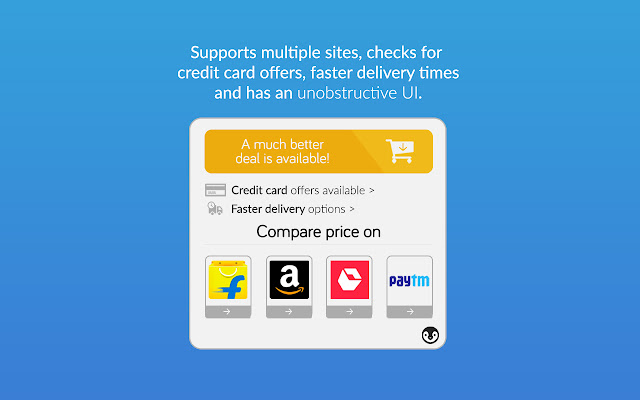
                        Shoppingo Online Shopping Assistant helps you save time and money online, by getting the best prices across Amazon, Flipkart, among others, and helps you get your products delivered faster.

- We find the best prices, even if it's available right on the same website.
- We compare prices for you, so you don't have to!
- Can spare a few extra bucks for faster delivery? We'll show you which websites can get the product fastest to you!
- We'll scan for the latest offers on credit/debit cards, and let you know if you should use a specific one to get maximum benefits!
- Pingu lives in a small space on your shopping websites, and does not crowd and hinder your shopping experience by displaying overlays or popups.
- You can always click on the Pingu Button to know about the latest offers and deals across websites!
扩展基本信息
| 名称 |  Shoppingo Shopping Assistant Shoppingo Shopping Assistant |
| ID | cglgggloahballbnpiijijjjihmenjmb |
| 官方URL | https://chrome.google.com/webstore/detail/shoppingo-shopping-assist/cglgggloahballbnpiijijjjihmenjmb |
| 简介 | The best way to save time and money while shopping online. |
| 文件大小 | 632 KB |
| 安装次数 | 98 |
| 当前版本 | 2.1 |
| 更新时间 | 2017-05-06 |
| 上架时间 | 2017-05-06 |
| 评分 | 5.00/5 共10次评分 |
| 开发者 | http://getshoppingo.com |
| 电子邮箱 | [email protected] |
| 付费类型 | free |
| 扩展官网 | https://www.getshoppingo.com |
| 隐私政策页面URL | https://getshoppingo.com/privacy.html |
| 支持的语言 | en |
| manifest.json | |
{
    "update_url": "https:\/\/clients2.google.com\/service\/update2\/crx",
    "name": "__MSG_appName__",
    "version": "2.1",
    "manifest_version": 2,
    "description": "__MSG_appDescription__",
    "icons": {
        "16": "icons\/icon-16.png",
        "128": "icons\/icon-128.png"
    },
    "default_locale": "en",
    "background": {
        "scripts": [
            "lib\/jquery-3.2.1.min.js",
            "background.js"
        ]
    },
    "permissions": [
        "tabs",
        "storage",
        "notifications",
        "activeTab",
        "http:\/\/*\/*",
        "https:\/\/*\/*"
    ],
    "content_security_policy": "script-src 'self' https:\/\/cdn.mxpnl.com; object-src 'self'",
    "web_accessible_resources": [
        "icons\/fonts\/*"
    ],
    "content_scripts": [
        {
            "matches": [
                "http:\/\/*\/*",
                "https:\/\/*\/*"
            ],
            "js": [
                "lib\/base64.js",
                "analytics.js",
                "templates.js",
                "pinguUtils.js",
                "comparison.js",
                "amazon.js",
                "flipkart.js",
                "snapdeal.js",
                "main.js"
            ],
            "css": [
                "pingu.css"
            ],
            "run_at": "document_end",
            "all_frames": false
        }
    ],
    "browser_action": {
        "default_icon": {
            "19": "icons\/icon-19.png",
            "38": "icons\/icon-38.png"
        },
        "default_title": "Shoppingo Shopping Assistant"
    }
} | |