MyAllSearch Search for Chrome
Search MyAllSearch privately from the Chrome extension bar.
什么是MyAllSearch Search for Chrome?
MyAllSearch Search for Chrome是由http://myallsearch.com开发的Chrome扩展程序,该扩展的主要功能是“Search MyAllSearch privately from the Chrome extension bar.”。
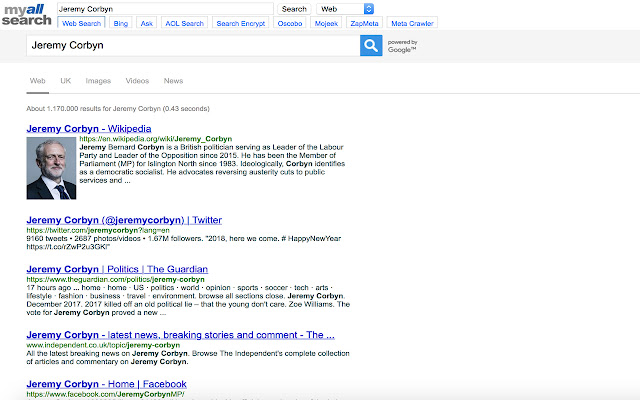
扩展截图

下载MyAllSearch Search for Chrome扩展crx文件
下载MyAllSearch Search for Chrome扩展crx格式的文件,手动将Chrome插件安装到浏览器中,也可以将crx文件分享给朋友,轻松安装Chrome插件。
扩展使用说明
                        MyAllSearch is a privacy-enhanced search engine and browser extension that provides industry-standard web, image and video search without collecting or sharing your personal information. This extension will add an easy shortcut button to the MyAllSearch.com search box to the Chrome extension bar.

Why use MyAllSearch.com when searching?

- We do not store or share your IP address with anyone
- We do not use cookies and will not track you
- We do not send your search term to the site you clicked on
- We do not store or share your search history with anyone
- We do not share your personal information with anyone

MyAllSearch protects you when searching online from companies who are trying to harvest your personal information, and who build a profile around your search history and browsing habits, ensuring your information stays safe and away from prying hands.
扩展基本信息
| 名称 |  MyAllSearch Search for Chrome MyAllSearch Search for Chrome |
| ID | cjebnlkbedanoigkdhmkhhjealeaideg |
| 官方URL | https://chrome.google.com/webstore/detail/myallsearch-search-for-ch/cjebnlkbedanoigkdhmkhhjealeaideg |
| 简介 | Search MyAllSearch privately from the Chrome extension bar. |
| 文件大小 | 7.34 KB |
| 安装次数 | 12 |
| 当前版本 | 1.2 |
| 更新时间 | 2018-07-29 |
| 上架时间 | 2018-07-29 |
| 评分 | 5.00/5 共3次评分 |
| 开发者 | http://myallsearch.com |
| 付费类型 | free |
| 扩展官网 | https://www.myallsearch.com |
| 帮助页面URL | https://www.myallsearch.com/contact.php |
| 隐私政策页面URL | https://www.myallsearch.com/policies.php |
| 支持的语言 | en-GB |
| manifest.json | |
{
    "update_url": "https:\/\/clients2.google.com\/service\/update2\/crx",
    "manifest_version": 2,
    "name": "MyAllSearch Search for Chrome",
    "description": "Search MyAllSearch privately from the Chrome extension bar.",
    "version": "1.2",
    "permissions": [
        "https:\/\/www.myallsearch.com\/"
    ],
    "browser_action": {
        "default_icon": "icon.png",
        "default_popup": "popup.html"
    },
    "chrome_settings_overrides": {
        "homepage": "https:\/\/www.myallsearch.com\/",
        "startup_pages": [
            "https:\/\/www.myallsearch.com\/"
        ]
    }
} | |