Functional JSON viewer
Modern JSON formatter and explorer.
什么是Functional JSON viewer?
Functional JSON viewer是由Dmytro开发的Chrome扩展程序,该扩展的主要功能是“Modern JSON formatter and explorer.”。
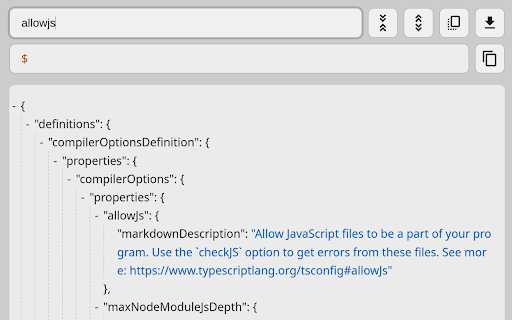
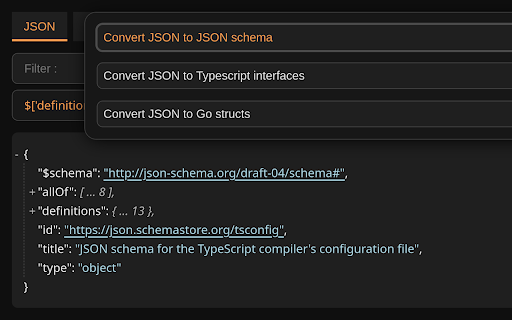
扩展截图


下载Functional JSON viewer扩展crx文件
下载Functional JSON viewer扩展crx格式的文件,手动将Chrome插件安装到浏览器中,也可以将crx文件分享给朋友,轻松安装Chrome插件。
扩展使用说明
                        Why to use:

- Foldable & filterable & focusable nodes
- (Shift-)Tab navigation
- Show node path on focus & hover
- Keymaps (Vim inspired)
- Clickable links
- Light & dark theme
- Converting JSON
- Screenshot (JSON to image .jpeg)

---
Functionality:

- Filter nodes
- Collapse all nodes
- Expand all nodes
- Save JSON
- Copy JSON
- Copy node
- Copy node path
- Switch formatted & raw data
- Sticky panels

---
Convert JSON to:

- JSON schema
- Typescript interfaces (.d.ts)
- Golang structs (.go)

---
Keymaps:

h | ArrowLeft - move focus left (parent node)
j | ArrowDown - move focus down (next sibling)
k | ArrowUp - move focus up (previous sibling)
l | ArrowRight - move focus right (child node)
c - collapse all child nodes
e - expand all child nodes
y - copy node
p - copy node path

---
Tips:

On large file, better search:
1. Click collapse all
2. Use native browser search (Ctrl+f)
3. Browser will auto expand matched nodes

---
Code:
https://github.com/diogenesofweb/fjv
扩展基本信息
| 名称 |  Functional JSON viewer Functional JSON viewer |
| ID | cokkmplppnaigoodkkjopoblfaelibab |
| 官方URL | https://chromewebstore.google.com/detail/functional-json-viewer/cokkmplppnaigoodkkjopoblfaelibab |
| 简介 | Modern JSON formatter and explorer. |
| 文件大小 | 55.38 KB |
| 安装次数 | 46 |
| 当前版本 | 0.0.9 |
| 更新时间 | 2024-01-07 |
| 上架时间 | 2023-06-18 |
| 评分 | 5.00/5 共1次评分 |
| 开发者 | Dmytro |
| 电子邮箱 | [email protected] |
| 付费类型 | free |
| 扩展官网 | https://github.com/diogenesofweb/fjv |
| 支持的语言 | en |
| manifest.json | |
{
"update_url": "https:\/\/clients2.google.com\/service\/update2\/crx",
"name": "Functional JSON viewer",
"version": "0.0.9",
"manifest_version": 3,
"description": "Modern JSON formatter and explorer.",
"homepage_url": "https:\/\/github.com\/diogenesofweb\/fjv",
"minimum_chrome_version": "88",
"icons": {
"128": "img\/128.png",
"48": "img\/48.png",
"32": "img\/32.png",
"16": "img\/16.png"
},
"content_scripts": [
{
"matches": [
" | |