Website read progress
Display a read progress bar
什么是Website read progress?
Website read progress是由jalmazdin开发的Chrome扩展程序,该扩展的主要功能是“Display a read progress bar”。
扩展截图

下载Website read progress扩展crx文件
下载Website read progress扩展crx格式的文件,手动将Chrome插件安装到浏览器中,也可以将crx文件分享给朋友,轻松安装Chrome插件。
扩展使用说明
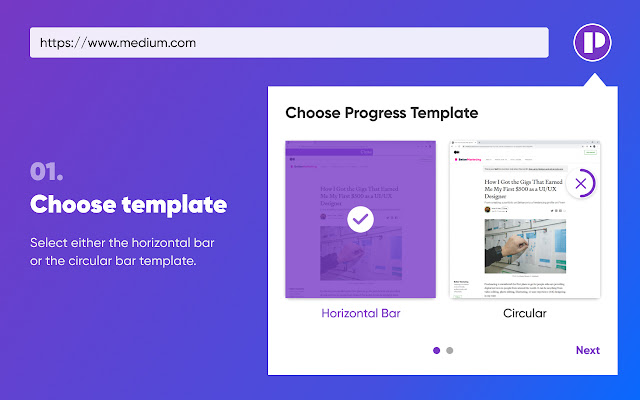
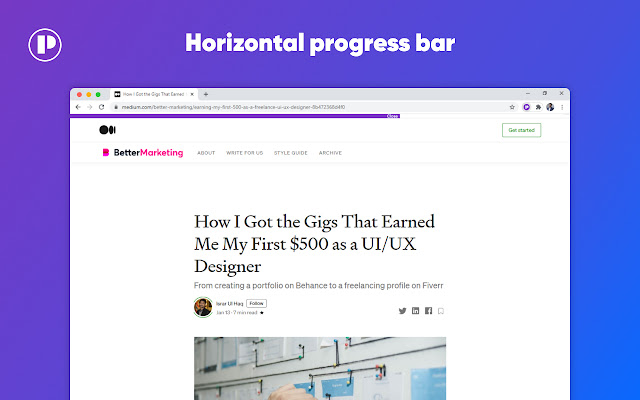
                        This extension gives the option of adding a horizontal or a circular reading progress bar for each website page or online article you come across.

The Website Read Progress extension measures the content length and considers various elements of a web article and post, including comments, related content, newsletter and more to give a correct estimation of the position of your overall reading progress and remaining content.

This useful chrome extension provides online readers with gradual feedback in terms of how far they’ve progressed in reading a particular page or a lengthy article.

As a result, the Website Read Progress extension enhances the overall reading experience by encouraging online readers to scroll through the entire lengthy article or website.

To display your Reading Progress Bar on any web page or post, simply click the extension icon and choose between the horizontal and circular reading progress bar.

The Website reading progress bar offers a fantastic way to encourage your reading productivity!

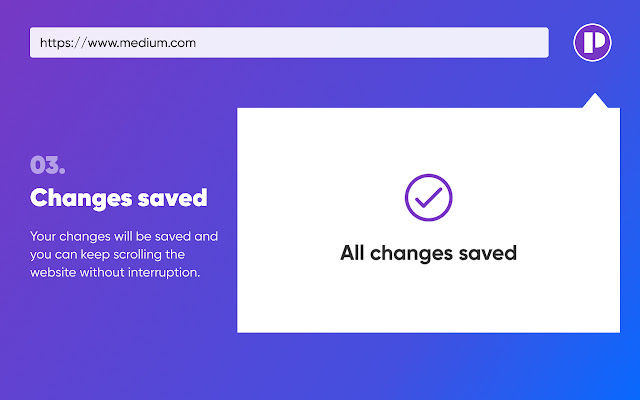
Most impressively, you can control its settings all from one place and display it on any website that you visit.

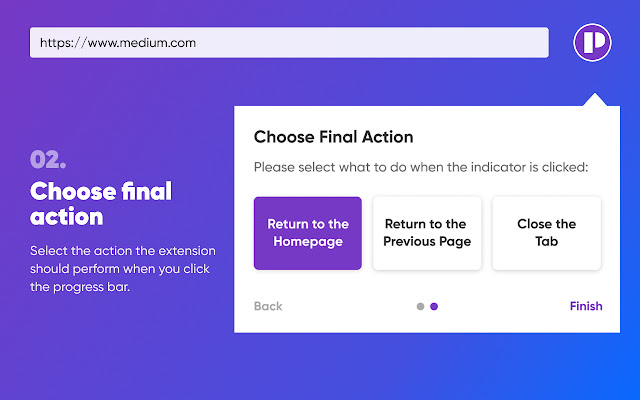
Click the extension icon. After selecting the preferred shape of your reading progress bar, choose between these progress completed buttons:
- Return to the homepage
- Return to the previous page
- Close the tab.
扩展基本信息
| 名称 |  Website read progress Website read progress |
| ID | cpmfchlofecflfioofchboebmocaelip |
| 官方URL | https://chrome.google.com/webstore/detail/cpmfchlofecflfioofchboebmocaelip |
| 简介 | Display a read progress bar |
| 文件大小 | 1.43 MB |
| 安装次数 | 5,774 |
| 当前版本 | 1.3.0 |
| 更新时间 | 2022-07-20 |
| 上架时间 | 2020-12-23 |
| 评分 | 5.00/5 共17次评分 |
| 开发者 | jalmazdin |
| 电子邮箱 | [email protected] |
| 付费类型 | free |
| 支持的语言 | en |
| manifest.json | |
{
    "update_url": "https:\/\/clients2.google.com\/service\/update2\/crx",
    "manifest_version": 2,
    "name": "Website read progress",
    "description": "Display a read progress bar",
    "version": "1.3.0",
    "icons": {
        "16": "icons\/icon16.png",
        "19": "icons\/icon19.png",
        "32": "icons\/icon32.png",
        "38": "icons\/icon38.png",
        "48": "icons\/icon48.png",
        "96": "icons\/icon96.png",
        "128": "icons\/icon128.png",
        "256": "icons\/icon256.png"
    },
    "background": {
        "persistent": true,
        "scripts": [
            "javascripts\/background.js"
        ]
    },
    "browser_action": {
        "default_title": "Popup",
        "default_popup": "popup\/popup.html"
    },
    "web_accessible_resources": [
        "indicators\/indicators.html",
        "indicators\/indicators.css",
        "javascripts\/page.zIndex.js",
        "assets\/Gilroy-Bold.woff"
    ],
    "permissions": [
        "*:\/\/*\/*",
        "storage",
        "tabs",
        "activeTab",
        "webRequest",
        "webRequestBlocking"
    ],
    "content_scripts": [
        {
            "matches": [
                "*:\/\/*\/*"
            ],
            "js": [
                "javascripts\/libraries\/Readability-readerable.js",
                "javascripts\/libraries\/Readability.js",
                "javascripts\/content.js"
            ],
            "css": [
                "styles\/content.css"
            ],
            "run_at": "document_start"
        },
        {
            "matches": [
                "*:\/\/*\/*"
            ],
            "js": [
                "content-scripts\/idle.js"
            ],
            "all_frames": true,
            "run_at": "document_idle"
        },
        {
            "matches": [
                "*:\/\/*\/*"
            ],
            "js": [
                "content-scripts\/start.js"
            ],
            "all_frames": true,
            "run_at": "document_start"
        }
    ]
} | |