Monitorito
This extension creates a real-time visualisation of your browsing activity
什么是Monitorito?
Monitorito是由Dimos Raptis开发的Chrome扩展程序,该扩展的主要功能是“This extension creates a real-time visualisation of your browsing activity”。
扩展截图


下载Monitorito扩展crx文件
下载Monitorito扩展crx格式的文件,手动将Chrome插件安装到浏览器中,也可以将crx文件分享给朋友,轻松安装Chrome插件。
扩展使用说明
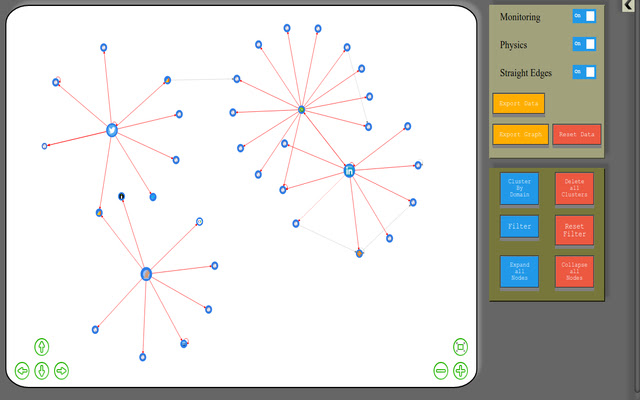
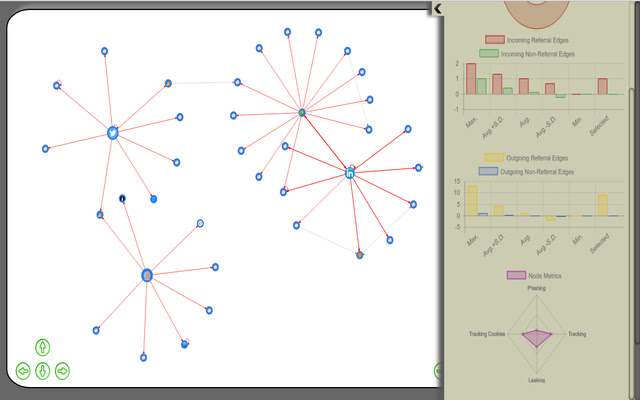
                        Monitorito is an extension capturing and visualising all the requests being made by the browser. Users can see a graph of all the domains they have accessed via requests, along with the corresponding connections between domains. In addition to that, users can:
- expand domains and also visualise each resource requested from each domain and the corresponding connections between resources (even across different domains)
- select specific domains nodes of the graph and see calculated metrics for this specific node, identifying behaviours (such as tracking)
- filter the graph and show only a specific sub-part of the graph, using specific paratemeters of the nodes
- cluster multiple domains in a single node, so that the user can aggregate the activity of multiple domains and investigate their behaviour as a whole
- export the data (the raw data or the generated graph)in .csv formatted files to import them in more advanced analytics tools
扩展基本信息
| 名称 |  Monitorito Monitorito |
| ID | cpnoiekgkadngaefmiiomndachemdcde |
| 官方URL | https://chrome.google.com/webstore/detail/monitorito/cpnoiekgkadngaefmiiomndachemdcde |
| 简介 | This extension creates a real-time visualisation of your browsing activity |
| 文件大小 | 1.6 MB |
| 安装次数 | 49 |
| 当前版本 | 1.0 |
| 更新时间 | 2016-09-08 |
| 上架时间 | 2016-09-08 |
| 开发者 | Dimos Raptis |
| 电子邮箱 | [email protected] |
| 付费类型 | free |
| 扩展官网 | https://monitorito.github.io |
| 支持的语言 | en |
| manifest.json | |
{
    "update_url": "https:\/\/clients2.google.com\/service\/update2\/crx",
    "manifest_version": 2,
    "name": "Monitorito",
    "description": "This extension creates a real-time visualisation of your browsing activity",
    "version": "1.0",
    "browser_action": {
        "default_icon": "icon.png"
    },
    "background": {
        "scripts": [
            "background.js"
        ]
    },
    "icons": {
        "16": "icon16.png",
        "32": "icon32.png",
        "48": "icon48.png",
        "128": "icon128.png"
    },
    "permissions": [
        "tabs",
        "webRequest",
        "http:\/\/*\/",
        "https:\/\/*\/",
        "webRequestBlocking",
        "storage",
        "unlimitedStorage"
    ]
} | |