Mouse Clerk - Easy image downloader
Allows you to organize, download and create images by simply clicking on them.
什么是Mouse Clerk - Easy image downloader?
Mouse Clerk - Easy image downloader是由https://www.studiowolfree.com开发的Chrome扩展程序,该扩展的主要功能是“Allows you to organize, download and create images by simply clicking on them.”。
扩展截图
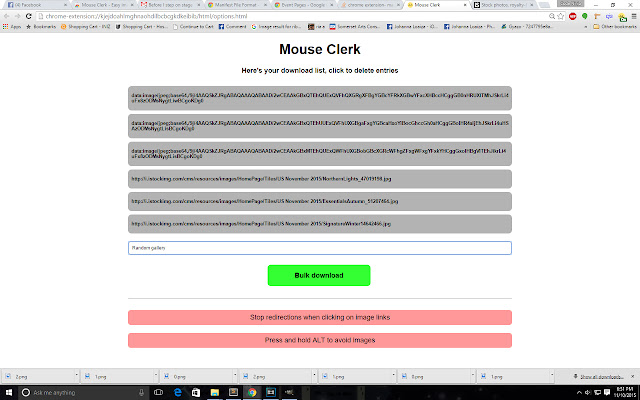


下载Mouse Clerk - Easy image downloader扩展crx文件
下载Mouse Clerk - Easy image downloader扩展crx格式的文件,手动将Chrome插件安装到浏览器中,也可以将crx文件分享给朋友,轻松安装Chrome插件。
扩展使用说明
                        Ever want to download tens, hundreds or even thousands of images without having to open tab after tab, right click after right click, drop after drop and rename after rename? Then Mouse Clerk is probably your best bet!

Mouse Clerk allows you to:

- Download images on base64
- Automatically create folders
- Automatically rename files
- Download images on bulk
- Generate source lists by simply clicking on them
- Disable image links temporarily
- Enable and disable it to browse freely

Ready to click and download? Then get Mouse Clerk! It is completely free and will stay free!

Developed by Cristian Herrera
扩展基本信息
| 名称 |  Mouse Clerk - Easy image downloader Mouse Clerk - Easy image downloader |
| ID | ehebkcpogpoedmlkhpgcmpmkepenacch |
| 官方URL | https://chrome.google.com/webstore/detail/mouse-clerk-easy-image-do/ehebkcpogpoedmlkhpgcmpmkepenacch |
| 简介 | Allows you to organize, download and create images by simply clicking on them. |
| 文件大小 | 127 KB |
| 安装次数 | 324 |
| 当前版本 | 0.9.2 |
| 更新时间 | 2017-08-14 |
| 上架时间 | 2017-08-14 |
| 评分 | 3.38/5 共8次评分 |
| 开发者 | https://www.studiowolfree.com |
| 电子邮箱 | [email protected] |
| 付费类型 | free |
| 支持的语言 | en |
| manifest.json | |
{
"update_url": "https:\/\/clients2.google.com\/service\/update2\/crx",
"manifest_version": 2,
"name": "Mouse Clerk - Easy image downloader",
"description": "Allows you to organize, download and create images by simply clicking on them.",
"version": "0.9.2",
"version_name": "Beta 9.2",
"short_name": "MouseClerk",
"browser_action": {
"name": "Click to start Mouse Clerk"
},
"homepage_url": "http:\/\/www.studiowolfree.com",
"permissions": [
"activeTab",
"downloads",
"contextMenus",
"storage"
],
"icons": {
"16": "img\/icon16.png",
"64": "img\/icon.png",
"48": "img\/icon48.png",
"128": "img\/icon128.png"
},
"content_scripts": [
{
"matches": [
" | |