Capitalize!t
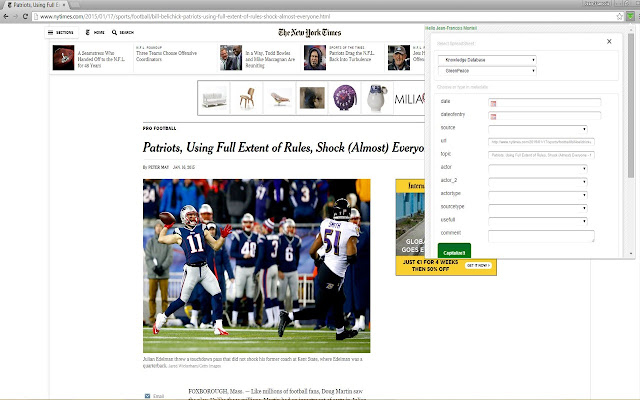
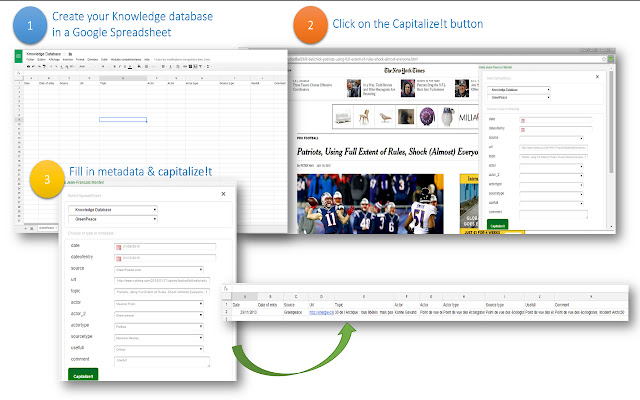
This Chrome Extension lets you bookmark any web page in a Google Spreadsheet, along with any structured metadata you want to add.…
什么是Capitalize!t?
Capitalize!t是由jfmonteil开发的Chrome扩展程序,该扩展的主要功能是“This Chrome Extension lets you bookmark any web page in a Google Spreadsheet, along with any structured metadata you want to add.…”。
扩展截图
下载Capitalize!t扩展crx文件
下载Capitalize!t扩展crx格式的文件,手动将Chrome插件安装到浏览器中,也可以将crx文件分享给朋友,轻松安装Chrome插件。
扩展使用说明
                        This Chrome Extension lets you bookmark any web page in a Google Spreadsheet, along with any structured metadata you want to add.

Initially intended for my students, in their Business Intelligence and Media Analysis program, this “software” (if I can call it so) can be used for anyone who wants to create / edit / annotate easily and share a bookmark database.

Why Capitalize!t when plenty of bookmarks management tool exist ?

> Capability to create your custom metadata
> All bookmarks and metadata saved in Google Spreadsheet enabling  Analysis with free tools on the web and Sharing with other students

New version 4 : lets you pick images from the page and highlighted text
扩展基本信息
| 名称 |  Capitalize!t Capitalize!t |
| ID | elkppeldmfcophocjliimofkdlnmeghk |
| 官方URL | https://chrome.google.com/webstore/detail/capitalizet/elkppeldmfcophocjliimofkdlnmeghk |
| 简介 | This Chrome Extension lets you bookmark any web page in a Google Spreadsheet, along with any structured metadata you want to add.… |
| 文件大小 | 403 KB |
| 安装次数 | 68 |
| 当前版本 | 4.0 |
| 更新时间 | 2015-02-01 |
| 上架时间 | 2015-02-01 |
| 评分 | 4.25/5 共4次评分 |
| 开发者 | jfmonteil |
| 电子邮箱 | [email protected] |
| 付费类型 | free |
| 扩展官网 | https://docs.google.com/document/d/1wQRXbFqNmNw-f4yDcX_Gfm_CYGbPIksEmj6VoX4gA1M/pub |
| 帮助页面URL | https://docs.google.com/document/d/1wQRXbFqNmNw-f4yDcX_Gfm_CYGbPIksEmj6VoX4gA1M/pub |
| 支持的语言 | en |
| manifest.json | |
{
"update_url": "https:\/\/clients2.google.com\/service\/update2\/crx",
"name": "Capitalize!t",
"version": "4.0",
"manifest_version": 2,
"minimum_chrome_version": "29",
"browser_action": {
"default_icon": "icon-small.png",
"default_popup": "popup.html"
},
"content_scripts": [
{
"js": [
"selectionjfm.js",
"jquery-1.11.1.min.js",
"jquery-ui.min.js"
],
"css": [
"jquery-ui.css"
],
"matches": [
"http:\/\/*\/*",
"https:\/\/*\/*"
],
"all_frames": true
}
],
"icons": {
"16": "icon-small.png",
"48": "icon.png",
"128": "icon-small.png"
},
"permissions": [
"https:\/\/secure.flickr.com\/",
"identity",
"https:\/\/accounts.google.com\/*",
"https:\/\/www.googleapis.com\/*",
"https:\/\/spreadsheets.google.com\/*",
"tabs",
"storage",
" | |