DesignBold
DesignBold Context Menu Button
什么是DesignBold?
DesignBold是由https://academy.designbold.com开发的Chrome扩展程序,该扩展的主要功能是“DesignBold Context Menu Button”。
扩展截图
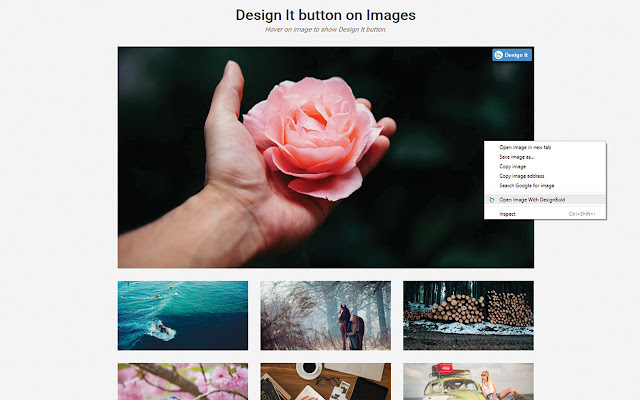


下载DesignBold扩展crx文件
下载DesignBold扩展crx格式的文件,手动将Chrome插件安装到浏览器中,也可以将crx文件分享给朋友,轻松安装Chrome插件。
扩展使用说明
                        Design instantly with any image!

The DesignBold Chrome extension lets you design with any image you like! See something eye-catching on the internet and wanna add a quote? Or a nice picture that you can use as poster background? Just right-click any image and select "Open with DesignBold".

DesignBold allows you to start creating and customizing image in a stunning, professional way!

- 11,000++ beautiful design templates
- Workspace to store all your designs
- Powerful design and photo edit tools - Grids, crop, lines, filters and so much more
- Direct sharing option to Social Networks
- Works on any website, any image!

Design made simple with DesignBold!
扩展基本信息
| 名称 |  DesignBold DesignBold |
| ID | hcnlanjijjffpmlkpedbijamgmkhgkkm |
| 官方URL | https://chrome.google.com/webstore/detail/designbold/hcnlanjijjffpmlkpedbijamgmkhgkkm |
| 简介 | DesignBold Context Menu Button |
| 文件大小 | 54.04 KB |
| 安装次数 | 1,000 |
| 当前版本 | 0.4.2 |
| 更新时间 | 2018-07-23 |
| 上架时间 | 2018-07-23 |
| 评分 | 4.55/5 共11次评分 |
| 开发者 | https://academy.designbold.com |
| 电子邮箱 | [email protected] |
| 付费类型 | free |
| 扩展官网 | https://www.designbold.com/ |
| 帮助页面URL | https://www.designbold.com/support |
| 隐私政策页面URL | https://www.designbold.com/policy |
| 支持的语言 | en |
| manifest.json | |
{
    "update_url": "https:\/\/clients2.google.com\/service\/update2\/crx",
    "name": "__MSG_extName__",
    "short_name": "__MSG_extName__",
    "version": "0.4.2",
    "manifest_version": 2,
    "description": "__MSG_extDesc__",
    "icons": {
        "16": "16.png",
        "128": "128.png"
    },
    "background": {
        "persistent": true,
        "scripts": [
            "background.js"
        ]
    },
    "content_scripts": [
        {
            "matches": [
                "https:\/\/*\/*",
                "http:\/\/*\/*"
            ],
            "js": [
                "init_button.js"
            ],
            "all_frames": false
        }
    ],
    "default_locale": "en",
    "browser_action": {
        "default_title": "DesignBold"
    },
    "options_page": "options.html",
    "options_ui": {
        "page": "options.html",
        "open_in_tab": true
    },
    "content_security_policy": "script-src 'self' 'unsafe-eval' https:\/\/cdnjs.cloudflare.com; object-src 'self'",
    "web_accessible_resources": [
        "chrome_extension.html"
    ],
    "permissions": [
        "contextMenus",
        "https:\/\/*\/*",
        "http:\/\/*\/*",
        "tabs",
        "activeTab",
        "storage"
    ]
} | |