eversign: eSign in Gmail, Drive & Google Docs
Sign documents right from Gmail, Google Docs, Google Drive, and from your Chrome Browser PDF Preview.
什么是eversign: eSign in Gmail, Drive & Google Docs?
eversign: eSign in Gmail, Drive & Google Docs是由https://eversign.com开发的Chrome扩展程序,该扩展的主要功能是“Sign documents right from Gmail, Google Docs, Google Drive, and from your Chrome Browser PDF Preview.”。
扩展截图

下载eversign: eSign in Gmail, Drive & Google Docs扩展crx文件
下载eversign: eSign in Gmail, Drive & Google Docs扩展crx格式的文件,手动将Chrome插件安装到浏览器中,也可以将crx文件分享给朋友,轻松安装Chrome插件。
扩展使用说明
                        eversign for Chrome allows you to place legally binding signatures on any document in Gmail, Google Drive, Google Docs, and sign documents right from your Chrome Browsers. You’ll never need to print, sign or scan a document again — just open a document file, place your signature and other dynamic fields, and let eversign do the rest. eversign ensures legally binding signatures and complies with worldwide e-Signature legality standards.

1. Sign from Gmail

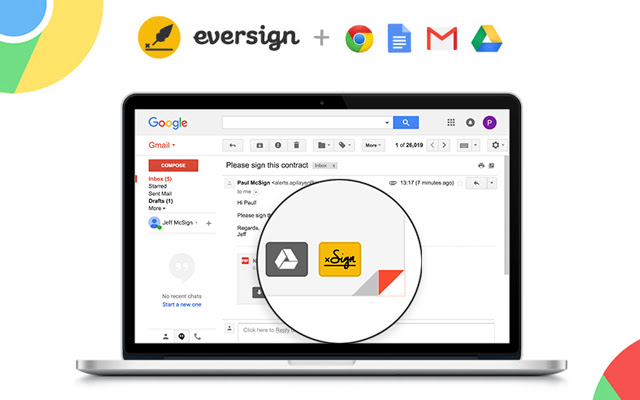
Just hover over an email attachment and click the new „Sign“ button in Gmail to immediately sign any document you receive without leaving your Gmail inbox. Once the document is signed, we’ll automatically attach it to your email’s draft response.

2. Sign from Google Docs

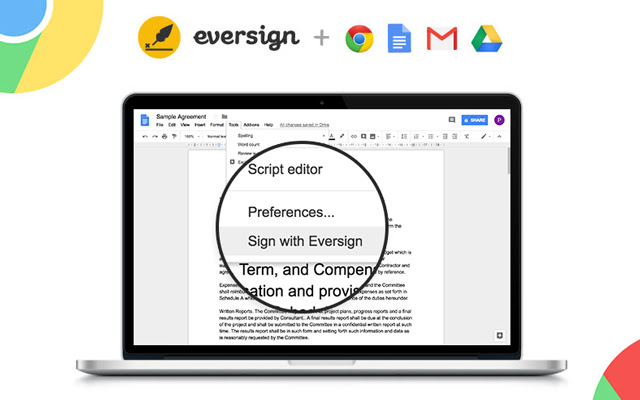
To sign a document right from Google Docs, just open the document, click „Tools“ in the top-options bar and select “Sign with eversign”. After signing you can download the document and we immediately archive it in your eversign account.

3. Sign from Google Drive

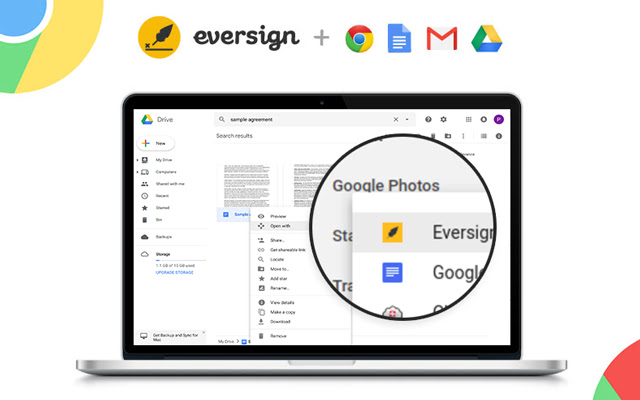
To sign a document right from Google Drive, simply right click on any File and choose „Open with eversign“. After signing you can download the final document and we immediately archive it in your eversign account.

4. Sign from Chrome Preview

Now you can sign PDF documents right from your Chrome Browser Preview Page. Simply click on the „Sign“ icon that appears in the lower right corner of your PDF Preview to sign any PDF document without leaving the page. After signing, you can download the document and we immediately archive it in your eversign account.

Want more information about eversign? Visit us at https://eversign.com
扩展基本信息
| 名称 |  eversign: eSign in Gmail, Drive & Google Docs eversign: eSign in Gmail, Drive & Google Docs |
| ID | hdlhmemcpdlkhkiglelebglchamjmhce |
| 官方URL | https://chrome.google.com/webstore/detail/eversign-esign-in-gmail-d/hdlhmemcpdlkhkiglelebglchamjmhce |
| 简介 | Sign documents right from Gmail, Google Docs, Google Drive, and from your Chrome Browser PDF Preview. |
| 文件大小 | 253 KB |
| 安装次数 | 13,474 |
| 当前版本 | 1.1.11 |
| 更新时间 | 2021-05-27 |
| 上架时间 | 2020-06-24 |
| 评分 | 3.44/5 共18次评分 |
| 开发者 | https://eversign.com |
| 电子邮箱 | [email protected] |
| 付费类型 | free |
| 扩展官网 | https://eversign.com |
| 帮助页面URL | https://eversign.com/help |
| 隐私政策页面URL | https://eversign.com/legal/privacy |
| 支持的语言 | de,en,fr,nl,tr,da,es,it,pl,pt-PT,sv,ru,zh-CN |
| manifest.json | |
{
    "update_url": "https:\/\/clients2.google.com\/service\/update2\/crx",
    "name": "__MSG_name__",
    "description": "__MSG_description__",
    "default_locale": "en",
    "version": "1.1.11",
    "manifest_version": 2,
    "author": "",
    "key": "MIIBIjANBgkqhkiG9w0BAQEFAAOCAQ8AMIIBCgKCAQEAmUy0PlVAsDxDMfG4ioIokYOht64Ilg9nVLSN7JvcKLvZ1Ooy5IOlurXyeE8GC1LnyMf4Jqacykvua3ZPSqvw9NHmmUNbOQfuvx1tuZGbyENx1CLbLzQfIh108L1KB\/SRGms3XGZLA1Qg+lW9Nkd8n8cS0hYCVkzb6ucAjdwW4BExhuaQXf1gqycHdq43BfH8rs6tkVCgArmSjVqweopnm4tlMWWee5f+qFlXUu4cNOrtPV8sy0z+cqBTe72EbA2fZOx4VuWSfG55OQ\/oTlKBykQlPvRPjqDM7tlhNsZ9To\/YLTBrVGnwitNRdlMGZqPIwvVzOyXvxAFowBk78n8kJQIDAQAB",
    "icons": {
        "128": "\/img\/logo_rounded.png"
    },
    "browser_action": {
        "default_icon": "\/img\/logo_rounded.png",
        "default_popup": "\/pages\/popup\/index.html"
    },
    "background": {
        "scripts": [
            "\/lib\/jquery.min.js",
            "\/lib\/x.js",
            "\/js\/background\/background.js"
        ],
        "persistent": false
    },
    "content_scripts": [
        {
            "matches": [
                "https:\/\/mail.google.com\/*",
                "https:\/\/drive.google.com\/*",
                "https:\/\/docs.google.com\/*",
                "https:\/\/eversign.com\/*",
                "https:\/\/*.eversign.com\/*"
            ],
            "all_frames": true,
            "js": [
                "\/lib\/jquery.min.js",
                "\/lib\/moment.min.js",
                "\/lib\/URI.min.js",
                "\/lib\/x.js",
                "\/js\/converters\/main_converter.js",
                "\/js\/converters\/gmail_converter.js",
                "\/js\/converters\/google_docs_converter.js",
                "\/js\/converters\/google_drive_converter.js",
                "\/js\/components\/FileDataManager.js",
                "\/js\/components\/InjectedCodeManager.js",
                "\/js\/components\/WidgetManager.js",
                "\/js\/components\/ApiManager.js",
                "\/js\/components\/GoogleDocsMenuItemManager.js",
                "\/js\/components\/GoogleDriveContextmenuManager.js",
                "\/js\/components\/GmailButtonManager.js",
                "\/js\/components\/PdfButtonManager.js",
                "\/js\/components\/Controller.js",
                "\/js\/content_scripts\/main.js"
            ]
        }
    ],
    "permissions": [
        "storage",
        "https:\/\/mail.google.com\/*",
        "https:\/\/drive.google.com\/*",
        "https:\/\/docs.google.com\/*",
        "https:\/\/*.googleusercontent.com\/*",
        "https:\/\/eversign.com\/*",
        "https:\/\/*.eversign.com\/*"
    ],
    "web_accessible_resources": [
        "\/*"
    ]
} | |