Rigami - New tab
Simple and beautiful new tab
什么是Rigami - New tab?
Rigami - New tab是由https://rigami.io开发的Chrome扩展程序,该扩展的主要功能是“Simple and beautiful new tab”。
扩展截图


下载Rigami - New tab扩展crx文件
下载Rigami - New tab扩展crx格式的文件,手动将Chrome插件安装到浏览器中,也可以将crx文件分享给朋友,轻松安装Chrome插件。
扩展使用说明
                        The app is no longer supported!
This extension was made by one developer on enthusiasm. I don't have the strength or the money to support him anymore.

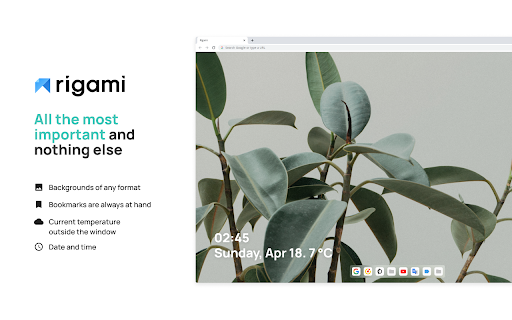
✨ Transform the start page of your favorite browser with live wallpapers.

Cleanliness and a minimum of details, just what is needed, excellent customization and huge functionality, in other words: "all the most important and nothing else."

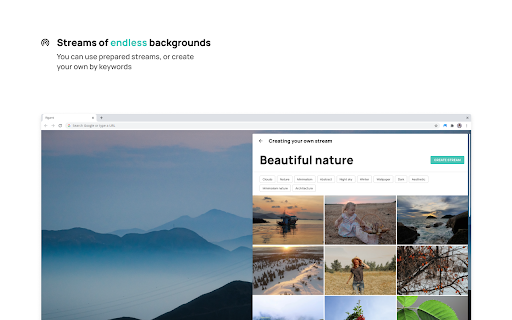
🔥 Backgrounds of any format
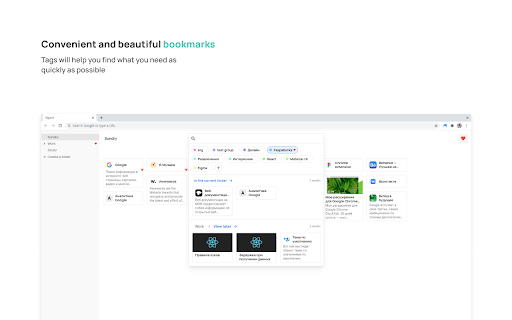
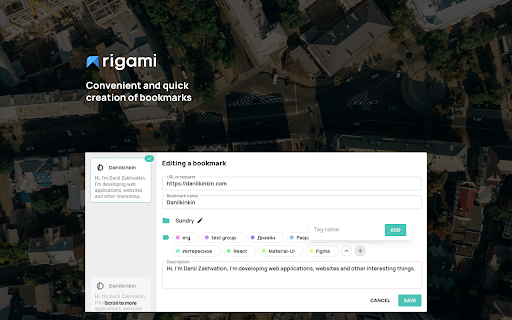
🔖 Bookmarks are always at hand
🌡️ Current temperature outside the window
⌚ Date and time

Backgrounds of any type:
✨ GIF animation
🎥 Video
🌇 Images
♾️ Streams of endless backgrounds

Help us by reporting problems. More information can be found at rigami.io/help-for-the-project
扩展基本信息
| 名称 |  Rigami - New tab Rigami - New tab |
| ID | hdpjmahlkfndaejogipnepcgdmjiamhd |
| 官方URL | https://chromewebstore.google.com/detail/rigami-new-tab/hdpjmahlkfndaejogipnepcgdmjiamhd |
| 简介 | Simple and beautiful new tab |
| 文件大小 | 3.32 MB |
| 安装次数 | 175 |
| 当前版本 | 2.1.1 |
| 更新时间 | 2023-09-04 |
| 上架时间 | 2021-04-30 |
| 评分 | 4.00/5 共16次评分 |
| 开发者 | https://rigami.io |
| 电子邮箱 | [email protected] |
| 付费类型 | free |
| 扩展官网 | https://rigami.io/ |
| 帮助页面URL | https://github.com/rigami/readme/blob/main/REVIEW.md |
| 支持的语言 | en,ru |
| manifest.json | |
{
    "update_url": "https:\/\/clients2.google.com\/service\/update2\/crx",
    "manifest_version": 3,
    "name": "__MSG_appNameFull__",
    "description": "__MSG_appDescFull__",
    "short_name": "Rigami",
    "default_locale": "en",
    "version": "2.1.1",
    "version_name": "2.1.1",
    "homepage_url": "https:\/\/rigami.io\/",
    "minimum_chrome_version": "88",
    "offline_enabled": true,
    "icons": {
        "16": "resource\/16x16.png",
        "32": "resource\/32x32.png",
        "64": "resource\/64x64.png",
        "128": "resource\/128x128.png"
    },
    "omnibox": {
        "keyword": "rigami"
    },
    "background": {
        "service_worker": "server.js"
    },
    "chrome_url_overrides": {
        "newtab": "index.html"
    },
    "host_permissions": [
        "https:\/\/danilkinkin.com\/",
        "*:\/\/*\/*"
    ],
    "content_security_policy": {
        "extension_pages": "default-src 'self';script-src http:\/\/localhost:8097\/;script-src-elem 'self' http:\/\/localhost:8097\/;style-src 'unsafe-inline';object-src 'none';img-src *;font-src *;connect-src 'unsafe-inline' data: blob: *;form-action 'self';media-src 'unsafe-inline' data: blob: *;"
    },
    "action": {
        "default_title": "__MSG_appAction__",
        "default_popup": "popup.html"
    },
    "permissions": [
        "storage",
        "unlimitedStorage",
        "alarms",
        "sessions"
    ]
} | |